Error Message | Experience Community
Skip to main content
Question

Error Message

  • August 4, 2026
  • 1 reply
  • 14 views

Hello:

I am new to Qualtrics and I currently have a survey that members are participating in. However, I have received a few messages stating that when they are at a certain section of the survey and asked to input a whole number, they are receiving an error message that states they need to enter a whole number and not able to move forward. 

Is there a way this can be corrected without having to send out the survey again? Many participants have already completed the survey. 

Thank you

1 reply

Forum|alt.badge.img+21
  • QPN Level 5 ●●●●●
  • August 4, 2026

hey ​@MSikorski ,If your goal is to allow respondents to move forward without answering that question, then you can remove the validation. - 

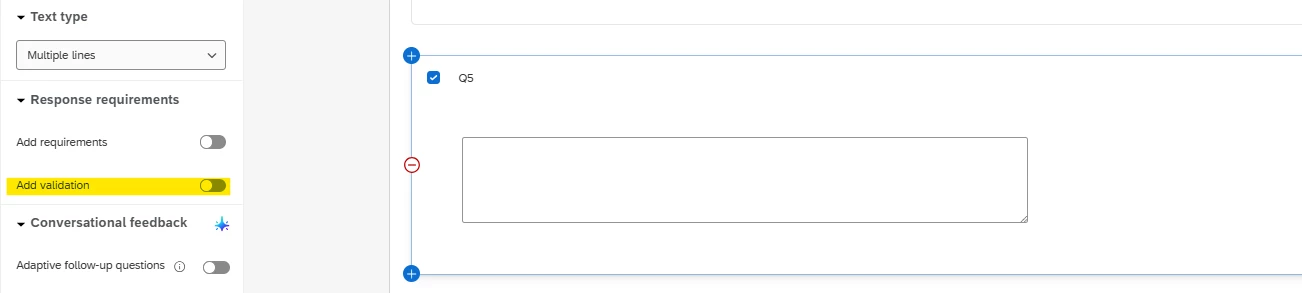
Find the affected question and check whether the highlighted validation toggle is enabled. This indicates that a specific validation has been applied to accept only whole numbers. Disable the toggle to remove the validation. Once you've made the change, click Publish so that it is saved and reflected in the live survey.

Important: This change will only apply to respondents who have not started the survey yet. Anyone who started the survey before the change was published will continue to see the older version of the question.
The only exception is if the survey uses an anonymous link or allows multiple completes. In that case, a respondent can submit their current attempt, restart the survey, and the new session will use the updated version.

I hope this helps! If your goal is something different (for example, you still want to require an answer but are trying to resolve the validation error), let me know and I will be happy to help further.