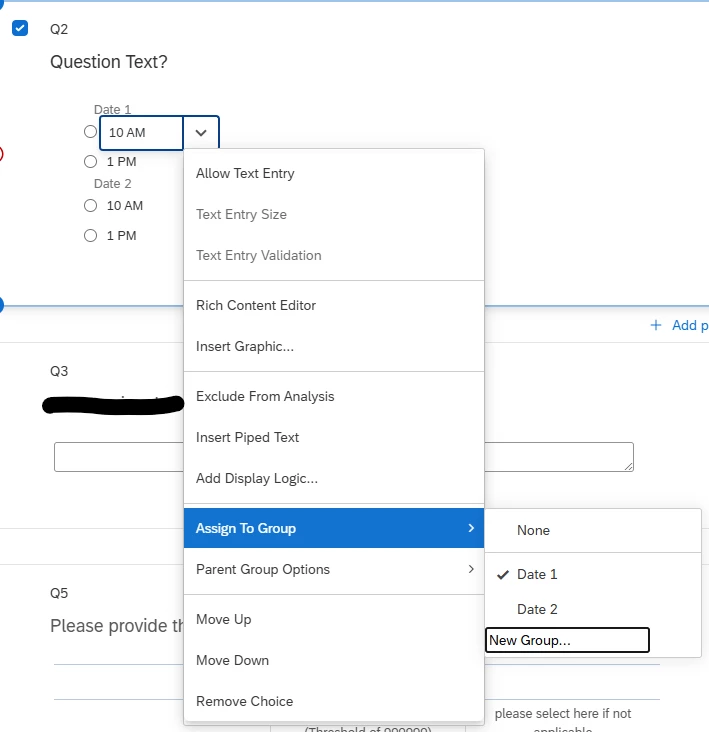


I work at a university and we organize an event year for the students to present their research. For scheduling, we use a Qualtrics survey that lets students choose a day and time from a list. The selections are linked to quotas. Once enough people choose a specific day/time, we use display logic so that choice no longer appears in the list of options.
I’m running into issue when we have times available on two separate days. Currently, I have each day as a separate question with the available times listed as choices underneath. The problem is that students often choose one time for each day, which messes up the quota counts. I’d like to figure out a way to make the two days look like separate questions but have them as part of one question so that they can only make one choice. Maybe there’s a way to make sections within a question? Or some other way to make it clear there are two dates, with two different sets of times?
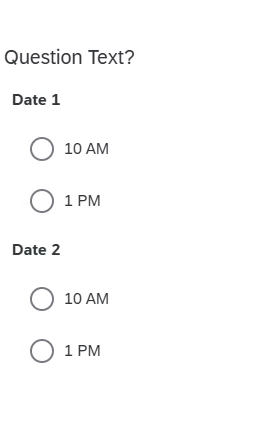
Ideally, it would look like this:
Date 1
-Time 1
-Time 2
Date 2
-Time 1
-Time 2
Additional Issues
I’m dealing with students doing this on their phones and they are bad at reading directions. My concern is that if I list all of the day/time options under one question, they won’t see that we’re offering two different days.
When we’ve told them in the past to choose one option, they either decide we mean one option for each question, which messes up the quotas, or they email us asking if we mean one total or one for each question. 🙄
I am better at computers than many people, but my coding experience is limited to very basic HTML.
I’ve tried looking through Qualtrics’ help articles/videos, but I’m not sure how to describe what I’m looking for.