



Matrix to Single Likert Questions and Dashboards | Experience Community
Skip to main content
Question

Matrix to Single Likert Questions and Dashboards

  • August 5, 2026
  • 2 replies
  • 34 views

Forum|alt.badge.img

Hello everyone. I am hoping someone can help with the some issues I am having.


In order to meet WCAG accessibility requirements, I need to convert the Matrix questions I have into separate questions. That part is easy, but my questions have to do with how the data can be merged after implementation. The issue is that I want to incorporate the data from the nonmatrix questions into the existing dashboard to continue to add to the data displayed in the dashboard. I do not want a separate chart to display the data.


Example:

Original Question in Matrix format: 

Was there a clear description of what you should be able to do or know by the end of the course (learning outcomes). Yes (1)/No (0)


Separated Question in Nonmatrix format:

Was there a clear description of what you should be able to do or know by the end of the course (learning outcomes). Yes (1)/No (0)


To merge the data from the two questions together, I went to Survey ->Data&Analysis->Field editor->Combine and brought in the two questions together. (See screenshot below)
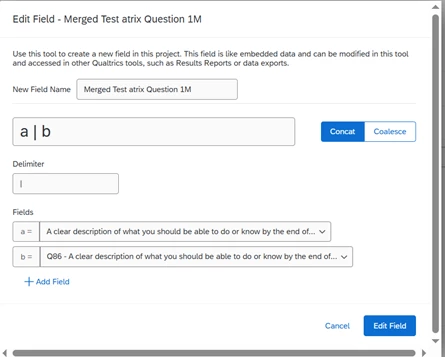
 

The merged field shows up in the data export, but I am not seeing it as an option to add as a new embedded data field in dashboard data. I am not sure what exactly the issue is.

What am I doing wrong? Do I need to remove the survey data source and re-add it? If this is not the way to go about it, what other options can I try? 


Thanks for any help.

 

2 replies

Forum|alt.badge.img+1
  • Level 1 ●
  • August 5, 2026

Hello!

It sounds like you have done everything right so far. When you create a field using Field Editor, it is actually called a 'Derived Data' field. When you look to add the field in your dashboard, look for Derived Data. If you do not see the option when you first click on the box, scroll down and click Show All and the Derived Data field should appear at the top with the Embedded Data field. 


Hope this helps!


Forum|alt.badge.img+28

Hello!

It sounds like you have done everything right so far. When you create a field using Field Editor, it is actually called a 'Derived Data' field. When you look to add the field in your dashboard, look for Derived Data. If you do not see the option when you first click on the box, scroll down and click Show All and the Derived Data field should appear at the top with the Embedded Data field. 


Hope this helps!


Adding on to DrCSLow’s comment, you can try to add a new copy of the field with a different name.

More information: Derived Data


If it doesn’t work, perhaps you can consider adding the same survey as a second source?

Then, in the field, map the original matrix question for the first source and the new nonmatrix question for the second source.