

Dear Community
In my survey I included several manipulations in the form of randomized pictures, but they won't show in the Data output for SPSS. So they habe a Question number (Q2.1, Q3.1, etc.), but they are simply not listed. I need to know which person has seen which picture to make my calculation. Can you help me out?
Thank you in advance for your answers!

Solved
Picture is not in Data Output
Best answer by ahmedA
In the SPSS export, select more options, then select export viewing order.
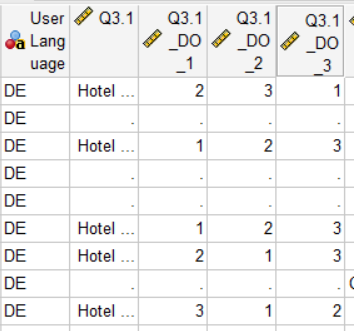
You should have a variable like Block-Name_DO (in your case Manipulationen Konzert_DO). That will have the values of either Q2.1 or Q2.2 or Q2.3.
Or you could have something like Manipulationen Konzert_DO_Q2.1, Manipulationen Konzert_DO_Q2.2... Where the values will either be 1, 2, 3 or empty. The questions with values were shown to the respondent in that order.
If its not there, because you know SPSS plays by its own rules, then download the data in the CSV format. It'll be there. You can then use the response ID and match it or just import the csv into SPSS.
This is why I had asked if you had gone through the support pages, as its all clearly explained over there.


 Could I make it clearer?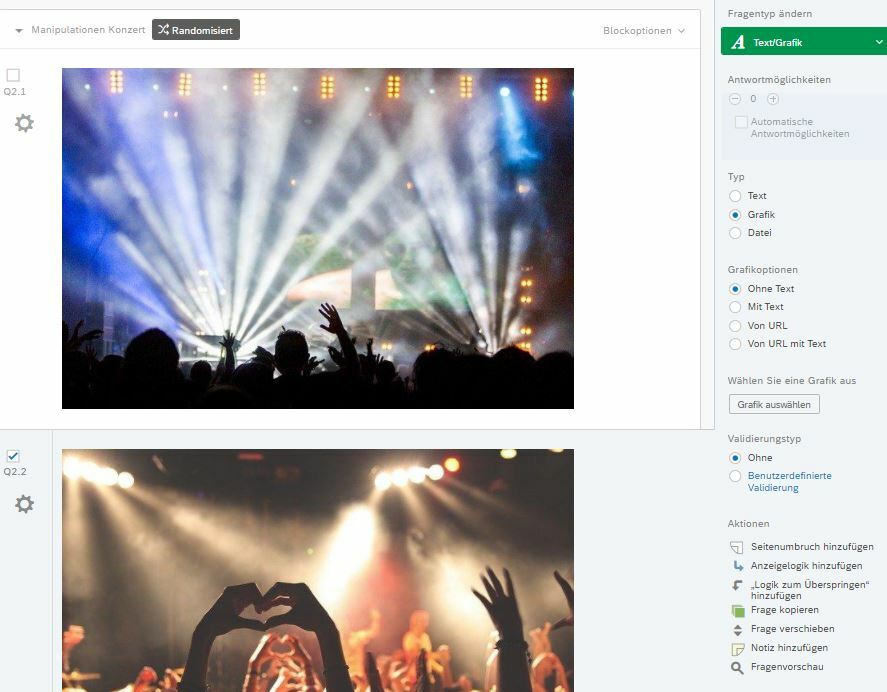
Sign up
Already have an account? Login

Welcome! To join the Qualtrics Experience Community, log in with your existing Qualtrics credentials below.
Confirm your username, share a bit about yourself, then you're ready to explore and connect .
Free trial account? No problem. Log in with your trial credentials to join.
No free trial account? No problem! Register here
Already a member? Hi and welcome back! We're glad you're here 🙂
You will see the Qualtrics login page briefly before being taken to the Experience Community.
Login with Qualtrics
Welcome! To join the Qualtrics Experience Community, log in with your existing Qualtrics credentials below.
Confirm your username, share a bit about yourself, then you're ready to explore and connect .
Free trial account? No problem. Log in with your trial credentials to join. No free trial account? No problem! Register here
Already a member? Hi and welcome back! We're glad you're here 🙂
You will see the Qualtrics login page briefly before being taken to the Experience Community.
Login to the Community
No account yet? Create an account
Welcome! To join the Qualtrics Experience Community, log in with your existing Qualtrics credentials below.
Confirm your username, share a bit about yourself, then you're ready to explore and connect .
Free trial account? No problem. Log in with your trial credentials to join.
No free trial account? No problem! Register here
Already a member? Hi and welcome back! We're glad you're here 🙂
You will see the Qualtrics login page briefly before being taken to the Experience Community.
Login with Qualtrics
Welcome! To join the Qualtrics Experience Community, log in with your existing Qualtrics credentials below.
Confirm your username, share a bit about yourself, then you're ready to explore and connect .
Free trial account? No problem. Log in with your trial credentials to join. No free trial account? No problem! Register here
Already a member? Hi and welcome back! We're glad you're here 🙂
You will see the Qualtrics login page briefly before being taken to the Experience Community.
Enter your E-mail address. We'll send you an e-mail with instructions to reset your password.