


Form Field Character Limit Placeholder & Counter in NSTE | Experience Community
Skip to main content
Solved

Form Field Character Limit Placeholder & Counter in NSTE

  • April 15, 2026
  • 6 replies
  • 54 views

Forum|alt.badge.img+2

In the legacy survey taking experience, I’m able to use the code here:


However, this code does not work in the new survey taking experience (NSTB). Can anyone provide code that I can use to do the same thing in NSTB?


Best answer by vgayraud

Hi,

Here’s ​@Deepak function adapted for NSTE. In addition, limits are specified individually at the top.

Qualtrics.SurveyEngine.addOnload(function () {

var limits = [50, 0, 200]; // one per input, in order. 0 means no limit.
var inputs = document.querySelectorAll("#question-" + this.questionId + " .choice-te-wrapper .text-input");

inputs.forEach(function (input, i) {

var maxChars = limits[i] || 0;
if (maxChars === 0) return;

input.placeholder = maxChars + " character limit.";

var display = document.createElement("div");
display.style.cssText = "visibility:hidden; padding-top:4px;";
display.innerHTML = "Characters remaining: <span class='charCount'>" + maxChars + "</span>";
input.closest(".choice-te-wrapper").insertAdjacentElement("afterend", display);

input.addEventListener("input", function () {
var remaining = maxChars - input.value.length;
if (remaining < 0) {
input.value = input.value.substring(0, maxChars);
remaining = 0;
}
display.style.visibility = input.value.length > 0 ? "visible" : "hidden";
display.querySelector(".charCount").textContent = remaining;
});
});
});


6 replies

vgayraud
QPN Level 7 ●●●●●●●
Forum|alt.badge.img+65
  • QPN Level 7 ●●●●●●●
  • Answer
  • April 16, 2026

Hi,

Here’s ​@Deepak function adapted for NSTE. In addition, limits are specified individually at the top.

Qualtrics.SurveyEngine.addOnload(function () {

var limits = [50, 0, 200]; // one per input, in order. 0 means no limit.
var inputs = document.querySelectorAll("#question-" + this.questionId + " .choice-te-wrapper .text-input");

inputs.forEach(function (input, i) {

var maxChars = limits[i] || 0;
if (maxChars === 0) return;

input.placeholder = maxChars + " character limit.";

var display = document.createElement("div");
display.style.cssText = "visibility:hidden; padding-top:4px;";
display.innerHTML = "Characters remaining: <span class='charCount'>" + maxChars + "</span>";
input.closest(".choice-te-wrapper").insertAdjacentElement("afterend", display);

input.addEventListener("input", function () {
var remaining = maxChars - input.value.length;
if (remaining < 0) {
input.value = input.value.substring(0, maxChars);
remaining = 0;
}
display.style.visibility = input.value.length > 0 ? "visible" : "hidden";
display.querySelector(".charCount").textContent = remaining;
});
});
});


Forum|alt.badge.img+1
  • June 22, 2026

@vgayraud Hi! Would you be able to help adjust this for an open ended question (not form field)? Thanks!!


vgayraud
QPN Level 7 ●●●●●●●
Forum|alt.badge.img+65
  • QPN Level 7 ●●●●●●●
  • June 23, 2026

Hi ​@Maddie 

This should work on both question types.

Qualtrics.SurveyEngine.addOnload(function () {
var limits = [50]; // one per input, in order. 0 means no limit.
var inputs = document.querySelectorAll("#question-" + this.questionId + " .text-input");
inputs.forEach(function (input, i) {
var maxChars = limits[i] || 0;
if (maxChars === 0) return;

input.placeholder = maxChars + " character limit.";

var anchor = input.closest(".choice-te-wrapper") || input.closest(".resize-wrapper");
if (!anchor) return;

var display = document.createElement("div");
display.style.cssText = "visibility:hidden; padding-top:4px;";
display.innerHTML = "Characters remaining: <span class='charCount'>" + maxChars + "</span>";
anchor.insertAdjacentElement("afterend", display);

input.addEventListener("input", function () {
var remaining = maxChars - input.value.length;
if (remaining < 0) {
input.value = input.value.substring(0, maxChars);
remaining = 0;
}
display.style.visibility = input.value.length > 0 ? "visible" : "hidden";
display.querySelector(".charCount").textContent = remaining;
});
});
});


Forum|alt.badge.img+1
  • June 23, 2026

Hi ​@vgayraud thank you so much for your reply! This doesn’t seem to be working for me. I am looking to just have text in the textbox and don’t need the countdown. 


I used this method in the past, but with the NSTE it doesn't work.

Any guidance would be greatly appreciated!


vgayraud
QPN Level 7 ●●●●●●●
Forum|alt.badge.img+65
  • QPN Level 7 ●●●●●●●
  • June 23, 2026

Hi,

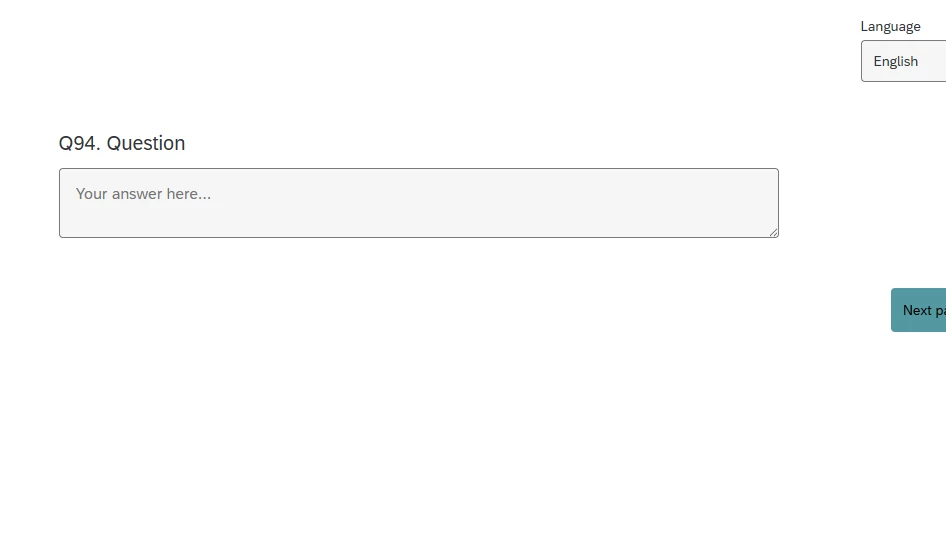
For a simple placeholder in an open-ended question, NSTE :

Qualtrics.SurveyEngine.addOnload(function () {
var placeholderText = "Your answer here...";
var input = document.querySelector("#question-" + this.questionId + " .text-input");
if (input) {
input.placeholder = placeholderText;
}
});


Forum|alt.badge.img+1
  • June 23, 2026

@vgayraud THANK YOU SO MUCH!! I really appreciate the help!




