Hide response from previous question | Experience Community
Skip to main content

Hide response from previous question

  • September 21, 2026
  • 5 replies
  • 43 views

Forum|alt.badge.img+1

Hi, I have the following scenario:

Q1 Which of the following mobile providers, if any, do you use?

Multiple Response. The responses are filtered based on the country (set up and working)

Q2 And which one would you say is your main mobile provider?

Single Response. Responses filtered from Q1 (set up and working)

Q3 Which provider are you considering using instead?

Singe response. Show Q1 responses but not Q2 response. (need help)

My Question:

How do I set up responses for Q3. Thank you

5 replies

Forum|alt.badge.img+1
  • Author
  • September 21, 2026

Should you be interested, I found a solution to my own problem. Obviously my question numbers are different in my script. But the below code will save the selected response into an embedded variable:  

  1. Create embedded variable called ‘__js_MainProvider’
  2. Code for Q2 to save response into embedded variable below:

Qualtrics.SurveyEngine.addOnReady(function()
{
    function captureMainProvider(event)
    {
        var input = event.target.closest('input[name="QID19"]');

        if (!input)
        {
            return;
        }

        var choiceId = input.id.split("-").pop();

        Qualtrics.SurveyEngine.setJSEmbeddedData(
            "__js_MainProvider",
            choiceId
        );

        console.log("QID19: MainProvider =", choiceId);
    }

    document.addEventListener("click", captureMainProvider, true);

    console.log(
        "QID19: delegation attached, inputs found =",
        document.querySelectorAll('input[name="QID19"]').length
    );
});   

  1. Code for Q3 to get response and hide it in Q3:


Qualtrics.SurveyEngine.addOnReady(function()

{

    var mainProvider = Qualtrics.SurveyEngine.getJSEmbeddedData(

        "__js_MainProvider"

    );


    console.log("QID32: MainProvider =", mainProvider);


    if (!mainProvider)

    {

        console.log("QID32: no MainProvider value found");

        return;

    }


    var input = document.querySelector(

        'input[name="QID32"][id$="' + mainProvider + '"]'

    );


    if (input)

    {

        var choice = input.closest(".choice");


        if (choice)

        {

            choice.style.display = "none";


            console.log(

                "QID32: hiding provider with code =",

                mainProvider

            );

        }

        else

        {

            console.log(

                "QID32: input found, but .choice container not found"

            );

        }

    }

    else

    {

        console.log(

            "QID32: provider input not found for code =",

            mainProvider

        );

    }

});


  • Level 4 ●●●●
  • September 21, 2026

You dont need JS for this. Simple way is to bring all q1 responses into q3 and add display logic for each (e.g., Q1 selected brands and Q2 = not selected brands).


Forum|alt.badge.img+1
  • Author
  • September 21, 2026

You dont need JS for this. Simple way is to bring all q1 responses into q3 and add display logic for each (e.g., Q1 selected brands and Q2 = not selected brands).


@jbk - thank you for the reply. But having a list that might grow to over 100 brands, I think the js route will be much quicker. I might be wrong :)


vgayraud
QPN Level 8 ●●●●●●●●
Forum|alt.badge.img+66
  • QPN Level 8 ●●●●●●●●
  • September 22, 2026

Hi,

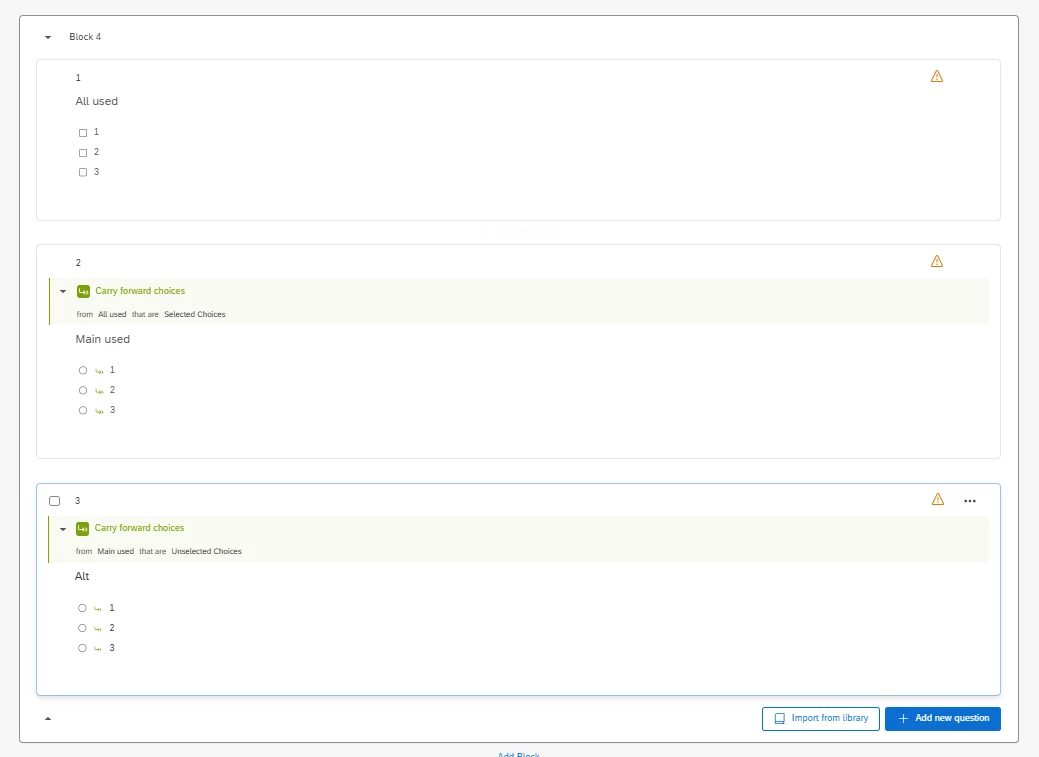
If I understand correctly, you would use carry forward choices to achieve this:


  • Level 4 ●●●●
  • September 22, 2026

Okay 

You dont need JS for this. Simple way is to bring all q1 responses into q3 and add display logic for each (e.g., Q1 selected brands and Q2 = not selected brands).


@jbk - thank you for the reply. But having a list that might grow to over 100 brands, I think the js route will be much quicker. I might be wrong :)

Yeah if you have over 100 brands thats gonna be painful.


But let me give you an easy solution. you dont have to create a JS that complex.


First, move Q3 into its own block. Then, after Q2, create a question that carries forward all the brands selected in Q1. Using JavaScript, you can hide this question and automatically select the brands that were chosen in Q1 but not in Q2.

This question wont be displayed to respondents but it will capture all the brands of your choice.  And then you can carry forward to Q3 from this hidden question.


This should be much easier and let me know if you need any help in JS for this Logic.