

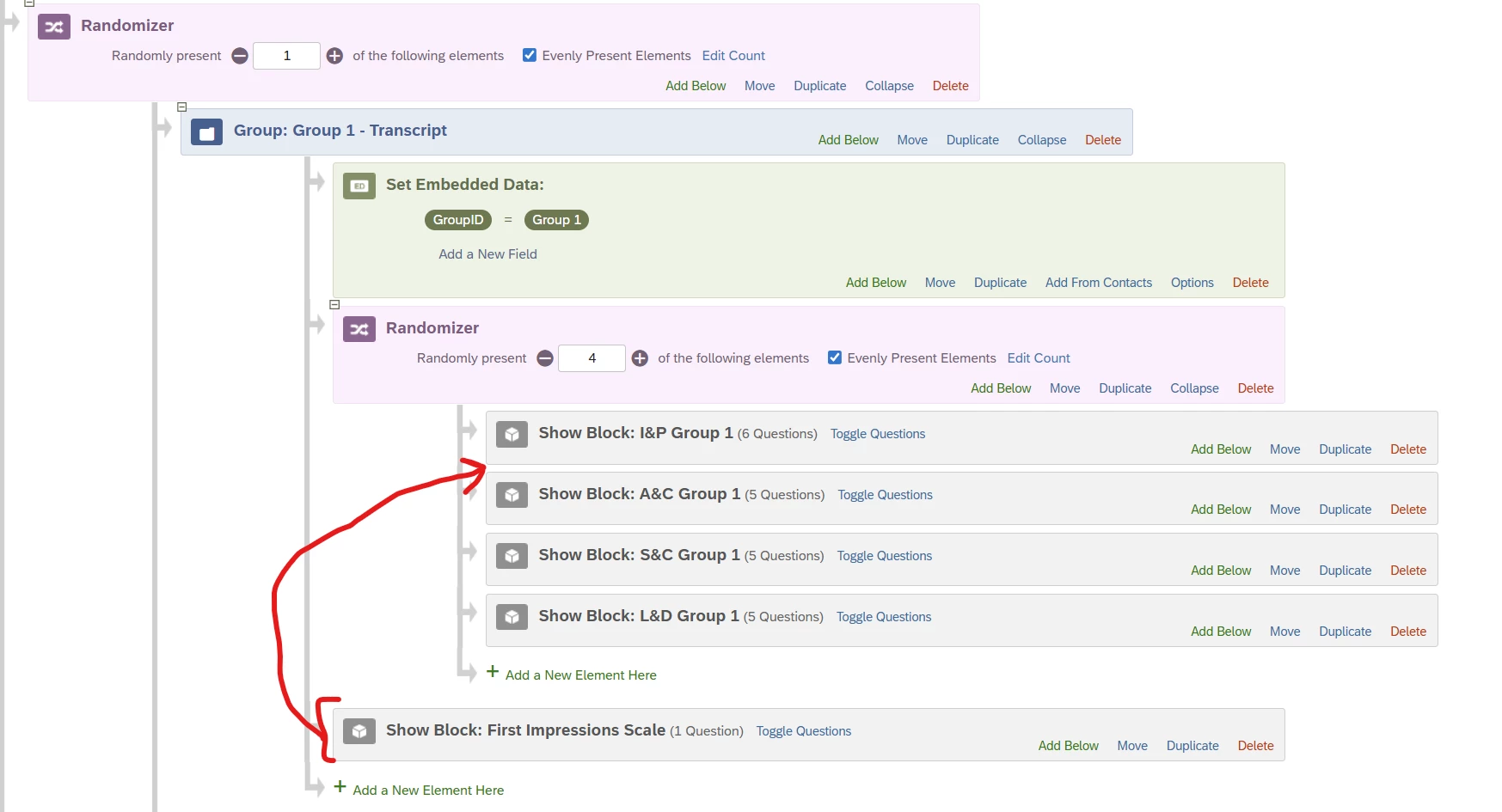
I’m setting up a Qualtrics experiment with 7 between-subjects groups (participants are randomly assigned to 1 group via Survey Flow randomizer). Within each group, participants see 4 blocks (S&C, L&D, I&P, A&C) plus:
a First Impressions Scale block that must always appear in position 2, and
for Groups 2–7 only, a Manipulation Check block that must always appear last.
Each of the four blocks includes instructions, experimental materials, and a rating scale. I need the 4 blocks to be fully randomized around these fixed blocks (e.g., any of the 4 can be in positions 1, 3, 4, 5), while keeping:
First Impressions Scale always at #2, and
Manipulation Check (when present) always at #6.
Qualtrics Support confirmed that native block/randomizer tools either randomize everything (including the fixed blocks) or keep everything fixed, and that the only straightforward native workaround would be to manually create all permutations (24 permutations × 7 groups = 168 separate blocks), which is not feasible. They suggested that this may require a JavaScript/embedded data solution.
I’m looking for a practical way to:
Randomize the order of the 4 transcript blocks within each group,
Keep specific blocks in fixed positions (2nd, and last for some groups),
And avoid manually building all 24 permutations per group.
Has anyone implemented this kind of “randomize N blocks around fixed-position blocks” pattern in Qualtrics (with Survey Flow, embedded data, or JavaScript)? Any example flows, JS snippets, or XML patterns would be greatly appreciated.

How to randomize N blocks around fixed-position blocks
 +1
+1






Sign up
Already have an account? Login

Welcome! To join the Qualtrics Experience Community, log in with your existing Qualtrics credentials below.
Confirm your username, share a bit about yourself, then you're ready to explore and connect .
Free trial account? No problem. Log in with your trial credentials to join.
No free trial account? No problem! Register here
Already a member? Hi and welcome back! We're glad you're here 🙂
You will see the Qualtrics login page briefly before being taken to the Experience Community.
Login with Qualtrics
Welcome! To join the Qualtrics Experience Community, log in with your existing Qualtrics credentials below.
Confirm your username, share a bit about yourself, then you're ready to explore and connect .
Free trial account? No problem. Log in with your trial credentials to join. No free trial account? No problem! Register here
Already a member? Hi and welcome back! We're glad you're here 🙂
You will see the Qualtrics login page briefly before being taken to the Experience Community.
Login to the Community
No account yet? Create an account
Welcome! To join the Qualtrics Experience Community, log in with your existing Qualtrics credentials below.
Confirm your username, share a bit about yourself, then you're ready to explore and connect .
Free trial account? No problem. Log in with your trial credentials to join.
No free trial account? No problem! Register here
Already a member? Hi and welcome back! We're glad you're here 🙂
You will see the Qualtrics login page briefly before being taken to the Experience Community.
Login with Qualtrics
Welcome! To join the Qualtrics Experience Community, log in with your existing Qualtrics credentials below.
Confirm your username, share a bit about yourself, then you're ready to explore and connect .
Free trial account? No problem. Log in with your trial credentials to join. No free trial account? No problem! Register here
Already a member? Hi and welcome back! We're glad you're here 🙂
You will see the Qualtrics login page briefly before being taken to the Experience Community.
Enter your E-mail address. We'll send you an e-mail with instructions to reset your password.