

Include a 'DK/DA' in a drill-down question | Experience Community
Skip to main content
Solved

Include a 'DK/DA' in a drill-down question

  • August 26, 2026
  • 2 replies
  • 11 views

VictorAV
Level 3 ●●●
Forum|alt.badge.img+6

Hi Qualtrics team, 

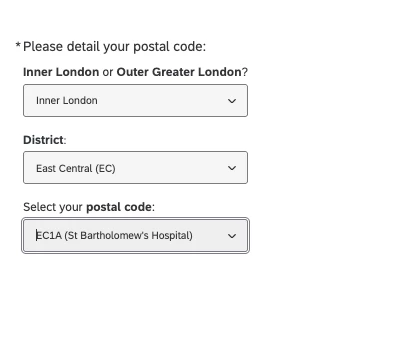
I’m working on a drill-down question where it’s requested to select 3 fields (London postal codes):

  • Region
  • District
  • Code

Everything works as expected by using a .csv file with the list of codes. 

But I would like to add an option outside these list for those who ‘Don’t know’ or ‘Living putside these areas’. How can I make it?

​​​​​​​Thanks!

Best answer by SaurabhPujare_Ugam

Hi ​@VictorAV, Hope you are well.

There are couple of ways you can achieve this, however, both of the approaches would need you to add a forth question with single option of “N/A”, where, this option should be added as a multiresponse/checkbox.


Approach 1: Use Custom Validation: Where either drop down should have value of “N/A” should be checked, and respondents must do either of the selection before proceeding.

Approach 2: Use custom JS: Where selecting the N/A option will clear out the drop-down values and make them read-only.


Hope this answers.

2 replies

SaurabhPujare_Ugam
QPN Level 5 ●●●●●
Forum|alt.badge.img+18

Hi ​@VictorAV, Hope you are well.

There are couple of ways you can achieve this, however, both of the approaches would need you to add a forth question with single option of “N/A”, where, this option should be added as a multiresponse/checkbox.


Approach 1: Use Custom Validation: Where either drop down should have value of “N/A” should be checked, and respondents must do either of the selection before proceeding.

Approach 2: Use custom JS: Where selecting the N/A option will clear out the drop-down values and make them read-only.


Hope this answers.


VictorAV
Level 3 ●●●
Forum|alt.badge.img+6
  • Author
  • Level 3 ●●●
  • August 27, 2026

Thanks ​@SaurabhPujare_Ugam !