

Dear community members, I would like to ask you for advice regarding the possibility of comparing embedded data values.
I have several numeric embedded variables (e.g. NT1, NT2, NT3, NT4). For future use, I need to compare the value of these variables respectively used following logic in the "branch element" or/and in "the display logic". The logic I need to use is "Display question"/"then branch if" the embedded data NT1 > NT2 AND > NT3 AND > NT4. I'm right that the conventional way of writing an operator into branch element or display logic expects the numeric value after "is greater than"? So, the picture below is probably nonsense? Consequently, my question is: Is there any way to put the order I mentioned to branch element/display logic? 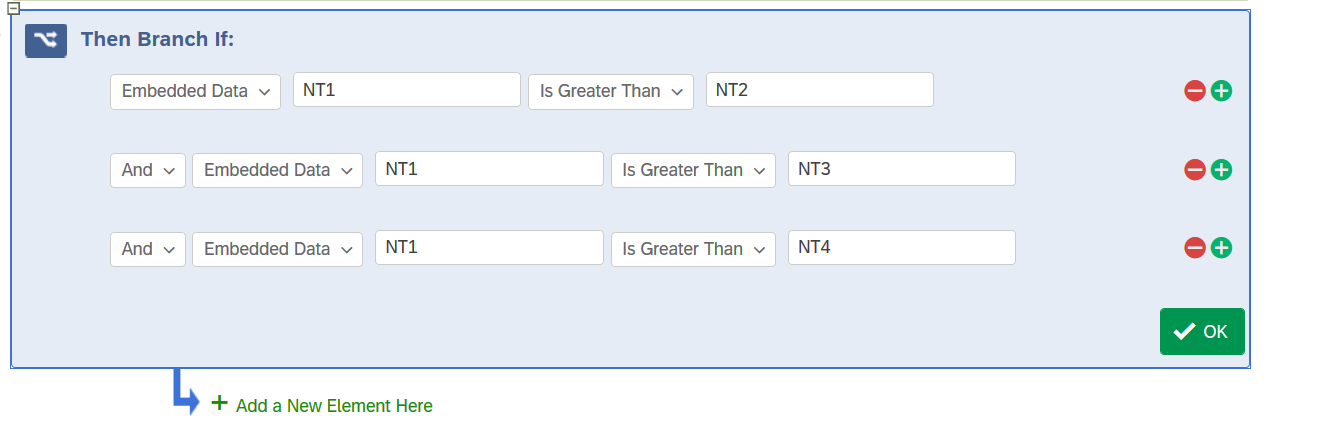
I'm also thinking about evading this problem, and this is my second question. Is there any possibility of creating an embedded variable with a specific value as a result of comparing the source embedded variable's values? For example, (new embedded variable) NTT with value 1 if the embedded variable NT1 > the embedded variable NT2 AND > the embedded variable NT3 AND > the embedded variable NT4.
Thank you a lot for your answers.

Output based on comparsion of embedded data values
Best answer by ahmedA
https://www.qualtrics.com/community/discussion/16614/output-based-on-comparsion-of-embedded-data-valuesThe text in the field after greater than or any other condition is interpreted literally. So you'll need to use the format for piped text like {e://Field/NT2} etc. otherwise your values will be compared to NT2 and since this will throw an error nothing will happen.


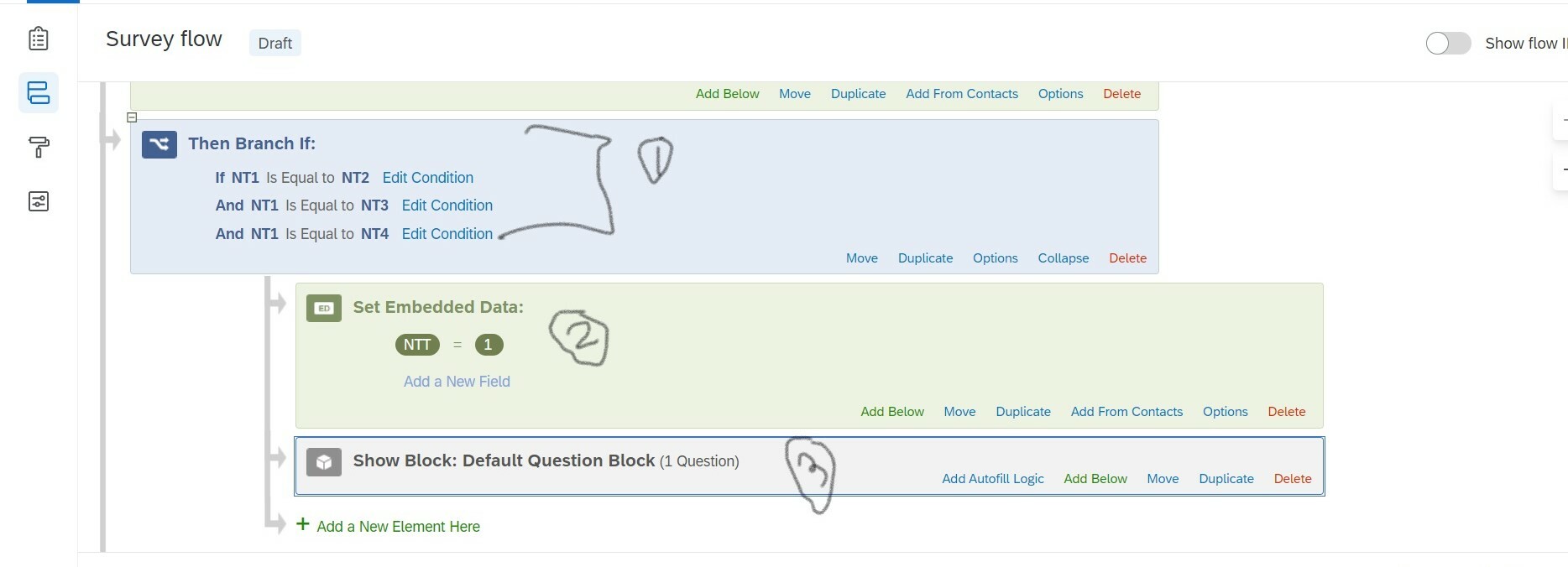 This might help

Sign up
Already have an account? Login

Welcome! To join the Qualtrics Experience Community, log in with your existing Qualtrics credentials below.
Confirm your username, share a bit about yourself, then you're ready to explore and connect .
Free trial account? No problem. Log in with your trial credentials to join.
No free trial account? No problem! Register here
Already a member? Hi and welcome back! We're glad you're here 🙂
You will see the Qualtrics login page briefly before being taken to the Experience Community.
Login with Qualtrics
Welcome! To join the Qualtrics Experience Community, log in with your existing Qualtrics credentials below.
Confirm your username, share a bit about yourself, then you're ready to explore and connect .
Free trial account? No problem. Log in with your trial credentials to join. No free trial account? No problem! Register here
Already a member? Hi and welcome back! We're glad you're here 🙂
You will see the Qualtrics login page briefly before being taken to the Experience Community.
Login to the Community
No account yet? Create an account
Welcome! To join the Qualtrics Experience Community, log in with your existing Qualtrics credentials below.
Confirm your username, share a bit about yourself, then you're ready to explore and connect .
Free trial account? No problem. Log in with your trial credentials to join.
No free trial account? No problem! Register here
Already a member? Hi and welcome back! We're glad you're here 🙂
You will see the Qualtrics login page briefly before being taken to the Experience Community.
Login with Qualtrics
Welcome! To join the Qualtrics Experience Community, log in with your existing Qualtrics credentials below.
Confirm your username, share a bit about yourself, then you're ready to explore and connect .
Free trial account? No problem. Log in with your trial credentials to join. No free trial account? No problem! Register here
Already a member? Hi and welcome back! We're glad you're here 🙂
You will see the Qualtrics login page briefly before being taken to the Experience Community.
Enter your E-mail address. We'll send you an e-mail with instructions to reset your password.