Redirecting to second survey using typed ID | Experience Community
Skip to main content
Solved

Redirecting to second survey using typed ID

  • September 24, 2026
  • 6 replies
  • 76 views

Forum|alt.badge.img+1

Hi! I’m trying to redirect to an anonymous survey where I keep three embedded variables the same across three surveys: Day, Counterbalance group, and participant ID. In my survey, people insert ID as the first question. So my redirect link will look something like

qualtrics.com/form/SURVEYCODE?ID=[PARTICIPANTID]&DAY=[DAY]&CBGROUP=[COUNTERBALANCINGGROUP]. I’m able to get day and counterbalancing group to embed in the link properly, but I can’t for participant ID. It just enters nothing in the URL

Things I have tried:

  • qualtrics.com/form/SURVEYCODE?ID=${q://ID/ChoiceGroup/SelectedChoices}
  • qualtrics.com/form/SURVEYCODE?ID=${q://ID}
  • Embedding ID as value set by panel and making redirect qualtrics.com/form/SURVEYCODE?ID=${e://Field/ID?format=urlencode}
  • Embedding ID as ${q://ID/ChoiceGroup/SelectedChoices} making redirect qualtrics.com/form/SURVEYCODE?ID=${e://Field/ID?format=urlencode}
  • Embedding ID as ${q://ID} making redirect qualtrics.com/form/SURVEYCODE?ID=${e://Field/ID?format=urlencode}

All end up the same way: qualtrics.com/form/SURVEYCODE?ID=&DAY=[DAY]&CBGROUP=[COUNTERBALANCINGGROUP]

How can I get my redirect link to include participant ID?
Best answer by Chee Heng_SZ

I did not realize I kept QID1, and hadn’t tried that!

If you are selecting the piped text from the question, it should be fine.

Extra information:

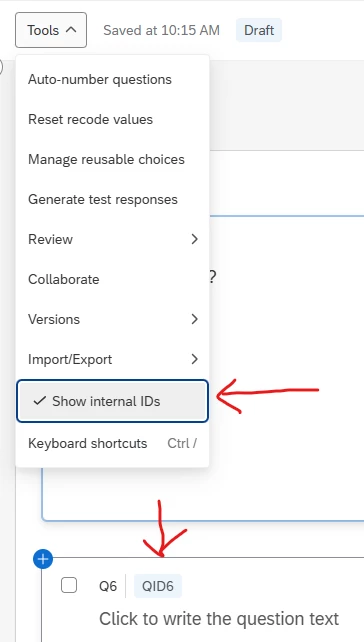
QID (internal IDs) is an order of the questions you have created since the start of survey building. It can be different from the order that you plan to show in the survey.

E.g. You created four question Q2 to Q5 (QID1 to QID4) as Q1 to Q4. You realised you left out a question Q1. Hence, you create Q1 (QID5), shift it to the top and change the Q1 to Q4 labelling to Q2 to Q5. Although it seems to be Q1 to Q5, the internal ID order will still remain as QID5, QID1 to QID4.

Click on the show internal IDs if required.


Is it a problem if it’s a text response instead of multiple choice? Or should I label the block QID1 instead of the question?

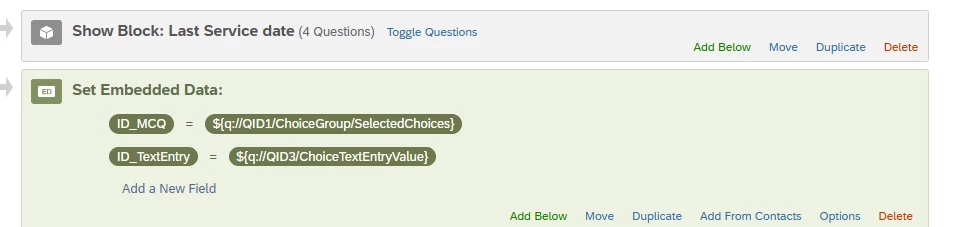
If your first question is a text entry question, your piped text will be show up differently.

There isn’t a need to label your block unless you are using it for reference such as moving blocks during survey flow.

selecting piped text from MCQ and selecting piped text from Text entry question.


View original

6 replies

  • Level 4 ●●●●
  • September 25, 2026

If you need to insert any other information in URL, you need have this & in your URL.

I can see that, there is no & mentioned for Participant ID whereas Day and CB group has.


Forum|alt.badge.img+1
  • Author
  • September 25, 2026

If you need to insert any other information in URL, you need have this & in your URL.

I can see that, there is no & mentioned for Participant ID whereas Day and CB group has.

I was confused because I assumed for the first thing you added on, there needed to be a question mark? The add was for anything subsequent. Additionally, you haven’t made clear what I’d need to embed my ID as or what I’d want to make my URL.


Forum|alt.badge.img+30
  • Embedding ID as ${q://ID/ChoiceGroup/SelectedChoices} making redirect qualtrics.com/form/SURVEYCODE?ID=${e://Field/ID?format=urlencode}

Assuming your embedded data variable ID takes the piped text ${q://QID1/ChoiceGroup/SelectedChoices} from your first question (MCQ), then your qualtrics.com/form/SURVEYCODE?ID=${e://Field/ID?format=urlencode} should have work.

Is the embedded data ID wrongly placed at the top instead of after QID1 of your survey flow?


Forum|alt.badge.img+1
  • Author
  • September 29, 2026
  • Embedding ID as ${q://ID/ChoiceGroup/SelectedChoices} making redirect qualtrics.com/form/SURVEYCODE?ID=${e://Field/ID?format=urlencode}

Assuming your embedded data variable ID takes the piped text ${q://QID1/ChoiceGroup/SelectedChoices} from your first question (MCQ), then your qualtrics.com/form/SURVEYCODE?ID=${e://Field/ID?format=urlencode} should have work.

Is the embedded data ID wrongly placed at the top instead of after QID1 of your survey flow?

I did not realize I kept QID1, and hadn’t tried that! The ID question is also at the top, I double checked that, and the embedded data question is right after that. Unfortunately it still does not work.

Is it a problem if it’s a text response instead of multiple choice? Or should I label the block QID1 instead of the question?


Forum|alt.badge.img+30

I did not realize I kept QID1, and hadn’t tried that!

If you are selecting the piped text from the question, it should be fine.

Extra information:

QID (internal IDs) is an order of the questions you have created since the start of survey building. It can be different from the order that you plan to show in the survey.

E.g. You created four question Q2 to Q5 (QID1 to QID4) as Q1 to Q4. You realised you left out a question Q1. Hence, you create Q1 (QID5), shift it to the top and change the Q1 to Q4 labelling to Q2 to Q5. Although it seems to be Q1 to Q5, the internal ID order will still remain as QID5, QID1 to QID4.

Click on the show internal IDs if required.


Is it a problem if it’s a text response instead of multiple choice? Or should I label the block QID1 instead of the question?

If your first question is a text entry question, your piped text will be show up differently.

There isn’t a need to label your block unless you are using it for reference such as moving blocks during survey flow.

selecting piped text from MCQ and selecting piped text from Text entry question.


Forum|alt.badge.img+1
  • Author
  • September 30, 2026

I did not realize I kept QID1, and hadn’t tried that!

If you are selecting the piped text from the question, it should be fine.

Extra information:

QID (internal IDs) is an order of the questions you have created since the start of survey building. It can be different from the order that you plan to show in the survey.

E.g. You created four question Q2 to Q5 (QID1 to QID4) as Q1 to Q4. You realised you left out a question Q1. Hence, you create Q1 (QID5), shift it to the top and change the Q1 to Q4 labelling to Q2 to Q5. Although it seems to be Q1 to Q5, the internal ID order will still remain as QID5, QID1 to QID4.

Click on the show internal IDs if required.


Is it a problem if it’s a text response instead of multiple choice? Or should I label the block QID1 instead of the question?

If your first question is a text entry question, your piped text will be show up differently.

There isn’t a need to label your block unless you are using it for reference such as moving blocks during survey flow.

selecting piped text from MCQ and selecting piped text from Text entry question.


TYSM! The ChoiceTextEntryValue thing was my problem!