Signature Question Help! | Experience Community
Skip to main content
Question

Signature Question Help!

  • April 16, 2026
  • 3 replies
  • 27 views

Forum|alt.badge.img+5

Hi everyone, 👋

Hope you’re all well.

If possible, I am after some help to edit a signature question.

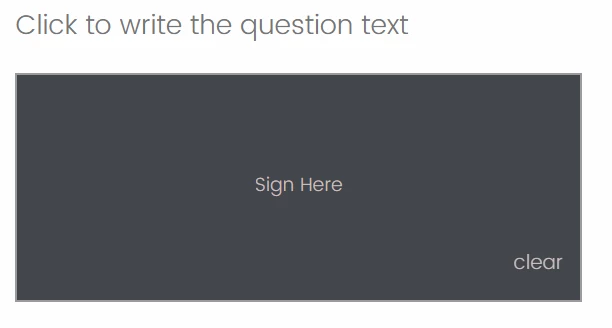
This is what I currently have:

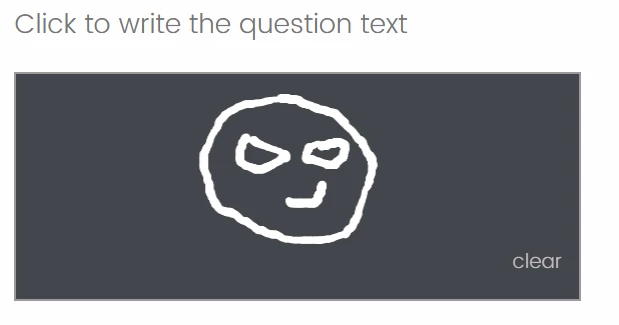
This is what I am aiming for:

I would also need the brushstroke to be white.

As always, appreciate the support.

Thanks :) 

3 replies

Forum|alt.badge.img+26

Hi ​@parkie_0007 ,

Referring to the other post here and here,

I tweaked some portions to the JavaScript (provided by Tom_1842) to give similar effect as your screenshot.

Qualtrics.SurveyEngine.addOnload(function()
{
/*Place your JavaScript here to run when the page loads*/
var qid = this.questionId;
const canvas = document.getElementById(qid+'-Signature')
const context = canvas.getContext("2d");

canvas.height = 300;
canvas.width = 800;


context.lineCap = "round";
context.lineJoin = "round";

//white color brush
context.strokeStyle = '#ffffff';
context.fillStyle = '#ffffff';

context.lineWidth = '2';


let drawing = false;

function startDrawing(e) {
drawing = true;
context.beginPath();
}

window.addEventListener("mousedown", startDrawing);
window.addEventListener("touchstart", startDrawing);

function endDrawing(e) {
drawing = false;
}

window.addEventListener("mouseup", endDrawing);
window.addEventListener("touchend", endDrawing);

function getMousePos(canvas, evt) {
var rect = canvas.getBoundingClientRect(),
scaleX = canvas.width / rect.width,
scaleY = canvas.height / rect.height;

return {
x: (evt.clientX - rect.left) * scaleX,
y: (evt.clientY - rect.top) * scaleY
}
}

function draw(e) {
if (!drawing) return;

let { x, y } = getMousePos(canvas, e);

context.lineTo(x, y);
context.stroke();
}

window.addEventListener("mousemove", draw);
window.addEventListener("touchmove", draw);

function startDrawing(e) {
drawing = true;
context.beginPath();
draw(e);
}

//Change the rgb to fit your preferred color for the box.
jQuery("#"+this.questionId+"-SignatureBox").css({"background":'rgb(58,58,58)',
"background-size": "100% 100%",
"background-repeat": "no-repeat",
"background-position": "center center",
"z-order":"1"});

jQuery("#"+this.questionId+"-SignLine").css({"display":"none"});
jQuery("#"+this.questionId+"-X").css({"display":"none"});

//Change the rgb for the SignHere text color to your preferred color and adjust the size accordingly. padding bottom is to raise the signhere text.
jQuery("#"+this.questionId+"-SignHere").css({"color":'rgb(100,100,100)',"font-size":'16px',"padding-bottom":'50px'});

//Change the rgb for the clear box and clear text to your preferred color
jQuery("#"+this.questionId+"-ClearSignature").css({"background-color": 'rgb(58,58,58)',"color":'rgb(100,100,100)'});

//jQuery("#"+this.questionId+"-Signature").css({"opacity": "0.25",
//"z-order":"2"});

});

The question container seems to be black by default in your screenshot.

Result using other dark background theme.

Hope this helps.


Forum|alt.badge.img+5
  • Author
  • Level 5 ●●●●●
  • April 17, 2026

Thanks, this is looking great,

This is what I currently have:

Are we able to remove the white border, and use Clear instead of clear. Is it also possible to position Clear neatly in a corner? Can the height also be reduced?

Another issue I have is for some reason when this question is displayed, it pushes all the other questions outwards and upwards rather than falling neatly below:

Thanks as always, love this community!


nikamshubham73
Level 2 ●●
Forum|alt.badge.img+3
  • Level 2 ●●
  • April 17, 2026

Hi ​@parkie_0007,

Please find below JS and CSS code, try these one too! 😁

CSS Code:

.ClearSignature {

    color: #c7bfbf !important;

    font-weight: normal !important;

}

.SignatureBox.Medium .SignHere {

    font-size: 17px !important;

    line-height: 5.4 !important;  

    margin-bottom: 8px;

}

.SignHere {

    text-transform: none !important;

    font-weight: normal !important;

    color: #c7bfbf !important;

}


.Skin .SignatureBox {

    background-color: #43464b !important;

}


JS Code:

Qualtrics.SurveyEngine.addOnReady(function()

{

    //Hide the line & x

    jQuery(".SignatureX").hide()

    jQuery(".SignLine").hide()


    //JS Code for White Stroke

    const canvas = jQuery(".SignatureCanvas")[0];

    if (canvas) {

        const ctx = canvas.getContext("2d");

        // Set drawing color to white

        ctx.strokeStyle = "#ffffff";

        ctx.fillStyle = "#ffffff";

    }

});