

I'm trying to create a closed sample survey with a version A and B that branch mid-survey based on predetermined groups. I created an email distribution list with an additional column in the file for "Path" to determine whether the respondent's personalized link branches them to version A or B of the survey. When I try to pull this into the survey flow following the instructions on the FAQ page, I'm able to add embedded data and find the "Path" variable, but the dropdown for choosing an entity (i.e. version A vs. B) is empty. Can someone who has set up predetermined survey paths/branching based on a variable in the respondent file advise on how to properly set up embedded data and use it in survey flow?

Solved
Survey Branching on Embedded Data
Best answer by MsIreen
Hi,
I I understand correctly, you need something like this: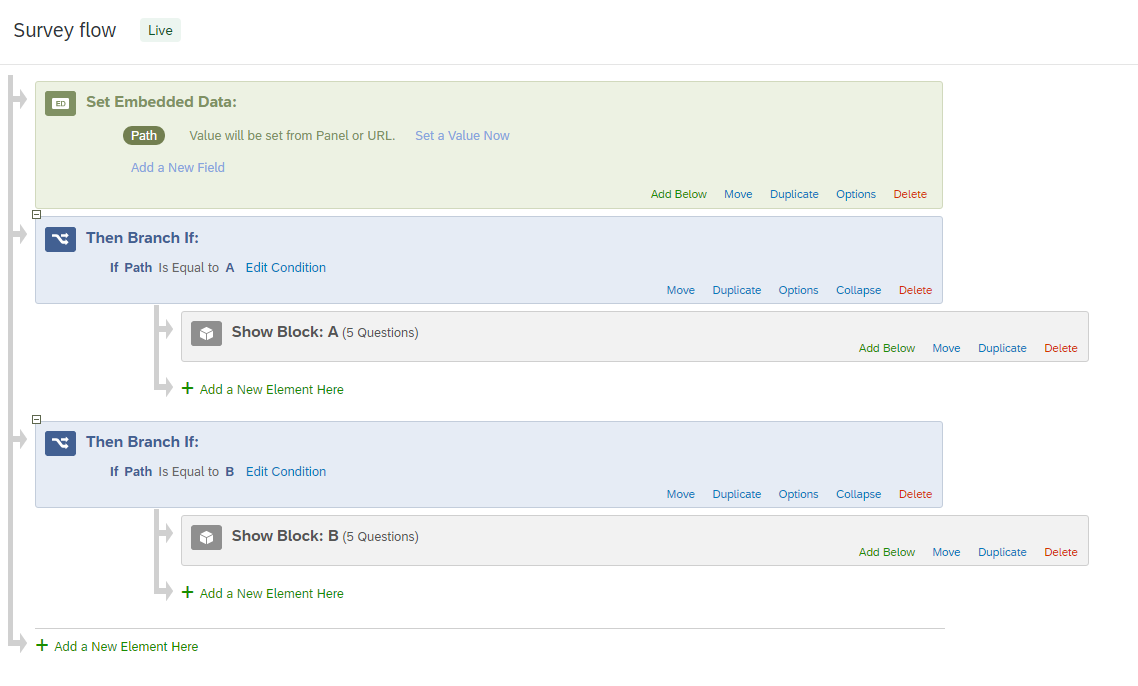 Make sure that embedded data field "Path" is on the top of the survey flow and spelled exactly the same as it is in the mailing list



Sign up
Already have an account? Login

Welcome! To join the Qualtrics Experience Community, log in with your existing Qualtrics credentials below.
Confirm your username, share a bit about yourself, then you're ready to explore and connect .
Free trial account? No problem. Log in with your trial credentials to join.
No free trial account? No problem! Register here
Already a member? Hi and welcome back! We're glad you're here 🙂
You will see the Qualtrics login page briefly before being taken to the Experience Community.
Login with Qualtrics
Welcome! To join the Qualtrics Experience Community, log in with your existing Qualtrics credentials below.
Confirm your username, share a bit about yourself, then you're ready to explore and connect .
Free trial account? No problem. Log in with your trial credentials to join. No free trial account? No problem! Register here
Already a member? Hi and welcome back! We're glad you're here 🙂
You will see the Qualtrics login page briefly before being taken to the Experience Community.
Login to the Community
No account yet? Create an account
Welcome! To join the Qualtrics Experience Community, log in with your existing Qualtrics credentials below.
Confirm your username, share a bit about yourself, then you're ready to explore and connect .
Free trial account? No problem. Log in with your trial credentials to join.
No free trial account? No problem! Register here
Already a member? Hi and welcome back! We're glad you're here 🙂
You will see the Qualtrics login page briefly before being taken to the Experience Community.
Login with Qualtrics
Welcome! To join the Qualtrics Experience Community, log in with your existing Qualtrics credentials below.
Confirm your username, share a bit about yourself, then you're ready to explore and connect .
Free trial account? No problem. Log in with your trial credentials to join. No free trial account? No problem! Register here
Already a member? Hi and welcome back! We're glad you're here 🙂
You will see the Qualtrics login page briefly before being taken to the Experience Community.
Enter your E-mail address. We'll send you an e-mail with instructions to reset your password.