

In the question that appears in the attached image, I have 19 items in total. The list is quite long, so I would like to add white spaces in between. The issue here is that I want to adjust the spacing manually (e.g. adding the space after every 3 items), but the current format doesn't seem to support that. Neither does it work for 'repeat headers' option. Can you please let me know how I can do it?
I would like to at least avoid adding white spaces on weird lines, because right now, the Qualtrics automatically add white spaces after every 5 lines and therefore, substantively related items get cut off in a weird manner (e.g. items #5 and #6) and I would like to avoid that. Any tips on how to adjust the location of white spaces would be very much appreciated. Thanks a lot in advance!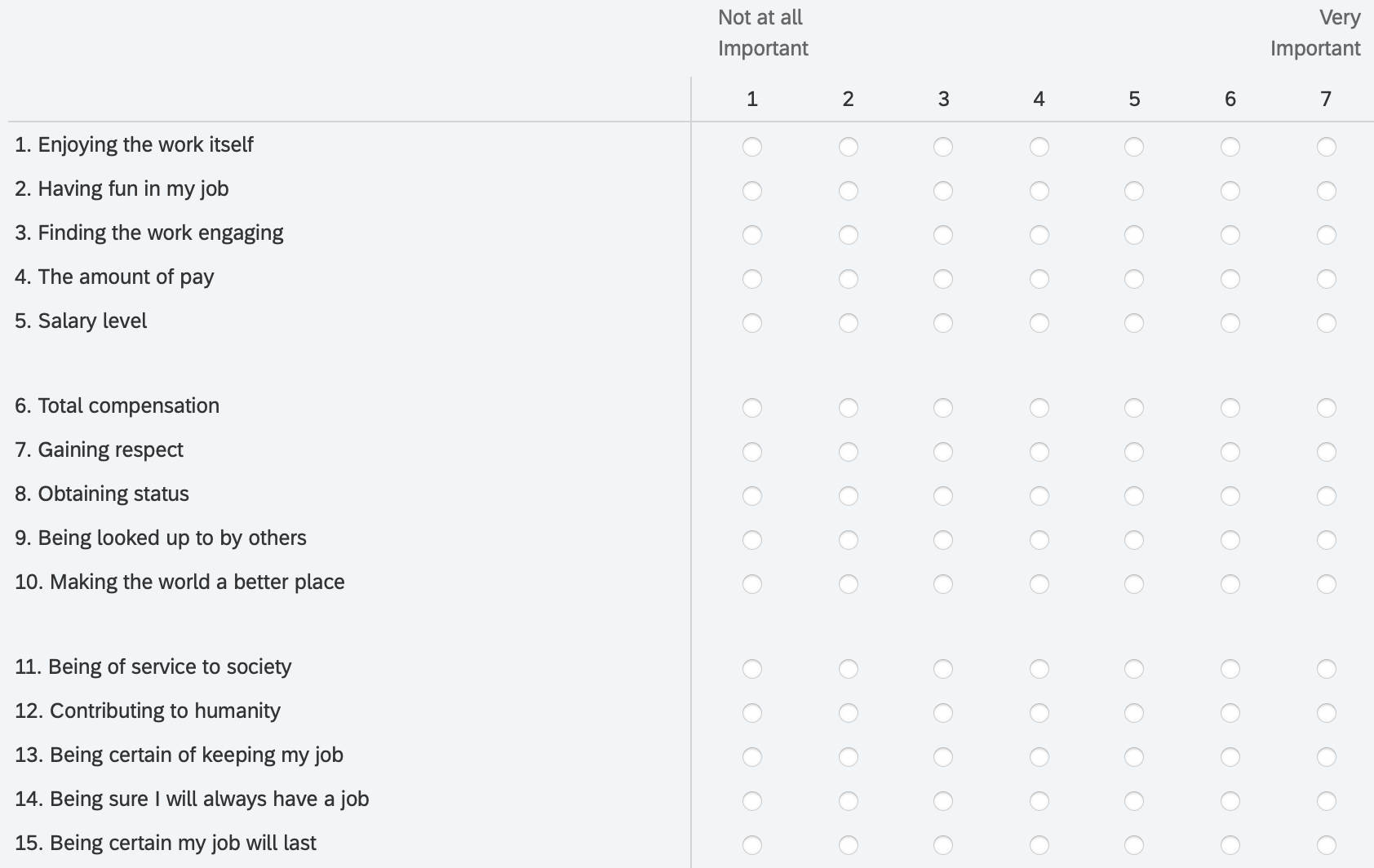

How to adjust where I can add white space (or repeat headers)
Best answer by ahmedA
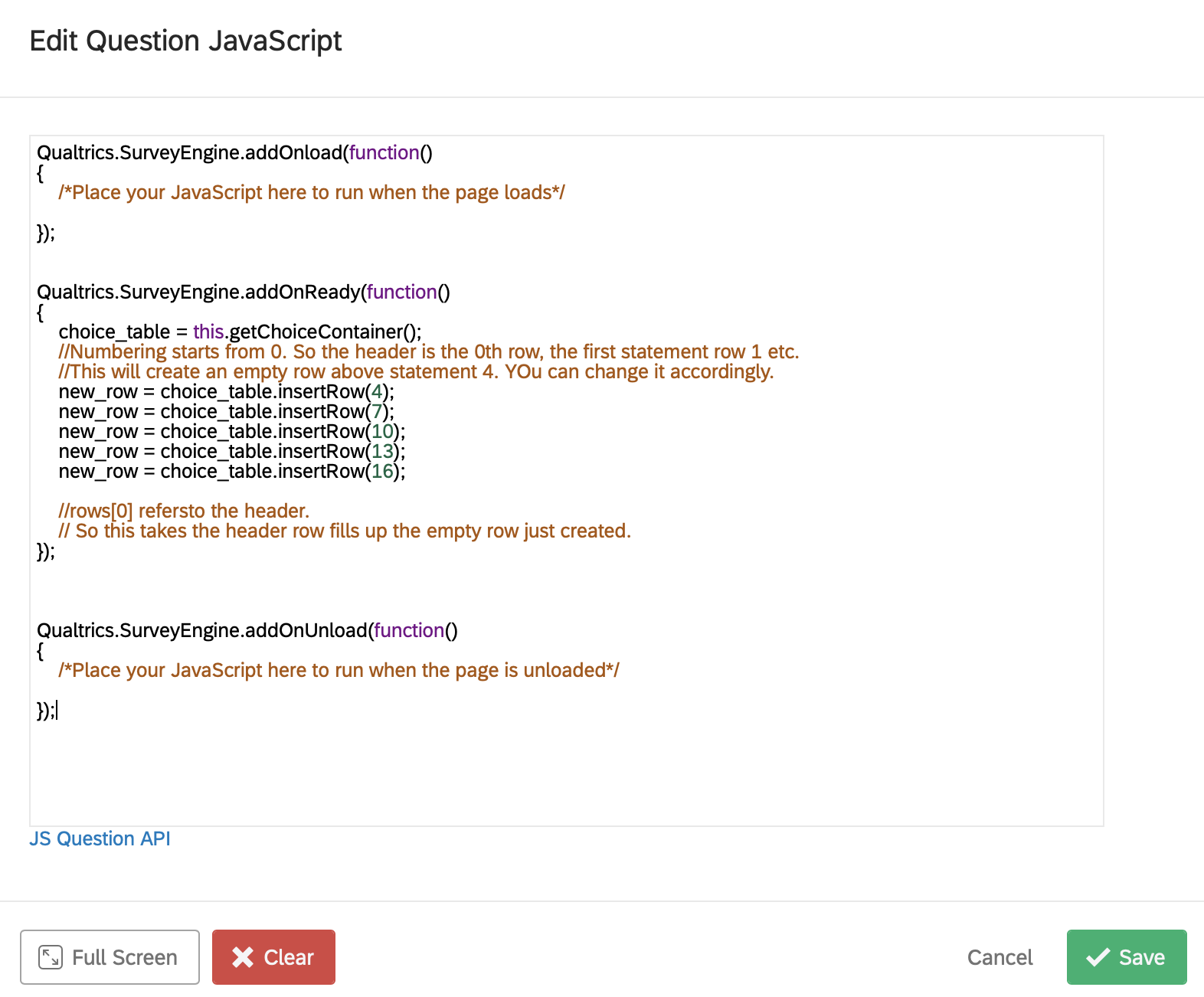
According to the screenshot, the problem is that the new rows you are creating are empty. So the browser is just ignoring them and there is no space being added.
Suppose you want to add some whitespace at the 4th row, you first create a row over there and then give it some some content with a line like this:
new_row.innerHTML = ""
You'll need to repeat this for every new row that you create.
For your question 2, largely its okay. But the problem is that, after inserting a row at index 4, the row which was at index 7 has now moved to index 8. So just take not of how many rows you have added and the new index. I usually start from the bottom to avoid this. But you can do it however, you prefer.


 Thank you so much for the link, I really appreciate it!!
 Sign up
Already have an account? Login

Welcome! To join the Qualtrics Experience Community, log in with your existing Qualtrics credentials below.
Confirm your username, share a bit about yourself, then you're ready to explore and connect .
Free trial account? No problem. Log in with your trial credentials to join.
No free trial account? No problem! Register here
Already a member? Hi and welcome back! We're glad you're here 🙂
You will see the Qualtrics login page briefly before being taken to the Experience Community.
Login with Qualtrics
Welcome! To join the Qualtrics Experience Community, log in with your existing Qualtrics credentials below.
Confirm your username, share a bit about yourself, then you're ready to explore and connect .
Free trial account? No problem. Log in with your trial credentials to join. No free trial account? No problem! Register here
Already a member? Hi and welcome back! We're glad you're here 🙂
You will see the Qualtrics login page briefly before being taken to the Experience Community.
Login to the Community
No account yet? Create an account
Welcome! To join the Qualtrics Experience Community, log in with your existing Qualtrics credentials below.
Confirm your username, share a bit about yourself, then you're ready to explore and connect .
Free trial account? No problem. Log in with your trial credentials to join.
No free trial account? No problem! Register here
Already a member? Hi and welcome back! We're glad you're here 🙂
You will see the Qualtrics login page briefly before being taken to the Experience Community.
Login with Qualtrics
Welcome! To join the Qualtrics Experience Community, log in with your existing Qualtrics credentials below.
Confirm your username, share a bit about yourself, then you're ready to explore and connect .
Free trial account? No problem. Log in with your trial credentials to join. No free trial account? No problem! Register here
Already a member? Hi and welcome back! We're glad you're here 🙂
You will see the Qualtrics login page briefly before being taken to the Experience Community.
Enter your E-mail address. We'll send you an e-mail with instructions to reset your password.