


Hello all,
I would like to measure how much people are willing to spend and give choice options that are 10%, 20%, 30% higher than their answers.
For example, if someone says he's willing to spend '$40', then on the next page, he will be given '$44', '$48', '$52', '$56' 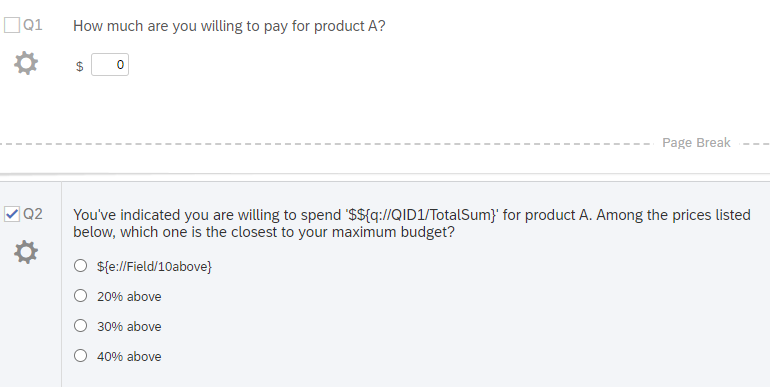
I also would like to round the numbers just in case. (Ex. $45 => $50(from 49.5), $54).
Here is the embedded data that I create for 10% above option and it displays nothing in the preview. 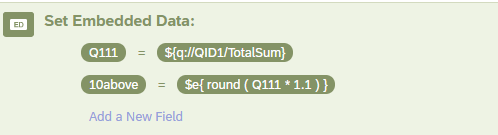
Do you have any idea how to fix it?
Thanks in advance

Solved
How to create embedded data? (math operation - round number)
Best answer by PraDeepKotian_XM
Hi S_smith
Could you please check the survey flow and the placement of these embedded variables? By looking at the questions screen capture it seems both the questions are in same block and calculations is done after or before the block because of which you are not able to piped text/calculate the values in question text.
Also correct the math operations for 10above using this link.





Sign up
Already have an account? Login

Welcome! To join the Qualtrics Experience Community, log in with your existing Qualtrics credentials below.
Confirm your username, share a bit about yourself, then you're ready to explore and connect .
Free trial account? No problem. Log in with your trial credentials to join.
No free trial account? No problem! Register here
Already a member? Hi and welcome back! We're glad you're here 🙂
You will see the Qualtrics login page briefly before being taken to the Experience Community.
Login with Qualtrics
Welcome! To join the Qualtrics Experience Community, log in with your existing Qualtrics credentials below.
Confirm your username, share a bit about yourself, then you're ready to explore and connect .
Free trial account? No problem. Log in with your trial credentials to join. No free trial account? No problem! Register here
Already a member? Hi and welcome back! We're glad you're here 🙂
You will see the Qualtrics login page briefly before being taken to the Experience Community.
Login to the Community
No account yet? Create an account
Welcome! To join the Qualtrics Experience Community, log in with your existing Qualtrics credentials below.
Confirm your username, share a bit about yourself, then you're ready to explore and connect .
Free trial account? No problem. Log in with your trial credentials to join.
No free trial account? No problem! Register here
Already a member? Hi and welcome back! We're glad you're here 🙂
You will see the Qualtrics login page briefly before being taken to the Experience Community.
Login with Qualtrics
Welcome! To join the Qualtrics Experience Community, log in with your existing Qualtrics credentials below.
Confirm your username, share a bit about yourself, then you're ready to explore and connect .
Free trial account? No problem. Log in with your trial credentials to join. No free trial account? No problem! Register here
Already a member? Hi and welcome back! We're glad you're here 🙂
You will see the Qualtrics login page briefly before being taken to the Experience Community.
Enter your E-mail address. We'll send you an e-mail with instructions to reset your password.