


I would like to randomly assign to subjects 3 pictures from a dataset of over 100 pictures. I assume I can just embed each image as embedded data and randomize. However, since the dataset is large (100+ images) I was wondering if there is a simpler way to do this. Thanks!

Solved
How to randomize large datasets?
Best answer by SurajK
Actually there is one more way, you can add the images as a choice in multiple choice question and in Advance randomization, display randomly 3 choices, make sure to select evenly present checkbox and add the below code in JS, it will select the random 3 images.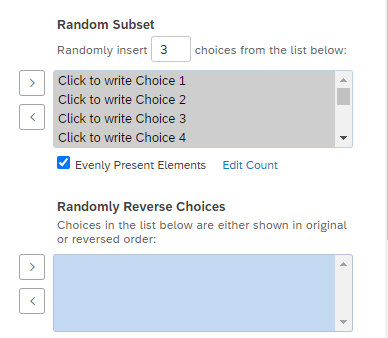 Create the 3 embedded data variables in the survey flow above the question, in the below code these are firstPicture, secondPicture and thirdPicture
Qualtrics.SurveyEngine.addOnload(function()
{
/*Place your JavaScript here to run when the page loads*/
jQuery('.QuestionOuter').css('display','none')
});
Qualtrics.SurveyEngine.addOnReady(function()
{
/*Place your JavaScript here to run when the page is fully displayed*/
jQuery('input[type="checkbox"]').prop('checked',true)
jQuery('#NextButton').click();
});
Qualtrics.SurveyEngine.addOnUnload(function()
{
/*Place your JavaScript here to run when the page is unloaded*/
});
Qualtrics.SurveyEngine.addOnPageSubmit(function(type)
{
if(type == "next")
{
var qid= this.questionId
var firstimg = jQuery.trim(jQuery('#'+qid).find('.Selection').eq(0).text())
Qualtrics.SurveyEngine.setEmbeddedData("firstPicture",firstimg)
var secondimg = jQuery.trim(jQuery('#'+qid).find('.Selection').eq(1).text())
Qualtrics.SurveyEngine.setEmbeddedData("secondPicture",secondimg)
var thirdimg = jQuery.trim(jQuery('#'+qid).find('.Selection').eq(2).text())
Qualtrics.SurveyEngine.setEmbeddedData("thirdPicture",thirdimg)
}
});



Sign up
Already have an account? Login

Welcome! To join the Qualtrics Experience Community, log in with your existing Qualtrics credentials below.
Confirm your username, share a bit about yourself, then you're ready to explore and connect .
Free trial account? No problem. Log in with your trial credentials to join.
No free trial account? No problem! Register here
Already a member? Hi and welcome back! We're glad you're here 🙂
You will see the Qualtrics login page briefly before being taken to the Experience Community.
Login with Qualtrics
Welcome! To join the Qualtrics Experience Community, log in with your existing Qualtrics credentials below.
Confirm your username, share a bit about yourself, then you're ready to explore and connect .
Free trial account? No problem. Log in with your trial credentials to join. No free trial account? No problem! Register here
Already a member? Hi and welcome back! We're glad you're here 🙂
You will see the Qualtrics login page briefly before being taken to the Experience Community.
Login to the Community
No account yet? Create an account
Welcome! To join the Qualtrics Experience Community, log in with your existing Qualtrics credentials below.
Confirm your username, share a bit about yourself, then you're ready to explore and connect .
Free trial account? No problem. Log in with your trial credentials to join.
No free trial account? No problem! Register here
Already a member? Hi and welcome back! We're glad you're here 🙂
You will see the Qualtrics login page briefly before being taken to the Experience Community.
Login with Qualtrics
Welcome! To join the Qualtrics Experience Community, log in with your existing Qualtrics credentials below.
Confirm your username, share a bit about yourself, then you're ready to explore and connect .
Free trial account? No problem. Log in with your trial credentials to join. No free trial account? No problem! Register here
Already a member? Hi and welcome back! We're glad you're here 🙂
You will see the Qualtrics login page briefly before being taken to the Experience Community.
Enter your E-mail address. We'll send you an e-mail with instructions to reset your password.