

Dear all
I'd like to create a table in which participants can enter their choice in the last column as shown in the image below.  I already tried to do it with "Hot Spot" by inserting the table as an image and define the boxes in last column as a field to enter a decision. However, the problem is that although I customize validation to 1, participants can still click on more than one hot spot. Thus to have a single choice in the last column would be the best!
I am very thankful for any suggestions and ideas!

Solved
Insert Single Choice as last column into a table
Best answer by ahmedA
You could make the choices of a multiple choice question into table rows and then use JS to move the radio buttons into the desired cell. Here's the demo for the code below:
Question HTML:
Please make your choice
Choices (Entered through edit multiple):
| Choice | Investment | Remaining Balance | Number of Shares | Your Decision |
|---|
| Choice 1 | $ 2 | $ 0 | 10 |
| Choice 2 | $ 1.5 | $ 0.5 | 9 |
Question JS:
Qualtrics.SurveyEngine.addOnReady(function () {
let all_inputs = this.getQuestionContainer().querySelector("ul").querySelectorAll(".q-radio");
let all_rows = this.getQuestionContainer().querySelector("ul").querySelectorAll("tr");
all_inputs[0].hide();
for (i = 1; i < all_inputs.length; i++) {
all_rows[i].lastElementChild.insert(all_inputs[i]);
all_inputs[i].style.float = "none";
all_inputs[i].style.verticalAlign = "middle";
}
});


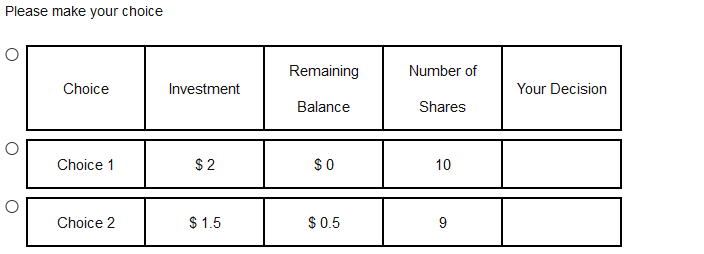 Although I tried to implement your code as you suggested.
 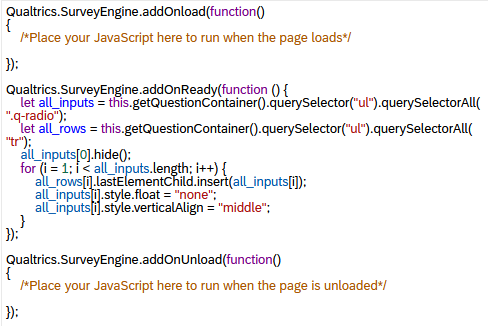 Where is my mistake?
Sign up
Already have an account? Login

Welcome! To join the Qualtrics Experience Community, log in with your existing Qualtrics credentials below.
Confirm your username, share a bit about yourself, then you're ready to explore and connect .
Free trial account? No problem. Log in with your trial credentials to join.
No free trial account? No problem! Register here
Already a member? Hi and welcome back! We're glad you're here 🙂
You will see the Qualtrics login page briefly before being taken to the Experience Community.
Login with Qualtrics
Welcome! To join the Qualtrics Experience Community, log in with your existing Qualtrics credentials below.
Confirm your username, share a bit about yourself, then you're ready to explore and connect .
Free trial account? No problem. Log in with your trial credentials to join. No free trial account? No problem! Register here
Already a member? Hi and welcome back! We're glad you're here 🙂
You will see the Qualtrics login page briefly before being taken to the Experience Community.
Login to the Community
No account yet? Create an account
Welcome! To join the Qualtrics Experience Community, log in with your existing Qualtrics credentials below.
Confirm your username, share a bit about yourself, then you're ready to explore and connect .
Free trial account? No problem. Log in with your trial credentials to join.
No free trial account? No problem! Register here
Already a member? Hi and welcome back! We're glad you're here 🙂
You will see the Qualtrics login page briefly before being taken to the Experience Community.
Login with Qualtrics
Welcome! To join the Qualtrics Experience Community, log in with your existing Qualtrics credentials below.
Confirm your username, share a bit about yourself, then you're ready to explore and connect .
Free trial account? No problem. Log in with your trial credentials to join. No free trial account? No problem! Register here
Already a member? Hi and welcome back! We're glad you're here 🙂
You will see the Qualtrics login page briefly before being taken to the Experience Community.
Enter your E-mail address. We'll send you an e-mail with instructions to reset your password.