


Solved
Mixture of dropdowns and text/number entry
 +1
+1Hi all!
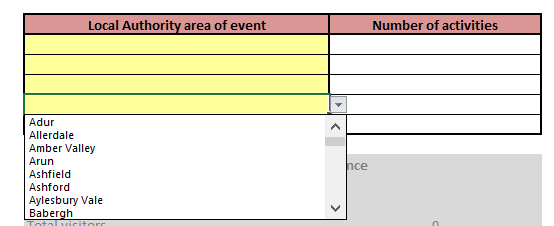
I'm trying to create a question which will allow respondents to select one option from a list of locations, and then enter a number next to this location (how many things took place in this location). Image below for illustration purposes.
Is there a way of blending two question types to make this possible?
Any advice much appreciated!
!
Best answer by TomG
> @LaurenTaylor said:
> Thanks @TomG
>
> My list of locations is very long. Is there a faster way to import the drop-down list than just typing it out?
>
> I've seen this for the drill-down question, but not for side-by-side.
Yes, create a list of your locations in a text file with each choice on its own line. Temporarily set the first column of the Side-by-side from Dropdown to Single Answer. Remove all the answers except the first one. Then copy the entire list from your text file and paste it into the first answer in your side-by-side. Then switch it back to dropdown.
View original





Sign up
Already have an account? Login

Welcome! To join the Qualtrics Experience Community, log in with your existing Qualtrics credentials below.
Confirm your username, share a bit about yourself, then you're ready to explore and connect .
Free trial account? No problem. Log in with your trial credentials to join.
No free trial account? No problem! Register here
Already a member? Hi and welcome back! We're glad you're here 🙂
You will see the Qualtrics login page briefly before being taken to the Experience Community.
Login with Qualtrics
Welcome! To join the Qualtrics Experience Community, log in with your existing Qualtrics credentials below.
Confirm your username, share a bit about yourself, then you're ready to explore and connect .
Free trial account? No problem. Log in with your trial credentials to join. No free trial account? No problem! Register here
Already a member? Hi and welcome back! We're glad you're here 🙂
You will see the Qualtrics login page briefly before being taken to the Experience Community.
Login to the Community
Welcome! To join the Qualtrics Experience Community, log in with your existing Qualtrics credentials below.
Confirm your username, share a bit about yourself, then you're ready to explore and connect .
Free trial account? No problem. Log in with your trial credentials to join.
No free trial account? No problem! Register here
Already a member? Hi and welcome back! We're glad you're here 🙂
You will see the Qualtrics login page briefly before being taken to the Experience Community.
Login with Qualtrics
Welcome! To join the Qualtrics Experience Community, log in with your existing Qualtrics credentials below.
Confirm your username, share a bit about yourself, then you're ready to explore and connect .
Free trial account? No problem. Log in with your trial credentials to join. No free trial account? No problem! Register here
Already a member? Hi and welcome back! We're glad you're here 🙂
You will see the Qualtrics login page briefly before being taken to the Experience Community.
Enter your E-mail address. We'll send you an e-mail with instructions to reset your password.