

Hi,
Hoping someone can help! I am trying to set up the survey flow so participants are allocated to one of four groups. I would like their language choice (EN or PT) to determine whether they are placed in either an EN or PT group and then randomiser to split them to either intervention or control - therefore they will be four groups in the end (intervention EN, waitlist EN, intervention PT, waitlist PT). I have looked through many posts on here and have tried to implement a flow based on what I have read but it still isn't working - e.g. even if I select PT as the language, I could still get allocated to the intervention EN group. Is it even possible to do what I am trying to achieve just in the survey flow? Screenshots of what I currently have in the flow: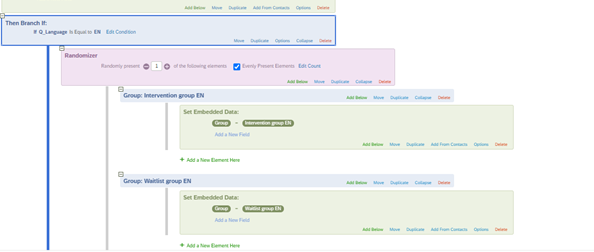
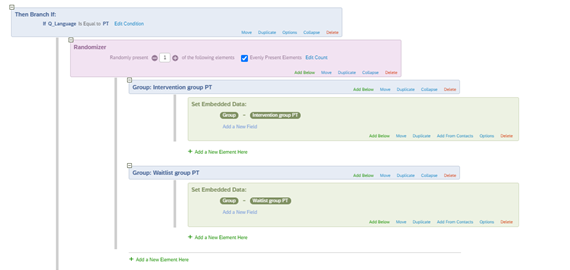 Many thanks in advance!!!

Randomising participants into groups based on language
Best answer by TomG
https://www.qualtrics.com/community/discussion/comment/31059#Comment_31059You'll want to hide the language selector throughout the whole survey. Add this to Look & Feel Custom CSS:
.LanguageSelectorContainer { display:none; }
Also:
- With the CSS above, you don't need to hide Q_lang in the script
- You don't need the embedded data field "language"; the embedded data field Q_Language always contains the current language.



Sign up
Already have an account? Login

Welcome! To join the Qualtrics Experience Community, log in with your existing Qualtrics credentials below.
Confirm your username, share a bit about yourself, then you're ready to explore and connect .
Free trial account? No problem. Log in with your trial credentials to join.
No free trial account? No problem! Register here
Already a member? Hi and welcome back! We're glad you're here 🙂
You will see the Qualtrics login page briefly before being taken to the Experience Community.
Login with Qualtrics
Welcome! To join the Qualtrics Experience Community, log in with your existing Qualtrics credentials below.
Confirm your username, share a bit about yourself, then you're ready to explore and connect .
Free trial account? No problem. Log in with your trial credentials to join. No free trial account? No problem! Register here
Already a member? Hi and welcome back! We're glad you're here 🙂
You will see the Qualtrics login page briefly before being taken to the Experience Community.
Login to the Community
No account yet? Create an account
Welcome! To join the Qualtrics Experience Community, log in with your existing Qualtrics credentials below.
Confirm your username, share a bit about yourself, then you're ready to explore and connect .
Free trial account? No problem. Log in with your trial credentials to join.
No free trial account? No problem! Register here
Already a member? Hi and welcome back! We're glad you're here 🙂
You will see the Qualtrics login page briefly before being taken to the Experience Community.
Login with Qualtrics
Welcome! To join the Qualtrics Experience Community, log in with your existing Qualtrics credentials below.
Confirm your username, share a bit about yourself, then you're ready to explore and connect .
Free trial account? No problem. Log in with your trial credentials to join. No free trial account? No problem! Register here
Already a member? Hi and welcome back! We're glad you're here 🙂
You will see the Qualtrics login page briefly before being taken to the Experience Community.
Enter your E-mail address. We'll send you an e-mail with instructions to reset your password.