

Hi everyone! I am currently trying to use the skip logic function that states that if the participant types the three requested words correctly, the survey will skip to the next question; however, if they type even one word incorrectly, the same question will repeat (up to 6 times). I tried using the skip logic function, but do not think I am using it correctly, as the question currently skips to the next if at least one of the words is correct (but I want to make it so that they all have to be typed correctly!) If anyone has an ideas, it would be much appreciated!

Solved
Skip Logic Help
Best answer by ahmedA
There is no straight forward way of doing what you intend to do. Skip Logic/Display logic are how other questions are displayed based on the answer of this question.
One way to go about it would be to repeat the same question 6 times in a block and use display logic from question 2 onwards. (if all the answers are correct, then don't display.
You can similarly use skip logic on each of the questions. When using skip logic, it appears you can add only one condition, but select the question and click "Add Skip Logic" and you can add as many conditions as you want.
If you want to avoid your respondents answering the questions again and again. From question 2 onwards you can select default choices, which you can select to be answers from any of the questions above. If you only want correct options to appear, then you'll have to use embedded data and JS, which will get quite complicated. 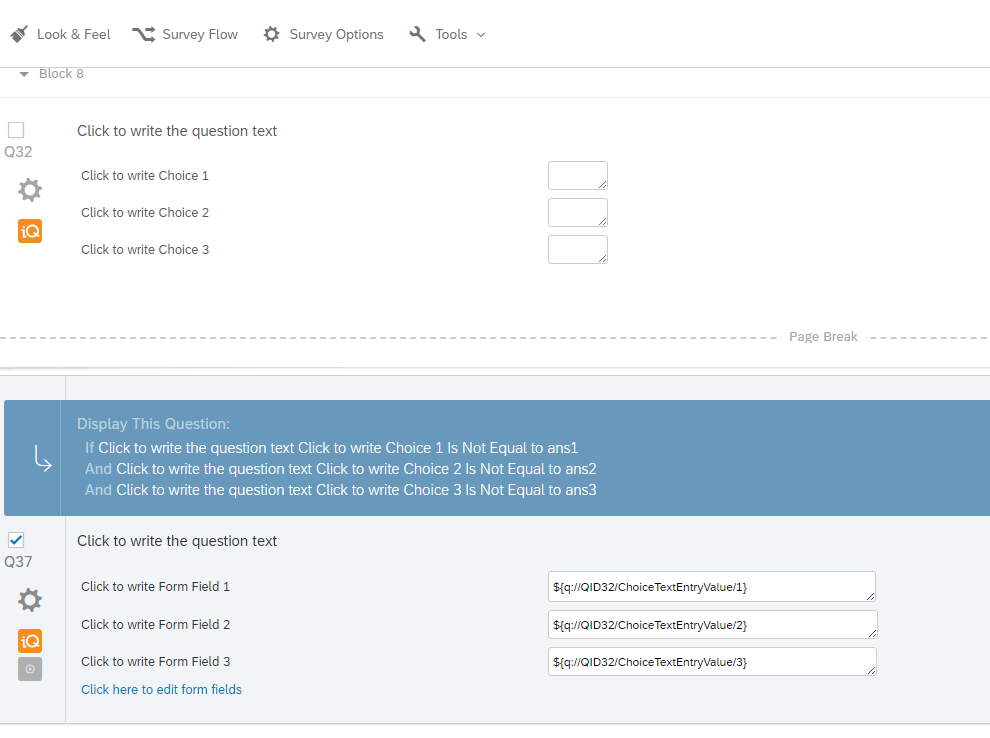


Sign up
Already have an account? Login

Welcome! To join the Qualtrics Experience Community, log in with your existing Qualtrics credentials below.
Confirm your username, share a bit about yourself, then you're ready to explore and connect .
Free trial account? No problem. Log in with your trial credentials to join.
No free trial account? No problem! Register here
Already a member? Hi and welcome back! We're glad you're here 🙂
You will see the Qualtrics login page briefly before being taken to the Experience Community.
Login with Qualtrics
Welcome! To join the Qualtrics Experience Community, log in with your existing Qualtrics credentials below.
Confirm your username, share a bit about yourself, then you're ready to explore and connect .
Free trial account? No problem. Log in with your trial credentials to join. No free trial account? No problem! Register here
Already a member? Hi and welcome back! We're glad you're here 🙂
You will see the Qualtrics login page briefly before being taken to the Experience Community.
Login to the Community
No account yet? Create an account
Welcome! To join the Qualtrics Experience Community, log in with your existing Qualtrics credentials below.
Confirm your username, share a bit about yourself, then you're ready to explore and connect .
Free trial account? No problem. Log in with your trial credentials to join.
No free trial account? No problem! Register here
Already a member? Hi and welcome back! We're glad you're here 🙂
You will see the Qualtrics login page briefly before being taken to the Experience Community.
Login with Qualtrics
Welcome! To join the Qualtrics Experience Community, log in with your existing Qualtrics credentials below.
Confirm your username, share a bit about yourself, then you're ready to explore and connect .
Free trial account? No problem. Log in with your trial credentials to join. No free trial account? No problem! Register here
Already a member? Hi and welcome back! We're glad you're here 🙂
You will see the Qualtrics login page briefly before being taken to the Experience Community.
Enter your E-mail address. We'll send you an e-mail with instructions to reset your password.