

Targeting Conditions Appearing in Action Set 1 Despite No Conditions Being Set | Experience Community
Skip to main content
Question

Targeting Conditions Appearing in Action Set 1 Despite No Conditions Being Set

  • June 24, 2026
  • 1 reply
  • 29 views

Forum|alt.badge.img+1

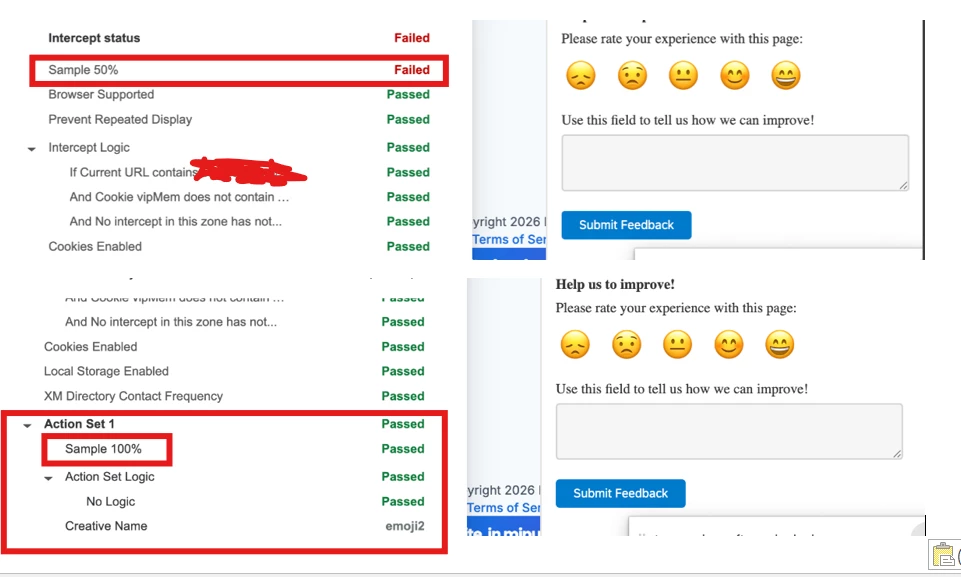
I’m using an intercept with a slider creative, and I’m seeing an issue where the targeting conditions appear to be met. It’s confusing because in Action Set 1, I don’t have any conditions configured, yet I’m still seeing the conditions.

My main concern is that the survey visibility is set to 50%, but Action Set 1 is showing it as 100%, due to which the survey pop’s up even though this condition is not met in the targeting logic.

Can someone please help me understand why this is happening and how to fix it?
 

1 reply

Lpena
Qualtrics Employee
Forum|alt.badge.img+4
  • Qualtrics Employee
  • July 9, 2026

Hey there, dealing with intercept logic mismatches like this can definitely be tricky, especially when your Action Set 1 doesn't have any conditions configured but is still triggering at 100% visibility instead of the 50% you intended.

While there isn't a single piece of documentation that explicitly addresses why an empty action set would show "conditions met," this kind of behavior usually boils down to a few common culprits in how Qualtrics evaluates intercept logic. First, it's worth double-checking your logic scope. Remember that intercept "targeting logic" controls the entire intercept, whereas "action set logic" only applies to that specific set. If you have targeting logic or sampling/weighting options set up elsewhere or within the action set options, it can make the creative eligible even if the action set itself is empty.

Another big one is the publish state. Qualtrics changes don't go live until you hit publish, so if you're testing the intercept but viewing an older revision, the live behavior won't match your new edits. Lastly, outside conditions—like rules that prevent repeated displays—can sometimes override your expectations.

The most direct way to see exactly what's passing is to open up the Intercepts debug window on the exact page where the slider fires. The debug output will give you a clear pass/fail breakdown with red warnings for anything that fails, letting you pinpoint which condition is actually evaluating to "true." Check if that passing condition is coming from the overall intercept targeting logic, the action set logic, or the advanced options, and make sure everything is fully published.

If you walk through those steps and the debug window is still showing a confusing readout, or if things just aren't behaving the way they should, it might be a deeper technical quirk. In that case, I'd highly recommend head over to the Qualtrics Customer Success Hub at https://support-portal.qualtrics.com/. You can log in and submit a support ticket so a specialist can securely look at your backend targeting setup and help you get it sorted out. Drop a comment back here if you find out what was causing it!