

I want my questions and choice text to display as black rather than the grey that seems to be the default, but each time I make the change using Old Editor (and save) the display reverts back to grey. Strangely using the same process to change the question text to bold half works - by that I mean it shows in Qualtrics as bold but when previewed.
From what I've read, when others post similar issues the solution is to use the Rich Content Editor but that means I have to edit every single question and every since response option. As I enter many surveys for students, this just isn't an option. I'm experiencing the problem for all projects, and I'm not copying questions between them.
This is my workflow. In the Old Editor, I change the colours and then save. 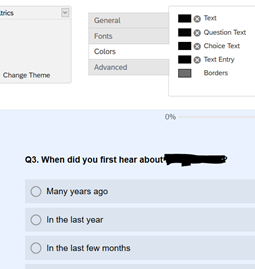 Immediately after saving, this is the screen I see, with everything reverted back to grey but the question is in bold. If I publish the change, it's the same. If I then go back into Old Editor, the changes to the selected colours has been lost.
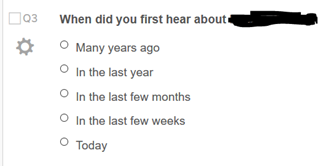 If I then preview the published changes, not only does the text not display as black, but the bold of the question text is lost.
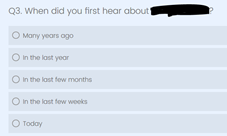 Thanks to anyone who can help!

Changes to default font colour keeps reverting back to grey
Best answer by ahmedA
Try this. Use the new look and feel editor, revert to defaults. And use the settings provided here to adjust the fonts.
As I said earlier, because you were making changes using the old editor, they weren't getting registered. But since you don't want the old theme, then make the changes in the new editor.
PS: Have you tried other themes. I think the Qualtrics minimal themes don't have a question container.


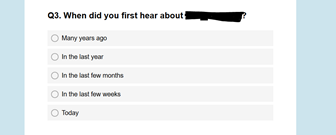 I find CSS coding quite a mystery and had tried posting in bits from other posts but failed to achieve changing the text colour to black.
 Sign up
Already have an account? Login

Welcome! To join the Qualtrics Experience Community, log in with your existing Qualtrics credentials below.
Confirm your username, share a bit about yourself, then you're ready to explore and connect .
Free trial account? No problem. Log in with your trial credentials to join.
No free trial account? No problem! Register here
Already a member? Hi and welcome back! We're glad you're here 🙂
You will see the Qualtrics login page briefly before being taken to the Experience Community.
Login with Qualtrics
Welcome! To join the Qualtrics Experience Community, log in with your existing Qualtrics credentials below.
Confirm your username, share a bit about yourself, then you're ready to explore and connect .
Free trial account? No problem. Log in with your trial credentials to join. No free trial account? No problem! Register here
Already a member? Hi and welcome back! We're glad you're here 🙂
You will see the Qualtrics login page briefly before being taken to the Experience Community.
Login to the Community
Welcome! To join the Qualtrics Experience Community, log in with your existing Qualtrics credentials below.
Confirm your username, share a bit about yourself, then you're ready to explore and connect .
Free trial account? No problem. Log in with your trial credentials to join.
No free trial account? No problem! Register here
Already a member? Hi and welcome back! We're glad you're here 🙂
You will see the Qualtrics login page briefly before being taken to the Experience Community.
Login with Qualtrics
Welcome! To join the Qualtrics Experience Community, log in with your existing Qualtrics credentials below.
Confirm your username, share a bit about yourself, then you're ready to explore and connect .
Free trial account? No problem. Log in with your trial credentials to join. No free trial account? No problem! Register here
Already a member? Hi and welcome back! We're glad you're here 🙂
You will see the Qualtrics login page briefly before being taken to the Experience Community.
Enter your E-mail address. We'll send you an e-mail with instructions to reset your password.