

I would like to have a Qualtrics final assessment at the end of some online courses we have created within my company. I’d like to get fancy and if the person passes the assessment use code to automatically generate a certificate of passing grade/completion that fills in their name, the course name and the date and displays our company Logo. Has anyone successfully done this and can help with the specifics of what I'd need to do? I'm a newbie to Qualtrics and other than add some workflow to capture the person's name and email address, I am afraid I am at a loss. Any and all help would be greatly appreciated. Thank you

XM Customer needs help

 +5
+5


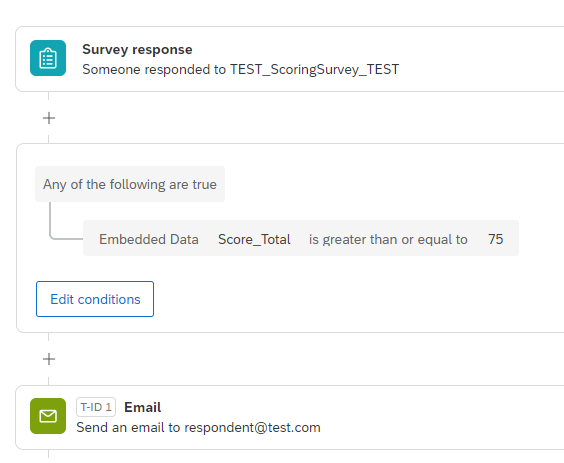



 Set the Embedded Data fields at the top of the Survey Flow. In the WorkFlow, pipe in the Embedded Data fields when setting up the Email Task for each survey completion. In the Survey, you might also pipe in the name of the Student Teacher on the first page as a reminder to the respondent which evaluation they are completing, like below:
Sign up
Already have an account? Login

Welcome! To join the Qualtrics Experience Community, log in with your existing Qualtrics credentials below.
Confirm your username, share a bit about yourself, then you're ready to explore and connect .
Free trial account? No problem. Log in with your trial credentials to join.
No free trial account? No problem! Register here
Already a member? Hi and welcome back! We're glad you're here 🙂
You will see the Qualtrics login page briefly before being taken to the Experience Community.
Login with Qualtrics
Welcome! To join the Qualtrics Experience Community, log in with your existing Qualtrics credentials below.
Confirm your username, share a bit about yourself, then you're ready to explore and connect .
Free trial account? No problem. Log in with your trial credentials to join. No free trial account? No problem! Register here
Already a member? Hi and welcome back! We're glad you're here 🙂
You will see the Qualtrics login page briefly before being taken to the Experience Community.
Login to the Community
No account yet? Create an account
Welcome! To join the Qualtrics Experience Community, log in with your existing Qualtrics credentials below.
Confirm your username, share a bit about yourself, then you're ready to explore and connect .
Free trial account? No problem. Log in with your trial credentials to join.
No free trial account? No problem! Register here
Already a member? Hi and welcome back! We're glad you're here 🙂
You will see the Qualtrics login page briefly before being taken to the Experience Community.
Login with Qualtrics
Welcome! To join the Qualtrics Experience Community, log in with your existing Qualtrics credentials below.
Confirm your username, share a bit about yourself, then you're ready to explore and connect .
Free trial account? No problem. Log in with your trial credentials to join. No free trial account? No problem! Register here
Already a member? Hi and welcome back! We're glad you're here 🙂
You will see the Qualtrics login page briefly before being taken to the Experience Community.
Enter your E-mail address. We'll send you an e-mail with instructions to reset your password.