


Creating a 'Sign In" survey for program/event participants to fill everytime they attend. Can I use a membership number to populate the rest of the survey and speed up sign in? | Experience Community
Skip to main content
Question

Creating a 'Sign In" survey for program/event participants to fill everytime they attend. Can I use a membership number to populate the rest of the survey and speed up sign in?

  • May 8, 2025 7:04 AM UTC
  • 3 replies
  • 100 views

Forum|alt.badge.img

Hi, 

Like the title suggests, we use Qualtrics to collect client demographics. Currently we have no way for clients to quickly sign in if they are a member. I’m trying to streamline their arrival by designing a “self sign-in” survey where they are prompted to add their membership code and then their demographics are automatically fill the rest of the survey questions. I’ve gotten as far as creating a contact list and using an authenticator in the survey flow but it is problematic when I try put the pipe text into the answer field. Right now it will only accept it into the question line. When I go through the survey as a test, the answer will be in the question line rather than the answer box. Help! 

3 replies

Shashi
Level 8 ●●●●●●●●
Forum|alt.badge.img+34
  • Level 8 ●●●●●●●●
  • May 8, 2025 7:57 AM UTC

Please check default choice option for text entry question. For other question type like multi choice we have to use JS for pre popolution based on embedded data.


Forum|alt.badge.img

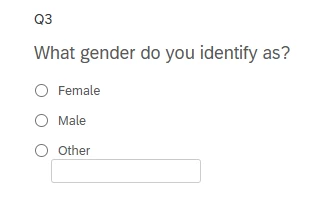
Thankyou! The default choice works fantastic. Are you able to explain more about JS specifically. I assume you are referring to Java Script. I’ve had a quick google and it looks very complex. Below is an example of a multi question we would ask participants, could you explain how JS would work? Thankyou in advance :) 


Forum|alt.badge.img+3
  • Level 2 ●●
  • May 8, 2025 2:51 PM UTC

​@WellWomensCentre , I’m doing something very similar to your use case.  I use the Form field question type, with the field values piped in using the default choices feature.  The respondent is prompted to update any info, if needed.