

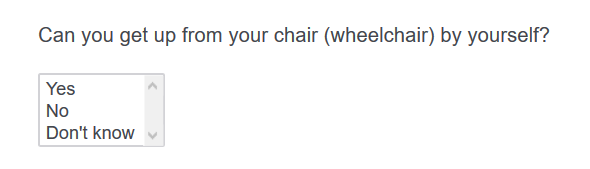
 To set the size property for the select box, simply add the following code to your 'addOnReady' function in the javascript editor of your select box question:
var qid = this.questionId;
jQuery( "select[name='QR\\~"+qid+"']" ).prop("size",3); // using 'qid' so you can simply copy and paste this code into other similar questions without needing to hard-code the question ID; setting the size=3
Note: The select box is useful if you wish to use 'in-page' display logic using the responses from this question type (answer choices such as dropdown do not seem to allow for in-page display logic) and where the tab key is mainly used to move through the survey and keyboard keys such as numbers are used to select the response options (where something such as a radio button group would require tabbing through each response option which can be inefficient).
To set the size property for the select box, simply add the following code to your 'addOnReady' function in the javascript editor of your select box question:
var qid = this.questionId;
jQuery( "select[name='QR\\~"+qid+"']" ).prop("size",3); // using 'qid' so you can simply copy and paste this code into other similar questions without needing to hard-code the question ID; setting the size=3
Note: The select box is useful if you wish to use 'in-page' display logic using the responses from this question type (answer choices such as dropdown do not seem to allow for in-page display logic) and where the tab key is mainly used to move through the survey and keyboard keys such as numbers are used to select the response options (where something such as a radio button group would require tabbing through each response option which can be inefficient).
Changing the 'size' of the select box with jQuery


 +13
+13The 'select box' answer type for multiple choice questions seems to default to a size of 10. If you only have a few responses to choose from it might not make sense to keep the size=10 (number of rows shown). Below is a example with the size property set at 3.
!
To set the size property for the select box, simply add the following code to your 'addOnReady' function in the javascript editor of your select box question:
var qid = this.questionId;
jQuery( "select[name='QR\\~"+qid+"']" ).prop("size",3); // using 'qid' so you can simply copy and paste this code into other similar questions without needing to hard-code the question ID; setting the size=3
Note: The select box is useful if you wish to use 'in-page' display logic using the responses from this question type (answer choices such as dropdown do not seem to allow for in-page display logic) and where the tab key is mainly used to move through the survey and keyboard keys such as numbers are used to select the response options (where something such as a radio button group would require tabbing through each response option which can be inefficient).
To set the size property for the select box, simply add the following code to your 'addOnReady' function in the javascript editor of your select box question:
var qid = this.questionId;
jQuery( "select[name='QR\\~"+qid+"']" ).prop("size",3); // using 'qid' so you can simply copy and paste this code into other similar questions without needing to hard-code the question ID; setting the size=3
Note: The select box is useful if you wish to use 'in-page' display logic using the responses from this question type (answer choices such as dropdown do not seem to allow for in-page display logic) and where the tab key is mainly used to move through the survey and keyboard keys such as numbers are used to select the response options (where something such as a radio button group would require tabbing through each response option which can be inefficient).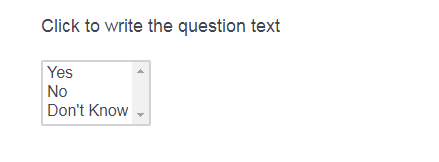

Sign up
Already have an account? Login

Welcome! To join the Qualtrics Experience Community, log in with your existing Qualtrics credentials below.
Confirm your username, share a bit about yourself, then you're ready to explore and connect .
Free trial account? No problem. Log in with your trial credentials to join.
No free trial account? No problem! Register here
Already a member? Hi and welcome back! We're glad you're here 🙂
You will see the Qualtrics login page briefly before being taken to the Experience Community.
Login with Qualtrics
Welcome! To join the Qualtrics Experience Community, log in with your existing Qualtrics credentials below.
Confirm your username, share a bit about yourself, then you're ready to explore and connect .
Free trial account? No problem. Log in with your trial credentials to join. No free trial account? No problem! Register here
Already a member? Hi and welcome back! We're glad you're here 🙂
You will see the Qualtrics login page briefly before being taken to the Experience Community.
Login to the Community
Welcome! To join the Qualtrics Experience Community, log in with your existing Qualtrics credentials below.
Confirm your username, share a bit about yourself, then you're ready to explore and connect .
Free trial account? No problem. Log in with your trial credentials to join.
No free trial account? No problem! Register here
Already a member? Hi and welcome back! We're glad you're here 🙂
You will see the Qualtrics login page briefly before being taken to the Experience Community.
Login with Qualtrics
Welcome! To join the Qualtrics Experience Community, log in with your existing Qualtrics credentials below.
Confirm your username, share a bit about yourself, then you're ready to explore and connect .
Free trial account? No problem. Log in with your trial credentials to join. No free trial account? No problem! Register here
Already a member? Hi and welcome back! We're glad you're here 🙂
You will see the Qualtrics login page briefly before being taken to the Experience Community.
Enter your E-mail address. We'll send you an e-mail with instructions to reset your password.