

In my survey I use a question with smilley as modalities. I apply a custom css so that there is no gray background displayed :
.Skin #QID19 label.SingleAnswer.q-checked{background-color:#ffffff; border-color:#009ee0;}
On the other hand, I would like to keep the modality surrounded with border-color so that if the respondent goes back, he will know which modality he has selected. It doesn't seem to be working. The background remains well selected but not the border.
How can I do this? Thank you

Solved
Circle the selected answer


 +10
+10Best answer by Tom_1842
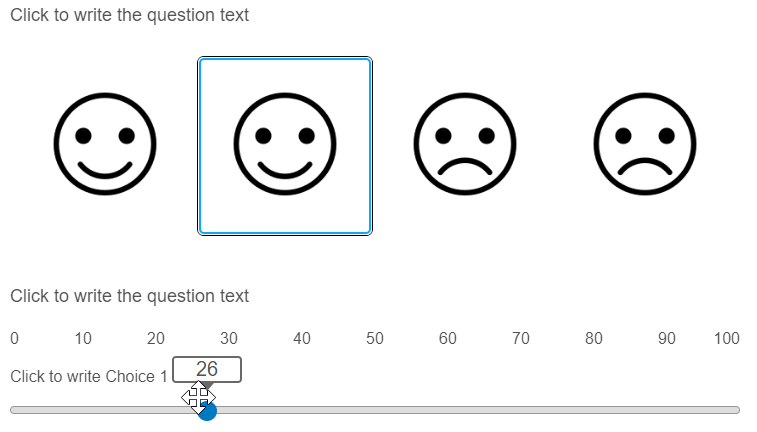
Hi there, if you still need, this can be put in place by grabbing the CSS for the .q-focused class (when an answer is selected and in focus) and adding it to the .q-checked class (when an answer is selected). For Classic layout, try adding the below CSS to the Style section of the survey's Look & Feel. Slider included in the picture to show respondent moved on from MC question and q-focused border still in place.
.Skin label.MultipleAnswer, .Skin label.SingleAnswer {
background: #ffffff !important;
}
.Skin label.MultipleAnswer.q-checked, .Skin label.SingleAnswer.q-checked {
background: #ffffff !important;
box-shadow: 0 0 0 3px activeborder !important;
outline: #0ea7ff auto 5px !important;
}



Sign up
Already have an account? Login

Welcome! To join the Qualtrics Experience Community, log in with your existing Qualtrics credentials below.
Confirm your username, share a bit about yourself, then you're ready to explore and connect .
Free trial account? No problem. Log in with your trial credentials to join.
No free trial account? No problem! Register here
Already a member? Hi and welcome back! We're glad you're here 🙂
You will see the Qualtrics login page briefly before being taken to the Experience Community.
Login with Qualtrics
Welcome! To join the Qualtrics Experience Community, log in with your existing Qualtrics credentials below.
Confirm your username, share a bit about yourself, then you're ready to explore and connect .
Free trial account? No problem. Log in with your trial credentials to join. No free trial account? No problem! Register here
Already a member? Hi and welcome back! We're glad you're here 🙂
You will see the Qualtrics login page briefly before being taken to the Experience Community.
Login to the Community
No account yet? Create an account
Welcome! To join the Qualtrics Experience Community, log in with your existing Qualtrics credentials below.
Confirm your username, share a bit about yourself, then you're ready to explore and connect .
Free trial account? No problem. Log in with your trial credentials to join.
No free trial account? No problem! Register here
Already a member? Hi and welcome back! We're glad you're here 🙂
You will see the Qualtrics login page briefly before being taken to the Experience Community.
Login with Qualtrics
Welcome! To join the Qualtrics Experience Community, log in with your existing Qualtrics credentials below.
Confirm your username, share a bit about yourself, then you're ready to explore and connect .
Free trial account? No problem. Log in with your trial credentials to join. No free trial account? No problem! Register here
Already a member? Hi and welcome back! We're glad you're here 🙂
You will see the Qualtrics login page briefly before being taken to the Experience Community.
Enter your E-mail address. We'll send you an e-mail with instructions to reset your password.