

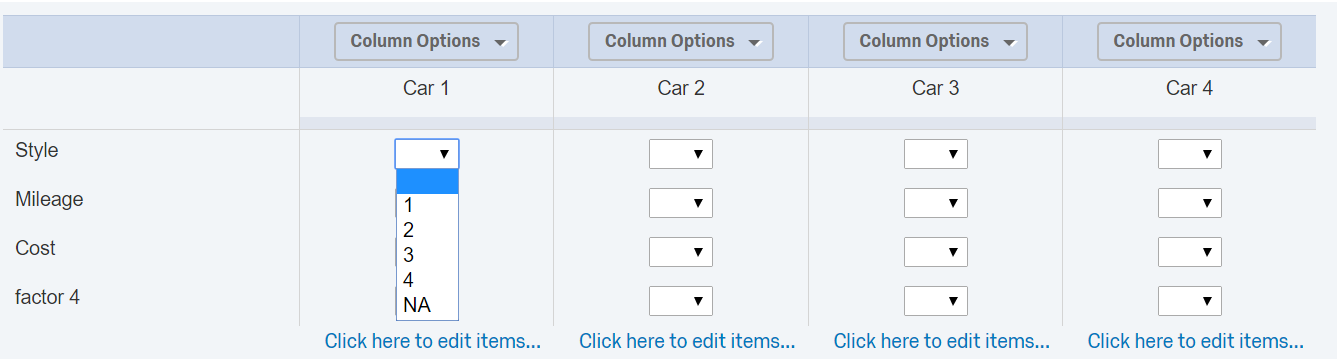
 I have applied force response for the entire side-by-side question; when I hide some of the columns, the question still prompts for some response for the hidden columns. I guess this can be handled by
1. auto-populating the hidden columns with dummy values in the side-by-side question - Please advise how this can be done
Also, can someone validate this approach for hiding selective column is correct / is there a much simpler option for this !

Solved
Hiding specific columns in a side-by-side Question and applying force response
Context: I have a side by side question, where users have to rank from 1-4 for various cars on different parameters!
Now I have a multiple choice question to capture which cars are owned by the respondent - I have to hide the respective columns based on response from multiple choice question
Thanks to @TomG, I have read many of his previous answers and my approach here is:
1. Capture the response from the multiple choice as embedded/ piped text
2. use Javascript to hide the respective cells - $('QR~' + qid +'#2~1~1').up('td').childElements().invoke('hide'); - and header - $('question2QID417' ).childElements().invoke('hide') -
!
I have applied force response for the entire side-by-side question; when I hide some of the columns, the question still prompts for some response for the hidden columns. I guess this can be handled by
1. auto-populating the hidden columns with dummy values in the side-by-side question - Please advise how this can be done
Also, can someone validate this approach for hiding selective column is correct / is there a much simpler option for this !
I have applied force response for the entire side-by-side question; when I hide some of the columns, the question still prompts for some response for the hidden columns. I guess this can be handled by
1. auto-populating the hidden columns with dummy values in the side-by-side question - Please advise how this can be done
Also, can someone validate this approach for hiding selective column is correct / is there a much simpler option for this !Best answer by TomG
@KumarA_156,
There are a couple of different ways you could do it. You could turn off force response, and use Custom Validation instead. Or you could write JavaScript to automatically select NA for all the dropdowns when that column is hidden.
An easier way to hide a column is (e.g. column 4):
```
jQuery("#"+this.questionId+" .SBS4").hide();
```
View original





Sign up
Already have an account? Login

Welcome! To join the Qualtrics Experience Community, log in with your existing Qualtrics credentials below.
Confirm your username, share a bit about yourself, then you're ready to explore and connect .
Free trial account? No problem. Log in with your trial credentials to join.
No free trial account? No problem! Register here
Already a member? Hi and welcome back! We're glad you're here 🙂
You will see the Qualtrics login page briefly before being taken to the Experience Community.
Login with Qualtrics
Welcome! To join the Qualtrics Experience Community, log in with your existing Qualtrics credentials below.
Confirm your username, share a bit about yourself, then you're ready to explore and connect .
Free trial account? No problem. Log in with your trial credentials to join. No free trial account? No problem! Register here
Already a member? Hi and welcome back! We're glad you're here 🙂
You will see the Qualtrics login page briefly before being taken to the Experience Community.
Login to the Community
Welcome! To join the Qualtrics Experience Community, log in with your existing Qualtrics credentials below.
Confirm your username, share a bit about yourself, then you're ready to explore and connect .
Free trial account? No problem. Log in with your trial credentials to join.
No free trial account? No problem! Register here
Already a member? Hi and welcome back! We're glad you're here 🙂
You will see the Qualtrics login page briefly before being taken to the Experience Community.
Login with Qualtrics
Welcome! To join the Qualtrics Experience Community, log in with your existing Qualtrics credentials below.
Confirm your username, share a bit about yourself, then you're ready to explore and connect .
Free trial account? No problem. Log in with your trial credentials to join. No free trial account? No problem! Register here
Already a member? Hi and welcome back! We're glad you're here 🙂
You will see the Qualtrics login page briefly before being taken to the Experience Community.
Enter your E-mail address. We'll send you an e-mail with instructions to reset your password.