


How can I display the overall mean and mode/frequency for each multiple choice question in a survey?





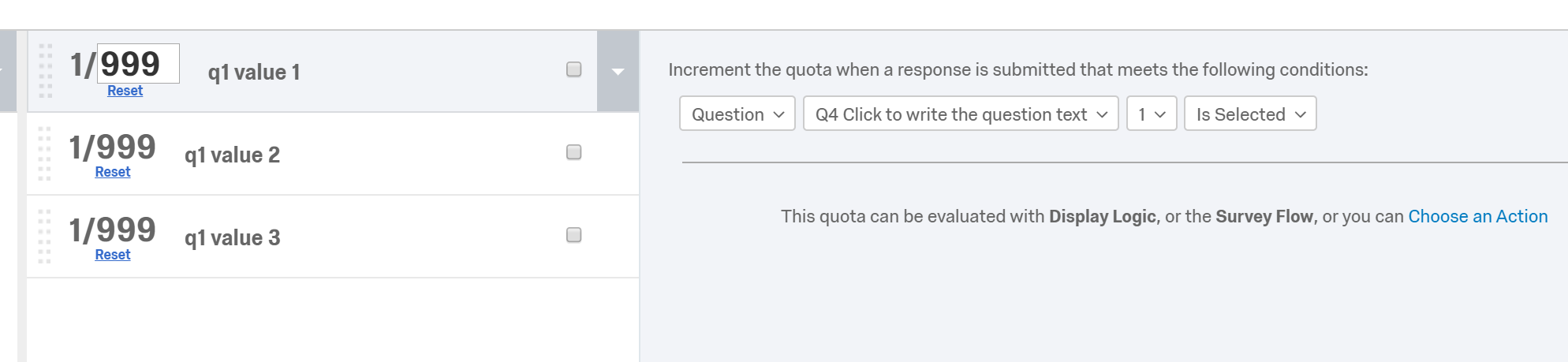 Quotas Counts can be piped in, which we'll use later for the math:
!
Quotas Counts can be piped in, which we'll use later for the math:
!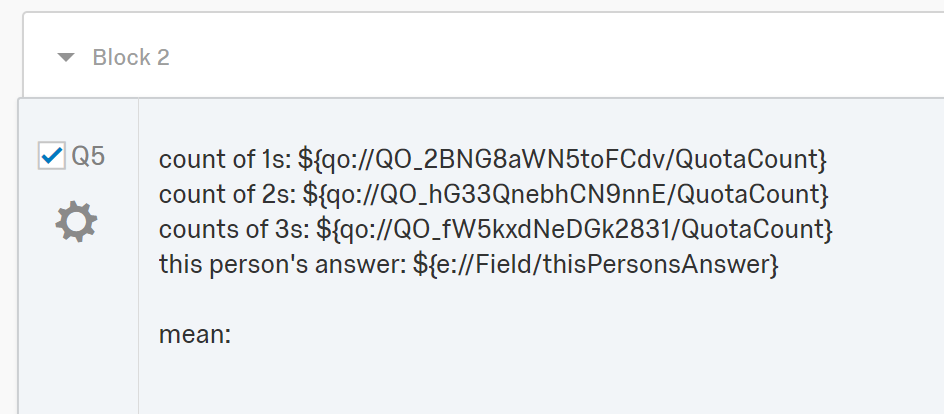 Capture the current respondent's answer in Embedded Data between two blocks (one holds the question, the next reveals the average)
!
Capture the current respondent's answer in Embedded Data between two blocks (one holds the question, the next reveals the average)
!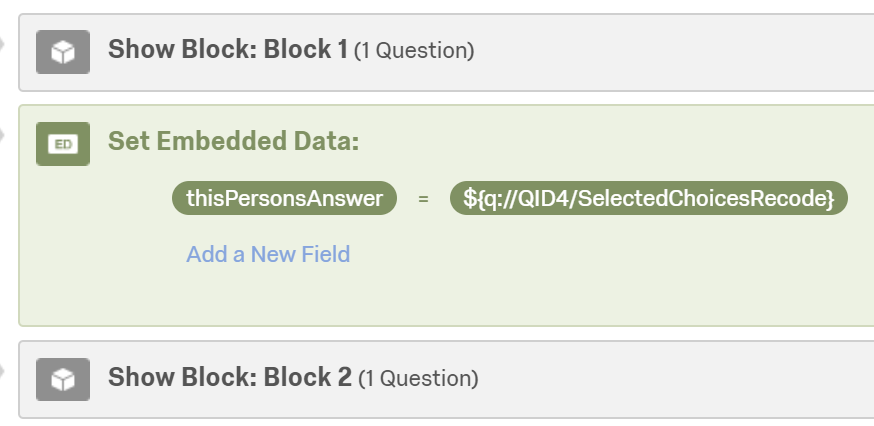 Put something like this in the HTML editor for the question, replacing a) the quota fields ```${qo://QO...}``` with relevant ones from your survey b) the message you want c) appropriate formulas based on the quota counts and answer choice values. It'll do the math when the page loads and populate `<span id='mean'></span>`.
You'll probably want logic to exclude this calculation/show a different message for the first few respondents to give the quotas time to fill up.
```html
here's the mean: <span id="mean"></span>
<script>
var ones = parseInt("${qo://QO_1/QuotaCount}")
var twos = parseInt("${qo://QO_2/QuotaCount}")
var threes = parseInt("${qo://QO_3/QuotaCount}")
var currentAnswer = parseInt("${e://Field/thisPersonsAnswer}")
//console.log(ones, twos, threes, currentAnswer)
var mnum = ((ones*1) + (twos*2) + (threes*3) + currentAnswer)
var mden = ones+twos+threes+1
var mean = mnum/mden
//console.log(mean, mnum, mden)
document.getElementById("mean").innerHTML = mean;
</script>
```
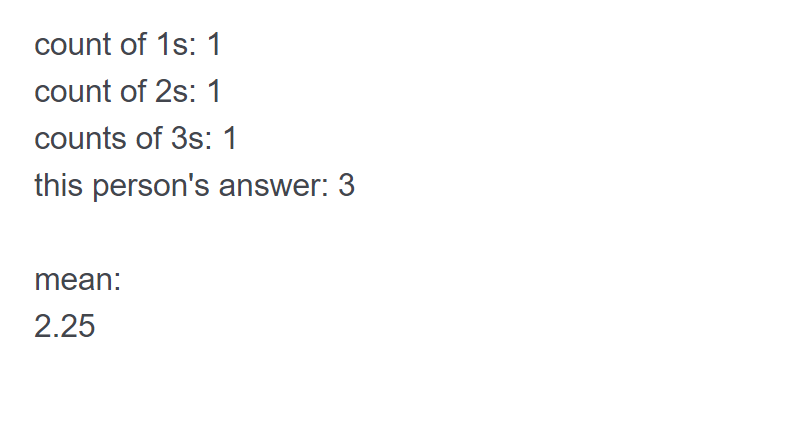
Result:
!
Put something like this in the HTML editor for the question, replacing a) the quota fields ```${qo://QO...}``` with relevant ones from your survey b) the message you want c) appropriate formulas based on the quota counts and answer choice values. It'll do the math when the page loads and populate `<span id='mean'></span>`.
You'll probably want logic to exclude this calculation/show a different message for the first few respondents to give the quotas time to fill up.
```html
here's the mean: <span id="mean"></span>
<script>
var ones = parseInt("${qo://QO_1/QuotaCount}")
var twos = parseInt("${qo://QO_2/QuotaCount}")
var threes = parseInt("${qo://QO_3/QuotaCount}")
var currentAnswer = parseInt("${e://Field/thisPersonsAnswer}")
//console.log(ones, twos, threes, currentAnswer)
var mnum = ((ones*1) + (twos*2) + (threes*3) + currentAnswer)
var mden = ones+twos+threes+1
var mean = mnum/mden
//console.log(mean, mnum, mden)
document.getElementById("mean").innerHTML = mean;
</script>
```
Result:
!
Sign up
Already have an account? Login

Welcome! To join the Qualtrics Experience Community, log in with your existing Qualtrics credentials below.
Confirm your username, share a bit about yourself, then you're ready to explore and connect .
Free trial account? No problem. Log in with your trial credentials to join.
No free trial account? No problem! Register here
Already a member? Hi and welcome back! We're glad you're here 🙂
You will see the Qualtrics login page briefly before being taken to the Experience Community.
Login with Qualtrics
Welcome! To join the Qualtrics Experience Community, log in with your existing Qualtrics credentials below.
Confirm your username, share a bit about yourself, then you're ready to explore and connect .
Free trial account? No problem. Log in with your trial credentials to join. No free trial account? No problem! Register here
Already a member? Hi and welcome back! We're glad you're here 🙂
You will see the Qualtrics login page briefly before being taken to the Experience Community.
Login to the Community
No account yet? Create an account
Welcome! To join the Qualtrics Experience Community, log in with your existing Qualtrics credentials below.
Confirm your username, share a bit about yourself, then you're ready to explore and connect .
Free trial account? No problem. Log in with your trial credentials to join.
No free trial account? No problem! Register here
Already a member? Hi and welcome back! We're glad you're here 🙂
You will see the Qualtrics login page briefly before being taken to the Experience Community.
Login with Qualtrics
Welcome! To join the Qualtrics Experience Community, log in with your existing Qualtrics credentials below.
Confirm your username, share a bit about yourself, then you're ready to explore and connect .
Free trial account? No problem. Log in with your trial credentials to join. No free trial account? No problem! Register here
Already a member? Hi and welcome back! We're glad you're here 🙂
You will see the Qualtrics login page briefly before being taken to the Experience Community.
Enter your E-mail address. We'll send you an e-mail with instructions to reset your password.