


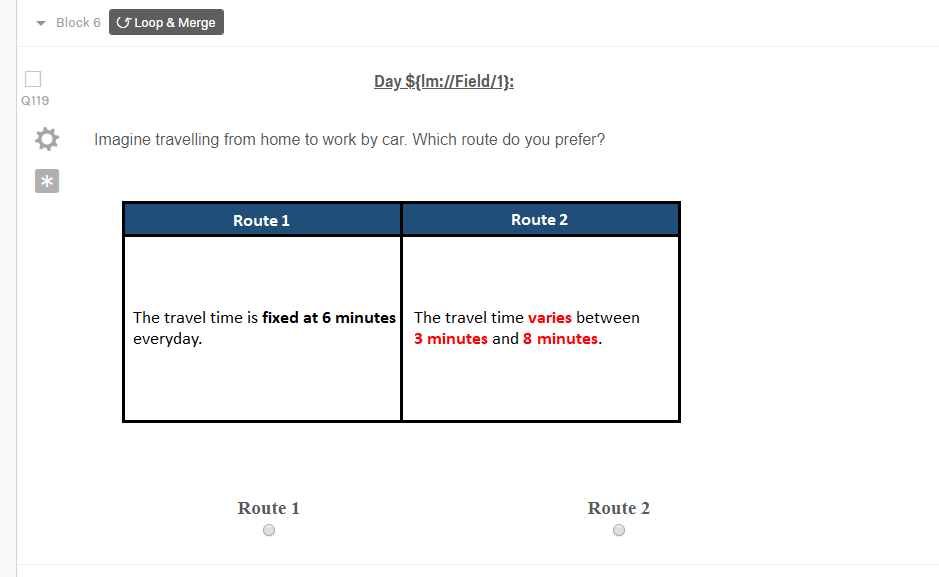
 If a participant selects route 1, I would like to show the same value each time (i.e., 6). This is easier. Using Loop and Merge, I can create a field and write ten times the value 6. This way every time a participant selects the option "Route 1", the 6 value would appear (or simply I can use Display Logic)
The problem is when a participant selects the other option "Route 2". The order of the values for the second option (Route 2) is as follows (for 10 questions):
3 3 3 8 8 3 3 3 8 8
These values should be shown according to the above exact same order. For instance, if a participant selects Route 1 in the first question and Route 2 in the second question, then I would like to show the first value from the above order (i.e. 3). In other words, if a participant in the first three questions select option 1 (Route 1), and in the fourth question "option 2 (Route 2)", then for the second option I would like to show the first value of the above order i.e. 3 (and Not 8)
I have been trying to use Loop and Merge so far, but haven't been successful. Any help in this regard would be appreciated. Perhaps something like a counter + 1 would work but I don't know how to implement that in Qualtrics
If a participant selects route 1, I would like to show the same value each time (i.e., 6). This is easier. Using Loop and Merge, I can create a field and write ten times the value 6. This way every time a participant selects the option "Route 1", the 6 value would appear (or simply I can use Display Logic)
The problem is when a participant selects the other option "Route 2". The order of the values for the second option (Route 2) is as follows (for 10 questions):
3 3 3 8 8 3 3 3 8 8
These values should be shown according to the above exact same order. For instance, if a participant selects Route 1 in the first question and Route 2 in the second question, then I would like to show the first value from the above order (i.e. 3). In other words, if a participant in the first three questions select option 1 (Route 1), and in the fourth question "option 2 (Route 2)", then for the second option I would like to show the first value of the above order i.e. 3 (and Not 8)
I have been trying to use Loop and Merge so far, but haven't been successful. Any help in this regard would be appreciated. Perhaps something like a counter + 1 would work but I don't know how to implement that in Qualtrics
Solved
Loop and Merge Based on Deterministic choice
Hi
In my survey, I have 10 questions and the answer includes only two choices:
!
If a participant selects route 1, I would like to show the same value each time (i.e., 6). This is easier. Using Loop and Merge, I can create a field and write ten times the value 6. This way every time a participant selects the option "Route 1", the 6 value would appear (or simply I can use Display Logic)
The problem is when a participant selects the other option "Route 2". The order of the values for the second option (Route 2) is as follows (for 10 questions):
3 3 3 8 8 3 3 3 8 8
These values should be shown according to the above exact same order. For instance, if a participant selects Route 1 in the first question and Route 2 in the second question, then I would like to show the first value from the above order (i.e. 3). In other words, if a participant in the first three questions select option 1 (Route 1), and in the fourth question "option 2 (Route 2)", then for the second option I would like to show the first value of the above order i.e. 3 (and Not 8)
I have been trying to use Loop and Merge so far, but haven't been successful. Any help in this regard would be appreciated. Perhaps something like a counter + 1 would work but I don't know how to implement that in Qualtrics
If a participant selects route 1, I would like to show the same value each time (i.e., 6). This is easier. Using Loop and Merge, I can create a field and write ten times the value 6. This way every time a participant selects the option "Route 1", the 6 value would appear (or simply I can use Display Logic)
The problem is when a participant selects the other option "Route 2". The order of the values for the second option (Route 2) is as follows (for 10 questions):
3 3 3 8 8 3 3 3 8 8
These values should be shown according to the above exact same order. For instance, if a participant selects Route 1 in the first question and Route 2 in the second question, then I would like to show the first value from the above order (i.e. 3). In other words, if a participant in the first three questions select option 1 (Route 1), and in the fourth question "option 2 (Route 2)", then for the second option I would like to show the first value of the above order i.e. 3 (and Not 8)
I have been trying to use Loop and Merge so far, but haven't been successful. Any help in this regard would be appreciated. Perhaps something like a counter + 1 would work but I don't know how to implement that in QualtricsBest answer by TomG
@fayyaz,
Initialize a route2 counter embedded data variable (e.g., countR2) as 0 in the survey flow. Then increment it each time Route2 is selected in a JavaScript attached to a question in the loop after your route question on another page (possibly a hidden question if you don't have any other questions in your loop).
```
if("{route question piped answer recode}" == "2") {
Qualtrics.SurveyEngine.setEmbeddedData("countR2", parseInt("${e://Field/countR2}")+1);
}
```
Then in your route question you can have JavaScript lookup the Route2 value from an array using countR2 as the index. Let's say the place where you want to show the number of minutes is inside a span tag with an id of r2mins.
```
var r2vals = [3, 3, 3, 8, 8, 3, 3, 3, 8, 8];
jQuery("#r2mins").html(r2vals[parseInt("${e://Field/countR2}"]);
```






Sign up
Already have an account? Login

Welcome! To join the Qualtrics Experience Community, log in with your existing Qualtrics credentials below.
Confirm your username, share a bit about yourself, then you're ready to explore and connect .
Free trial account? No problem. Log in with your trial credentials to join.
No free trial account? No problem! Register here
Already a member? Hi and welcome back! We're glad you're here 🙂
You will see the Qualtrics login page briefly before being taken to the Experience Community.
Login with Qualtrics
Welcome! To join the Qualtrics Experience Community, log in with your existing Qualtrics credentials below.
Confirm your username, share a bit about yourself, then you're ready to explore and connect .
Free trial account? No problem. Log in with your trial credentials to join. No free trial account? No problem! Register here
Already a member? Hi and welcome back! We're glad you're here 🙂
You will see the Qualtrics login page briefly before being taken to the Experience Community.
Login to the Community
No account yet? Create an account
Welcome! To join the Qualtrics Experience Community, log in with your existing Qualtrics credentials below.
Confirm your username, share a bit about yourself, then you're ready to explore and connect .
Free trial account? No problem. Log in with your trial credentials to join.
No free trial account? No problem! Register here
Already a member? Hi and welcome back! We're glad you're here 🙂
You will see the Qualtrics login page briefly before being taken to the Experience Community.
Login with Qualtrics
Welcome! To join the Qualtrics Experience Community, log in with your existing Qualtrics credentials below.
Confirm your username, share a bit about yourself, then you're ready to explore and connect .
Free trial account? No problem. Log in with your trial credentials to join. No free trial account? No problem! Register here
Already a member? Hi and welcome back! We're glad you're here 🙂
You will see the Qualtrics login page briefly before being taken to the Experience Community.
Enter your E-mail address. We'll send you an e-mail with instructions to reset your password.