
I have a Loop & Merge question that is timed (participants see an single image on their screens that automatically switches to another every 8 seconds using timer).
I want them to not see a previous or a next button during this process.
I have read that the JS function below does not work in timed questions and can confirm it did stop working once I added the Timer.
Qualtrics.SurveyEngine.addOnReady(function () {
$('NextButton').hide();
$('PreviousButton').hide();
});
I did found a workaround where you can add the timer for auto-advance and then add a delay for the next button for a longer period (i.e. auto-advance 8 seconds; delay for next button 10 seconds) which means the participants move forward automatically without ever seeing the next button. However, this does not prevent the previous button from appearing.
How can I also prevent the previous button from showing on a looped timed question?
Thank you 😊

Removing Previous Button from Loop & Merge Question with Timer
Best answer by NiC
hi TGM ,
The JS code written above might not be working, but the Qualtrics defined methods do work.
and Qualtrics has the following methods 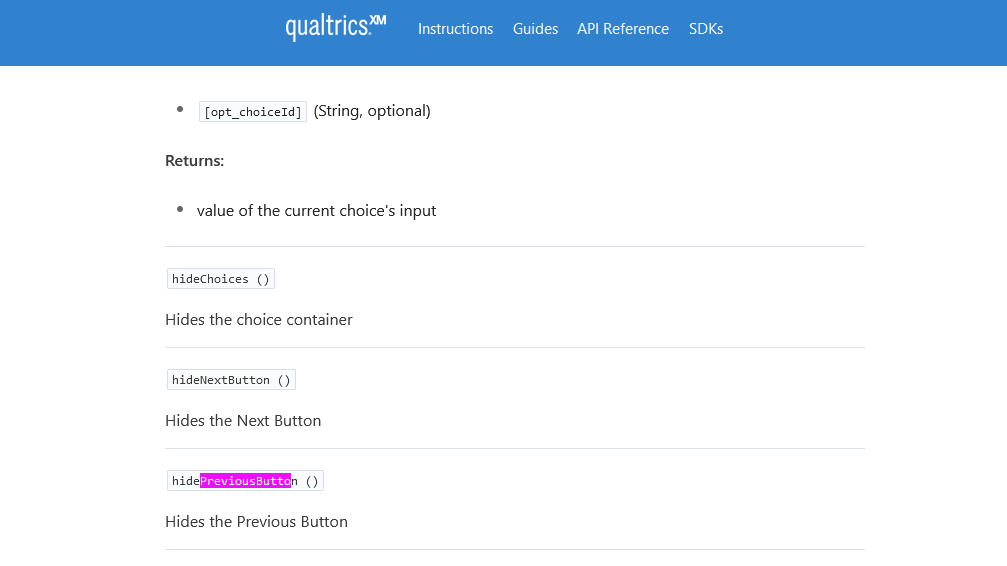 src -> https://api.qualtrics.com/instructions/ZG9jOjIwMTY2NzUy-javascript-question-api
using this i was able to hide both the next and previous button. Please find the survey link below:
Preview - Qualtrics Survey | Qualtrics Experience Management
In case you need to see how i have added the code below is screenshot, we need to add this code in the loop and merge question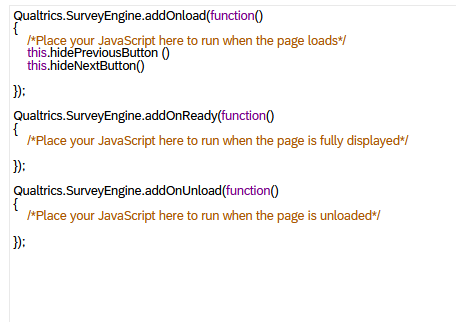



Sign up
Already have an account? Login

Welcome! To join the Qualtrics Experience Community, log in with your existing Qualtrics credentials below.
Confirm your username, share a bit about yourself, Once your account has been approved by our admins then you're ready to explore and connect .
Free trial account? No problem. Log in with your trial credentials to join.
No free trial account? No problem! Register here
Already a member? Hi and welcome back! We're glad you're here 🙂
You will see the Qualtrics login page briefly before being taken to the Experience Community
Login with Qualtrics
Welcome! To join the Qualtrics Experience Community, log in with your existing Qualtrics credentials below.
Confirm your username, share a bit about yourself, Once your account has been approved by our admins then you're ready to explore and connect .
Free trial account? No problem. Log in with your trial credentials to join. No free trial account? No problem! Register here
Already a member? Hi and welcome back! We're glad you're here 🙂
You will see the Qualtrics login page briefly before being taken to the Experience Community
Login to the Community
Welcome! To join the Qualtrics Experience Community, log in with your existing Qualtrics credentials below.
Confirm your username, share a bit about yourself, Once your account has been approved by our admins then you're ready to explore and connect .
Free trial account? No problem. Log in with your trial credentials to join.
No free trial account? No problem! Register here
Already a member? Hi and welcome back! We're glad you're here 🙂
You will see the Qualtrics login page briefly before being taken to the Experience Community
Login with Qualtrics
Welcome! To join the Qualtrics Experience Community, log in with your existing Qualtrics credentials below.
Confirm your username, share a bit about yourself, Once your account has been approved by our admins then you're ready to explore and connect .
Free trial account? No problem. Log in with your trial credentials to join. No free trial account? No problem! Register here
Already a member? Hi and welcome back! We're glad you're here 🙂
You will see the Qualtrics login page briefly before being taken to the Experience Community
Enter your E-mail address. We'll send you an e-mail with instructions to reset your password.