
Trying to change TEXT color of survey buttons | Experience Community
Skip to main content
Solved

Trying to change TEXT color of survey buttons

  • Jun 30, 2023 9:11 PM UTC
  • 9 replies
  • 960 views

Forum|alt.badge.img+2

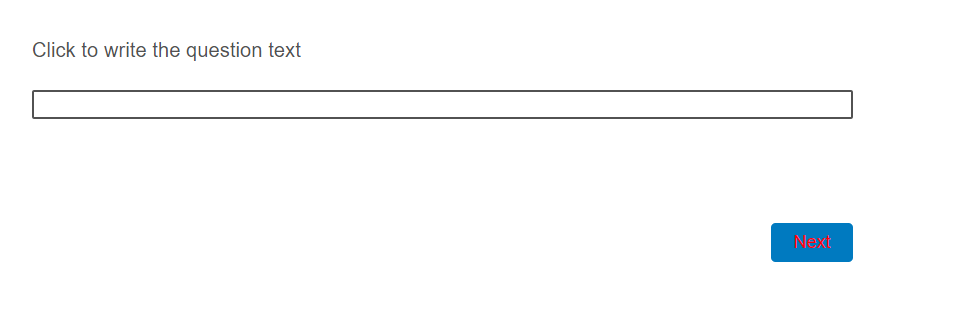
I’ve tried this CSS code but it does not work:

.Skin #Buttons #NextButton {
color: #abcdef;
}

How can I change the color of text on next and submit buttons?

 

Best answer by Tom_1842

Also if you are using Simple layout, try the below:

#navigation #next-button {
background-color: #00ffff;
color: #ff0000;
}

#navigation #previous-button {
background-color: #00ffff;
color: #ff0000;
}


View original

9 replies

Forum|alt.badge.img+9

Hi there,

i would say check the code again in CSS , its better to click Edit and open it in full screen and add your code.

Some time when you add the code in that small screen it does not take it.


For me below code worked like charm. and yours don't see any difference


.Skin #Buttons #NextButton{
background-color: #BA0B27;  /* This will change the Box colour of next button
color: #D8E12B; /* This will change the Text colour present inside the Next Button
}


However if you want to move per page based Button edit. i would recommend this post for reference.

Regards

Pratyush


krbhavya
Level 6 ●●●●●●
Forum|alt.badge.img+20
  • Level 6 ●●●●●●
  • Jul 1, 2023 5:19 AM UTC

Hi @klm999 

The code is working fine. I’m  able to change the color of my Next button.

Are you clicking on APPLY button at the bottom-right  after making the changes?


Tom_1842
Level 8 ●●●●●●●●
Forum|alt.badge.img+28
  • Level 8 ●●●●●●●●
  • Answer
  • Jul 1, 2023 3:14 PM UTC

Also if you are using Simple layout, try the below:

#navigation #next-button {
background-color: #00ffff;
color: #ff0000;
}

#navigation #previous-button {
background-color: #00ffff;
color: #ff0000;
}


Forum|alt.badge.img+2
  • Author
  • Level 1 ●
  • Jul 7, 2023 4:02 PM UTC

Also if you are using Simple layout, try the below:

#navigation #next-button {
background-color: #00ffff;
color: #ff0000;
}

#navigation #previous-button {
background-color: #00ffff;
color: #ff0000;
}


This worked - somewhat. The results are not exactly as I expected. The little arrow on the next button stays black. Also, the back button’s text hasn’t changed.

I am using Simple layout so obviously the CSS code does not work exactly as it should.


Tom_1842
Level 8 ●●●●●●●●
Forum|alt.badge.img+28
  • Level 8 ●●●●●●●●
  • Jul 7, 2023 6:03 PM UTC

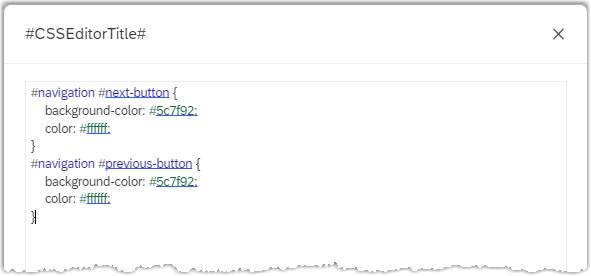
Try using the below where the arrow/chevron colors are denoted by the svg fill. I also added some bits that change the button background-color on mouse hover. 

#navigation #next-button {
background-color: #5c7f92;
color: #ffffff;
}

#navigation #previous-button {
background-color: #5c7f92;
border: 0;
color: #ffffff;
}

#navigation #next-button svg {
fill: #ffffff;
}

#navigation #previous-button svg {
fill: #ffffff;
}

#navigation #next-button:hover {
background-color: #949494;
}

#navigation #previous-button:hover {
background-color: #949494;
}


MattiasM
Level 5 ●●●●●
Forum|alt.badge.img+63
  • Level 5 ●●●●●
  • Sep 21, 2023 8:42 AM UTC

Good morning from a sunny Sweden!

I am using this code, and I can not for the life of me impact the color of the text (expecting a white text on a green background).

.Skin #Buttons #NextButton{
background-color: #009844;  /* This will change the Box colour of next button
color: #ffffff; /* This will change the Text colour present inside the Next Button
}

The results

Is there anywhere else that this can be set that overrides the code? 


Thanks in advance

-Mattias


Tom_1842
Level 8 ●●●●●●●●
Forum|alt.badge.img+28
  • Level 8 ●●●●●●●●
  • Sep 21, 2023 1:17 PM UTC

Hi @MattiasM ! Try adding !importants to your CSS rules to ensure they override any other styling:

.Skin #Buttons #NextButton {
background-color: #009844 !important;
color: #ffffff !important;
}


MattiasM
Level 5 ●●●●●
Forum|alt.badge.img+63
  • Level 5 ●●●●●
  • Sep 21, 2023 1:25 PM UTC

Hi @MattiasM ! Try adding !importants to your CSS rules to ensure they override any other styling:

.Skin #Buttons #NextButton {
background-color: #009844 !important;
color: #ffffff !important;
}


Thanks that solved it! 


Forum|alt.badge.img+1
  • Oct 10, 2023 11:16 AM UTC

Hi @MattiasM ! Try adding !importants to your CSS rules to ensure they override any other styling:

.Skin #Buttons #NextButton {
background-color: #009844 !important;
color: #ffffff !important;
}


!importants do the magic! I’ve been looking for a solution for several months. Thank you @Tom_1842 my hero 😎