I am trying to create a level-based CX org hierarchy that essentially acts as a parent-child hierarchy with employee/manager names listed throughout the hierarchy. The hierarchy should be based on the employee ID which will match a data field in the survey response/dashboard data set. When the hierarchy filter displays in the dashboard, the filter should display the employee names rather than employee ID.
We initially tried to do this via parent-child hierarchies, but that did not work for us since we wanted to be able to select the very bottom leaves/nodes in the hierarchy to view their results rather than just select managers. We switched to level-based hierarchies based on the advice here.
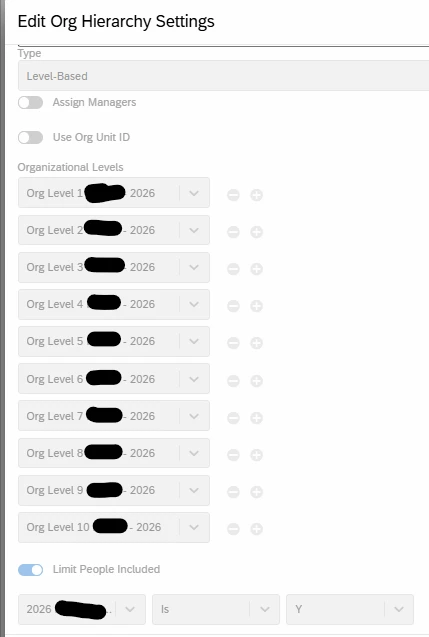
I can confirm the overall level-based hierarchy structure is working using the configuration below. A hierarchy is generated with a level for each of the 10 levels of the org hierarchy with dashboard users assigned to their appropriate level. However, the org levels are named after employee IDs rather than employee names. We want the employee names to display in the filter.
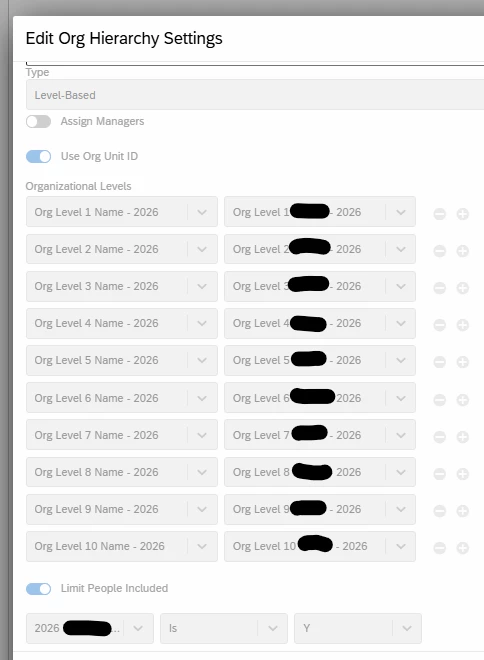
I thought this could be done using the “Use Org Unit ID” option in the level based hierarchy setup (shown in 2nd screenshot), but it does not seem to work how I expected. I tried including the each level name on the left side of the configuration, and each level employee ID on the right side to act as the org unit ID. Once the hierarchy finishes processing, it is empty. There are no levels in the hierarchy and no users/employees assigned to any levels. Does anyone know how to get the CX hierarchy to work this way?
WORKS TO GENERATE HIERARCHY (but displays employee ID rather than name for each level name)
DOES NOT WORK TO GENERATE HIERARCHY (results in empty hierarchy, no levels and no users assigned)