

 Thanks!
Solved
How do I change the order of the content in the Ticker widget?

Hello!
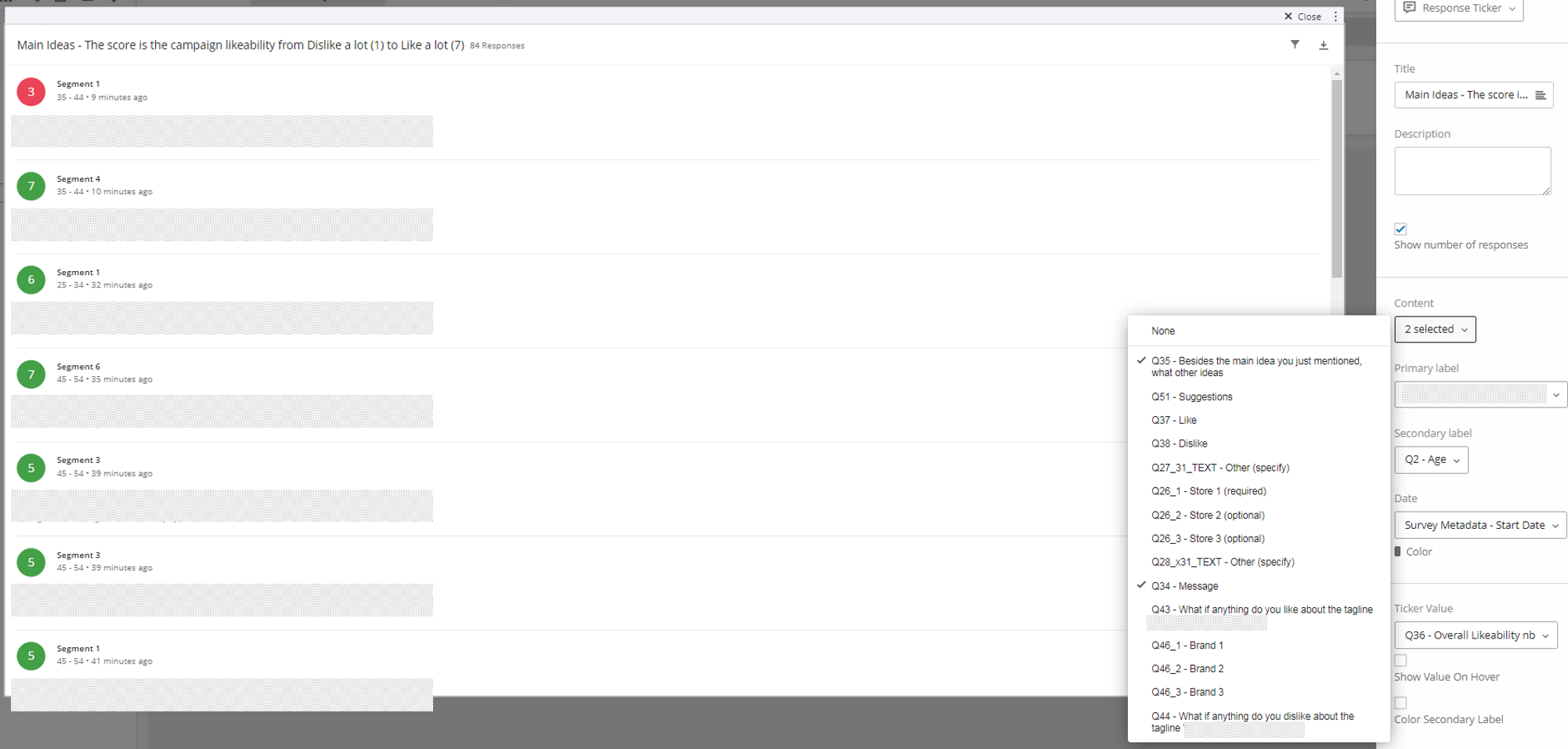
I am using the Response Ticker widget to display the open-ended answers to two questions (Main Idea, Other Ideas). However when selecting them in "Content", Qualtrics chooses the order of display and ends-up displaying my Other Ideas before my Main Ideas. I tried un-mapping both, and re-adding them in the order I want them displayed, but it had no impact at all. Any idea? Or it's not something we can control and I can't force one to appear before the other?
Example below:
!
Thanks!
Thanks!Best answer by DaisyD
In case you were wondering, read below Qualtrics Support answer :-)
"I understand that you are trying to change the order that fields appear in the Response Ticker widget, or display them in a different order in your fields such that they will be lined up correctly. Unfortunately, fields cannot be re-ordered in these dropdown menus and however they are appearing there cannot be changed."
"Typically, the order is determined by data type, so I would recommend that if this happens again, simply add duplicates of the fields that aren't showing in the correct order. This will cause one of the sets of duplicates to be on top of the other one, so you can always get the desired order."
View original




Sign up
Already have an account? Login

Welcome! To join the Qualtrics Experience Community, log in with your existing Qualtrics credentials below.
Confirm your username, share a bit about yourself, then you're ready to explore and connect .
Free trial account? No problem. Log in with your trial credentials to join.
No free trial account? No problem! Register here
Already a member? Hi and welcome back! We're glad you're here 🙂
You will see the Qualtrics login page briefly before being taken to the Experience Community.
Login with Qualtrics
Welcome! To join the Qualtrics Experience Community, log in with your existing Qualtrics credentials below.
Confirm your username, share a bit about yourself, then you're ready to explore and connect .
Free trial account? No problem. Log in with your trial credentials to join. No free trial account? No problem! Register here
Already a member? Hi and welcome back! We're glad you're here 🙂
You will see the Qualtrics login page briefly before being taken to the Experience Community.
Login to the Community
Welcome! To join the Qualtrics Experience Community, log in with your existing Qualtrics credentials below.
Confirm your username, share a bit about yourself, then you're ready to explore and connect .
Free trial account? No problem. Log in with your trial credentials to join.
No free trial account? No problem! Register here
Already a member? Hi and welcome back! We're glad you're here 🙂
You will see the Qualtrics login page briefly before being taken to the Experience Community.
Login with Qualtrics
Welcome! To join the Qualtrics Experience Community, log in with your existing Qualtrics credentials below.
Confirm your username, share a bit about yourself, then you're ready to explore and connect .
Free trial account? No problem. Log in with your trial credentials to join. No free trial account? No problem! Register here
Already a member? Hi and welcome back! We're glad you're here 🙂
You will see the Qualtrics login page briefly before being taken to the Experience Community.
Enter your E-mail address. We'll send you an e-mail with instructions to reset your password.