

Hey everyone,
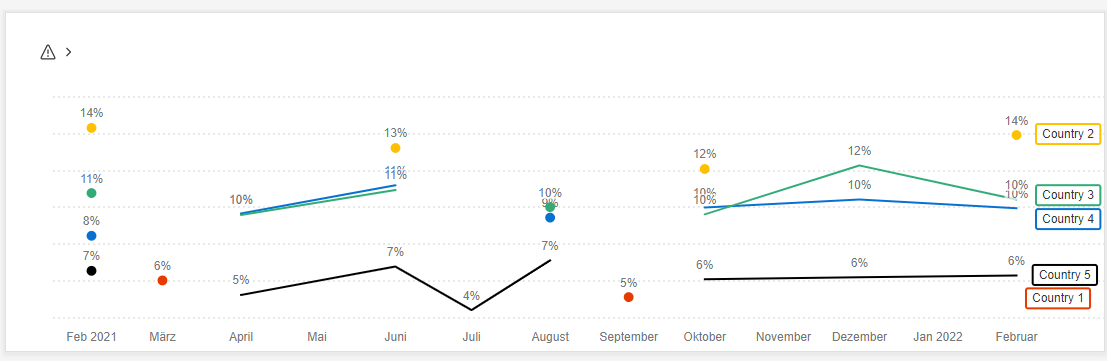
I measure the same value in multiple surveys on different timings and want to show the results per source, displayed by month as a time series with one line per source in one widget.
My problem is that the lines break if a measuring was not done. Is there a way to have connected lines for all?
Example: I have 6 sources who are 6 countries who should be my 6 lines.
I masure some countries 6 times a year e.g. in february, april, june, october, december and others only 3 times in february, june and october
(not always this timings, sometimes also one in feb, one in march, etc.) .
If i display my value now by country=time series (6 lines) and Date by Month = x,
the outcome is that the countries with only 3 measure points show only dots and only those with 6 show a line. I want to connect the dots but show only 3 values for those with 3 measure points and 6 values for those with 6 measure points.
Is there any way to get this 6 lines without breaks in one widget?
Thanks in advance.

How to connect dots in a time series with multiple lines and measure points?
 +3
+3


Sign up
Already have an account? Login

Welcome! To join the Qualtrics Experience Community, log in with your existing Qualtrics credentials below.
Confirm your username, share a bit about yourself, then you're ready to explore and connect .
Free trial account? No problem. Log in with your trial credentials to join.
No free trial account? No problem! Register here
Already a member? Hi and welcome back! We're glad you're here 🙂
You will see the Qualtrics login page briefly before being taken to the Experience Community.
Login with Qualtrics
Welcome! To join the Qualtrics Experience Community, log in with your existing Qualtrics credentials below.
Confirm your username, share a bit about yourself, then you're ready to explore and connect .
Free trial account? No problem. Log in with your trial credentials to join. No free trial account? No problem! Register here
Already a member? Hi and welcome back! We're glad you're here 🙂
You will see the Qualtrics login page briefly before being taken to the Experience Community.
Login to the Community
No account yet? Create an account
Welcome! To join the Qualtrics Experience Community, log in with your existing Qualtrics credentials below.
Confirm your username, share a bit about yourself, then you're ready to explore and connect .
Free trial account? No problem. Log in with your trial credentials to join.
No free trial account? No problem! Register here
Already a member? Hi and welcome back! We're glad you're here 🙂
You will see the Qualtrics login page briefly before being taken to the Experience Community.
Login with Qualtrics
Welcome! To join the Qualtrics Experience Community, log in with your existing Qualtrics credentials below.
Confirm your username, share a bit about yourself, then you're ready to explore and connect .
Free trial account? No problem. Log in with your trial credentials to join. No free trial account? No problem! Register here
Already a member? Hi and welcome back! We're glad you're here 🙂
You will see the Qualtrics login page briefly before being taken to the Experience Community.
Enter your E-mail address. We'll send you an e-mail with instructions to reset your password.