

Hi community!
I am trying to reorder these time fields displayed in one of the filters of my dashboard (More concrete, I would like to have the “> 90 minutes” option, as the last one):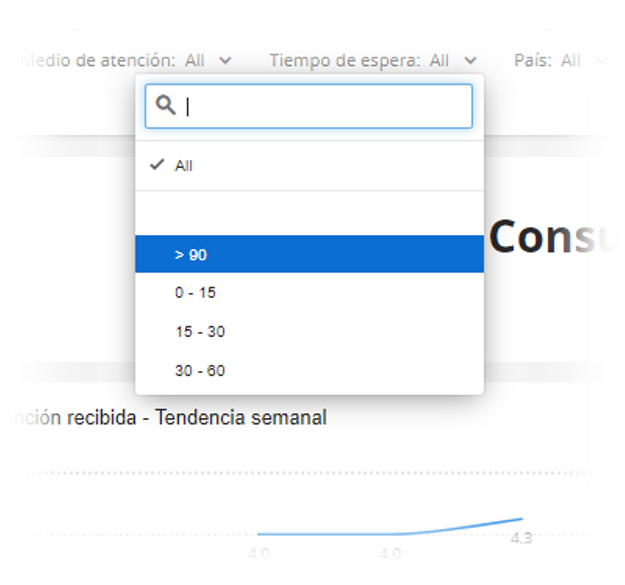 The reason I want to do so is that “> 90 minutes” is a longer time length than “0-15 minutes”. As my intention is to have the filter in ascendant order, it does not make sense to have it in the first place, as shown in the picture. Apparently, because of the 90 having a symbol before, Qualtrics puts it before any number.
Does anyone know a way to reverse this order and have the symbols come after the numbers?
Thank you very much in advanced, I will really appreciate your wise advices :)
Yours sincerely,
Irene

Solved
Order of the options displayed in filters when there are symbols, letters and/or numbers

Best answer by AmaraW
Hi ireneperal! If you haven't already, we’d recommend reviewing this support page on recoding dashboard fields to help you get started. If you still have questions after reviewing the linked support page, you'll want to reach out to the Support team, as they are best equipped to help answer questions and provide support! 😁


Sign up
Already have an account? Login

Welcome! To join the Qualtrics Experience Community, log in with your existing Qualtrics credentials below.
Confirm your username, share a bit about yourself, then you're ready to explore and connect .
Free trial account? No problem. Log in with your trial credentials to join.
No free trial account? No problem! Register here
Already a member? Hi and welcome back! We're glad you're here 🙂
You will see the Qualtrics login page briefly before being taken to the Experience Community.
Login with Qualtrics
Welcome! To join the Qualtrics Experience Community, log in with your existing Qualtrics credentials below.
Confirm your username, share a bit about yourself, then you're ready to explore and connect .
Free trial account? No problem. Log in with your trial credentials to join. No free trial account? No problem! Register here
Already a member? Hi and welcome back! We're glad you're here 🙂
You will see the Qualtrics login page briefly before being taken to the Experience Community.
Login to the Community
No account yet? Create an account
Welcome! To join the Qualtrics Experience Community, log in with your existing Qualtrics credentials below.
Confirm your username, share a bit about yourself, then you're ready to explore and connect .
Free trial account? No problem. Log in with your trial credentials to join.
No free trial account? No problem! Register here
Already a member? Hi and welcome back! We're glad you're here 🙂
You will see the Qualtrics login page briefly before being taken to the Experience Community.
Login with Qualtrics
Welcome! To join the Qualtrics Experience Community, log in with your existing Qualtrics credentials below.
Confirm your username, share a bit about yourself, then you're ready to explore and connect .
Free trial account? No problem. Log in with your trial credentials to join. No free trial account? No problem! Register here
Already a member? Hi and welcome back! We're glad you're here 🙂
You will see the Qualtrics login page briefly before being taken to the Experience Community.
Enter your E-mail address. We'll send you an e-mail with instructions to reset your password.