Drop down options | Experience Community
Skip to main content
Solved

Drop down options

  • June 17, 2026
  • 6 replies
  • 17 views

Forum|alt.badge.img+1

Hello community! Does anyone know if you can have a drop down option from a multiple answer? If an employee answers they fall under “BDS” organization but there are different divisions under BDS, can those divisions be a drop down under BDS?

Example:

Question 1: What division are you in?

  1. BDS
  2. BCA
  3. BGS

Best answer by pamelalbeck

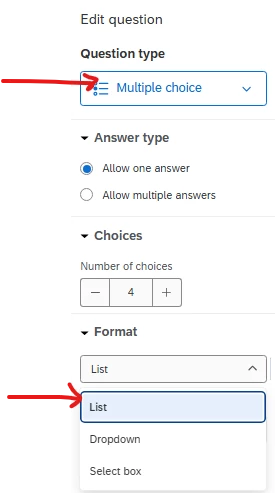
Yes, if you’re looking at edit question → Question Type → Multiple Choice.  Under format click the drop-down menu and select list.

you can then type in the fields for a drop-down list on the question.

If you need the respondent to pick a company first and then which branch they belong to, I would probably do a traditional multiple choice question of the companies and then a display logic question with the different branches as a drop-down menu.

6 replies

pamelalbeck
Level 5 ●●●●●
Forum|alt.badge.img+41
  • Level 5 ●●●●●
  • Answer
  • June 17, 2026

Yes, if you’re looking at edit question → Question Type → Multiple Choice.  Under format click the drop-down menu and select list.

you can then type in the fields for a drop-down list on the question.

If you need the respondent to pick a company first and then which branch they belong to, I would probably do a traditional multiple choice question of the companies and then a display logic question with the different branches as a drop-down menu.


Forum|alt.badge.img+1
  • Author
  • Level 2 ●●
  • June 17, 2026

thanks Pamela!


pamelalbeck
Level 5 ●●●●●
Forum|alt.badge.img+41
  • Level 5 ●●●●●
  • June 17, 2026

You’re welcome!


Forum|alt.badge.img+1
  • Author
  • Level 2 ●●
  • June 19, 2026

Hi Pamela! After the multiple choice answers have been listed, can an additional drop down box be applied for the multiple choice answers? 

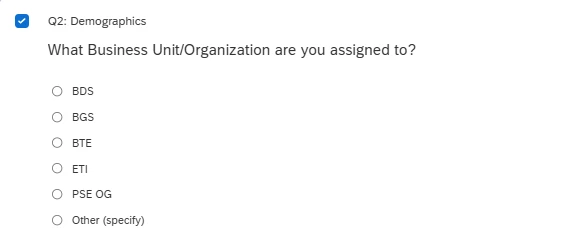
Example: What BU are you assigned to? BDS, BCA, BGS

Then BDS would need a drop down to identify what division under BDS.


pamelalbeck
Level 5 ●●●●●
Forum|alt.badge.img+41
  • Level 5 ●●●●●
  • June 23, 2026

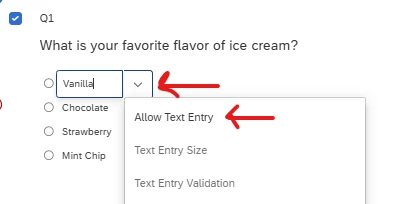
@jduncan If you don’t want to create a whole new question and use display logic, you could allow text entry under the multiple choice options and the respondent can type in their specific subdivision under BDS.  

  1. Click to the right of the multiple choice question you want to add the text option to.
  2. Select “Allow Text Entry” from the menu.
  3. A text box will now appear under that option.

See screen shot below:


You can also force a response on that one multiple choice/text entry point by selecting “Text Entry Validation” on that same drop-down menu so respondents don’t select BDS and skip over the division piece you need.


Test it out in survey preview and see what you think.


I’m sure there may be a JS solution for what you’re asking so if anyone else from the community that specializes in JS wants to jump in 😀


Forum|alt.badge.img+1
  • Author
  • Level 2 ●●
  • June 23, 2026

Very helpful, thanks so much!