Adding participants to a lifecycle project from a workflow | Experience Community
Skip to main content
Solved

Adding participants to a lifecycle project from a workflow

  • October 8, 2025
  • 30 replies
  • 314 views

Show first post

30 replies

Forum|alt.badge.img+3
  • Author
  • Level 2 ●●
  • October 29, 2025


All corrected.  Still same result (Did Not Match Existing Employee)


Make sure your branching logic under the webservice also uses the same updated embedded data field name (participants.0.userId).

Yes!!  Just corrected that and that worked.  Now troubleshooting the workflow.  :)


You are a blessing!  Thank you very much for your help!  Problem solved!!


Forum|alt.badge.img+8
  • QPN Level 4 ●●●●
  • October 29, 2025


You are a blessing!  Thank you very much for your help!  Problem solved!!


That’s wonderful to hear, you are very welcome!


Forum|alt.badge.img+3
  • Author
  • Level 2 ●●
  • October 30, 2025


You are a blessing!  Thank you very much for your help!  Problem solved!!


That’s wonderful to hear, you are very welcome!


While this does pull in the participant into the survey, I’ve found it did not bring in the employee metadata.  Any ideas on that?


Forum|alt.badge.img+8
  • QPN Level 4 ●●●●
  • Answer
  • October 30, 2025


While this does pull in the participant into the survey, I’ve found it did not bring in the employee metadata.  Any ideas on that?


Hi Cheri,

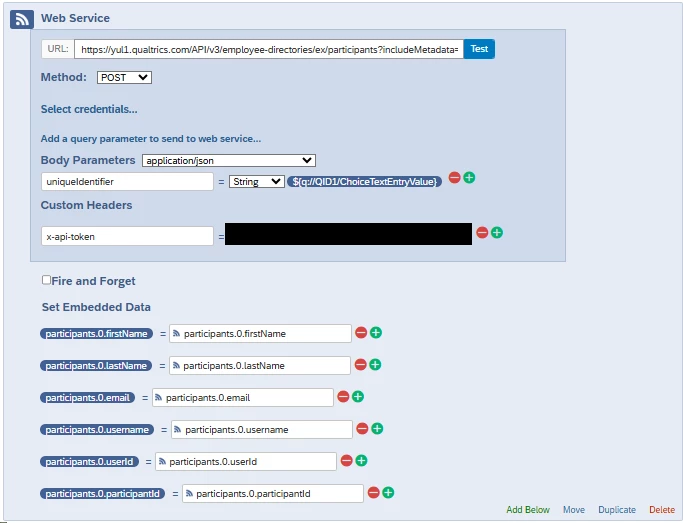
If you would like all of their metadata from the directory to be copied over with them into the survey, you can instead use the Copy Participants API in the workflow that’s triggered after the intake form is submitted: api.qualtrics.com/c03ae4b3e935d-copy-participants

This would require updating your workflow to the following configuration:


Just make sure to update the Project ID in the URL.


Forum|alt.badge.img+2
  • Level 2 ●●
  • March 16, 2026

IGNORE THIS COMMENT! I can’t seem to delete. The above copy participant instructions worked, I just missed them as they were on the second page (face palm).


Thank you for this thread, it will (hopefully) solve the same issue for me. I’ve set this up and tested, employee is adding correctly to the project I need it to, however I would like all of their metadata to come across as well. I attempted to add the same metadata fields that I have in the Web Service/Survey Flow in the Web Service Work Flow, however it’s showing the error “JSON may be invalid depending on the value of the chained piped-text”. I’ve tried changing the setting from JSON/Free text to Plain text (after some troubleshooting searching) however that gives the error pasted in the second screenshot. Any ideas?