


How to random texts' links from a database on Qualtrics ?
Best answer by fleb
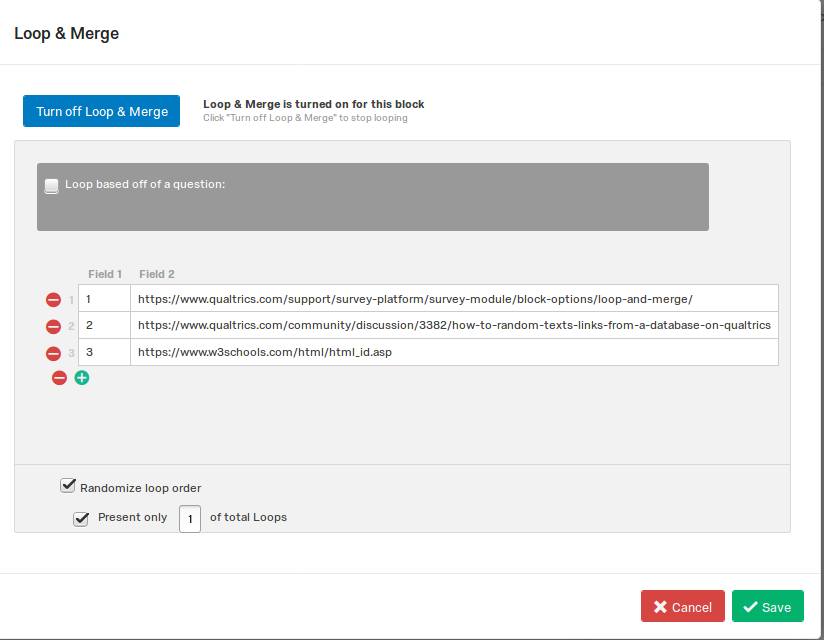 This will select a random file for each respondent.
3) Create a link to your files in the body of your question in HTML. Just put piped text referring to the Field2 there, where you usually put the URL (see file "link.txt" for an example; you have to use the "HTML View" to do this).
4) Create a new embedded data filed in the survey flow (called for example "my_file") and place following JavaScript to the question.
`Qualtrics.SurveyEngine.setEmbeddedData("my_file", "${lm://Field/1}");`
This will create a new column in your data. This column will store the name/ID of the file a respondent was working with.
I think you can use your own links in both cases (and don't need to put all your files into the Qualtrics) if your database is public.
This will select a random file for each respondent.
3) Create a link to your files in the body of your question in HTML. Just put piped text referring to the Field2 there, where you usually put the URL (see file "link.txt" for an example; you have to use the "HTML View" to do this).
4) Create a new embedded data filed in the survey flow (called for example "my_file") and place following JavaScript to the question.
`Qualtrics.SurveyEngine.setEmbeddedData("my_file", "${lm://Field/1}");`
This will create a new column in your data. This column will store the name/ID of the file a respondent was working with.
I think you can use your own links in both cases (and don't need to put all your files into the Qualtrics) if your database is public.


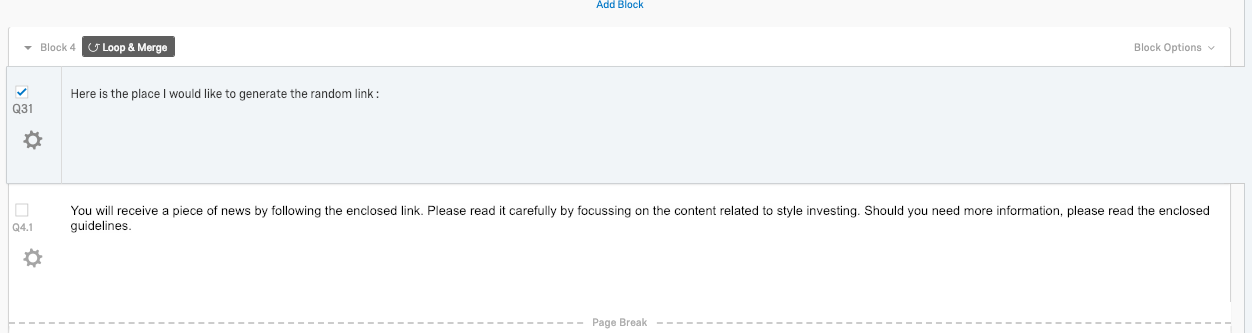 Here is what I already did
!
Here is what I already did
!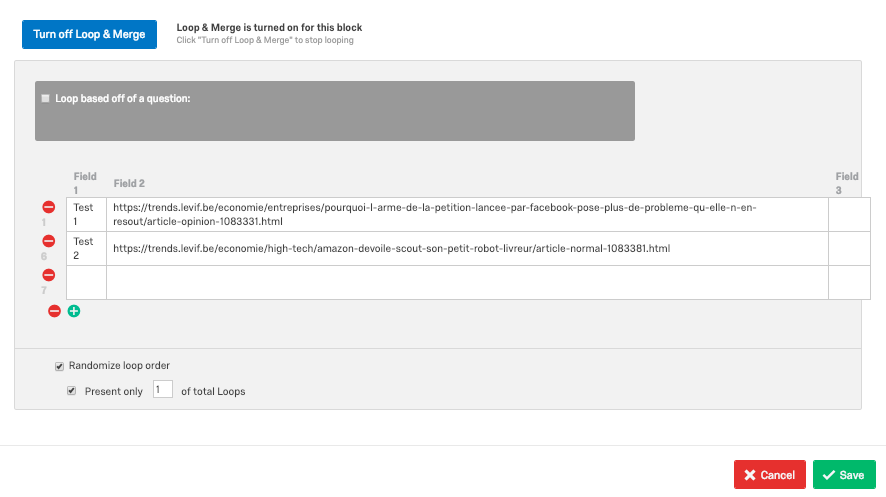 The fact is that I don't receive any text's link when I preview the survey ...
I don't know if I was clear enough in the description of my question.
But I would like that a respondant receive only one text (randomly chosen in my data base, here for example test 1 ou test2), and then he will answer the rest of the survey (questions are the same for each text) . I will, after, look at these answer and link it with the randomly chosen text.
Thank you !
Rémy
The fact is that I don't receive any text's link when I preview the survey ...
I don't know if I was clear enough in the description of my question.
But I would like that a respondant receive only one text (randomly chosen in my data base, here for example test 1 ou test2), and then he will answer the rest of the survey (questions are the same for each text) . I will, after, look at these answer and link it with the randomly chosen text.
Thank you !
RémySign up
Already have an account? Login

Welcome! To join the Qualtrics Experience Community, log in with your existing Qualtrics credentials below.
Confirm your username, share a bit about yourself, then you're ready to explore and connect .
Free trial account? No problem. Log in with your trial credentials to join.
No free trial account? No problem! Register here
Already a member? Hi and welcome back! We're glad you're here 🙂
You will see the Qualtrics login page briefly before being taken to the Experience Community.
Login with Qualtrics
Welcome! To join the Qualtrics Experience Community, log in with your existing Qualtrics credentials below.
Confirm your username, share a bit about yourself, then you're ready to explore and connect .
Free trial account? No problem. Log in with your trial credentials to join. No free trial account? No problem! Register here
Already a member? Hi and welcome back! We're glad you're here 🙂
You will see the Qualtrics login page briefly before being taken to the Experience Community.
Login to the Community
Welcome! To join the Qualtrics Experience Community, log in with your existing Qualtrics credentials below.
Confirm your username, share a bit about yourself, then you're ready to explore and connect .
Free trial account? No problem. Log in with your trial credentials to join.
No free trial account? No problem! Register here
Already a member? Hi and welcome back! We're glad you're here 🙂
You will see the Qualtrics login page briefly before being taken to the Experience Community.
Login with Qualtrics
Welcome! To join the Qualtrics Experience Community, log in with your existing Qualtrics credentials below.
Confirm your username, share a bit about yourself, then you're ready to explore and connect .
Free trial account? No problem. Log in with your trial credentials to join. No free trial account? No problem! Register here
Already a member? Hi and welcome back! We're glad you're here 🙂
You will see the Qualtrics login page briefly before being taken to the Experience Community.
Enter your E-mail address. We'll send you an e-mail with instructions to reset your password.