I am designing a survey in Qualtrics and would like to customize a later question based on a participant’s earlier choice.
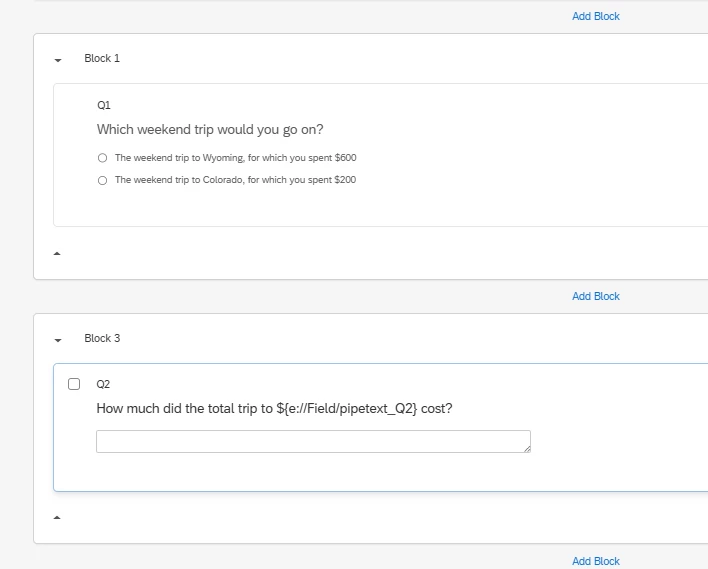
Q2: Which weekend trip would you go on?
The weekend trip to Wyoming, for which you spent $600
The weekend trip to Colorado, for which you spent $200
Later, I have:
Q8:How much did the total trip cost?
For Q8, I only want the trip name to change depending on the option selected in Q2. For example:
If the participant selects Wyoming, Q8 should display: “How much did the total trip to Wyoming cost?”
If the participant selects Colorado, Q8 should display: “How much did the total trip to Colorado cost?”
The answer options will already contain the correct cost values, so I only need to dynamically insert the chosen trip name into the question text.
What is the best way to program this in Qualtrics? Should I use piped text from Q2 or display logic/embedded data?
Thank you for your help!
Best answer by arunxmarchitect
@Rija ,
The Solution: Branch Logic + Embedded Data
To achieve this, you don't need complex Piped Text directly from the question. Instead, you create a "container" (Embedded Data) to hold the specific name you want to show later.
1. Set up your Survey Flow
Go to the Survey Flow tab and follow these steps:
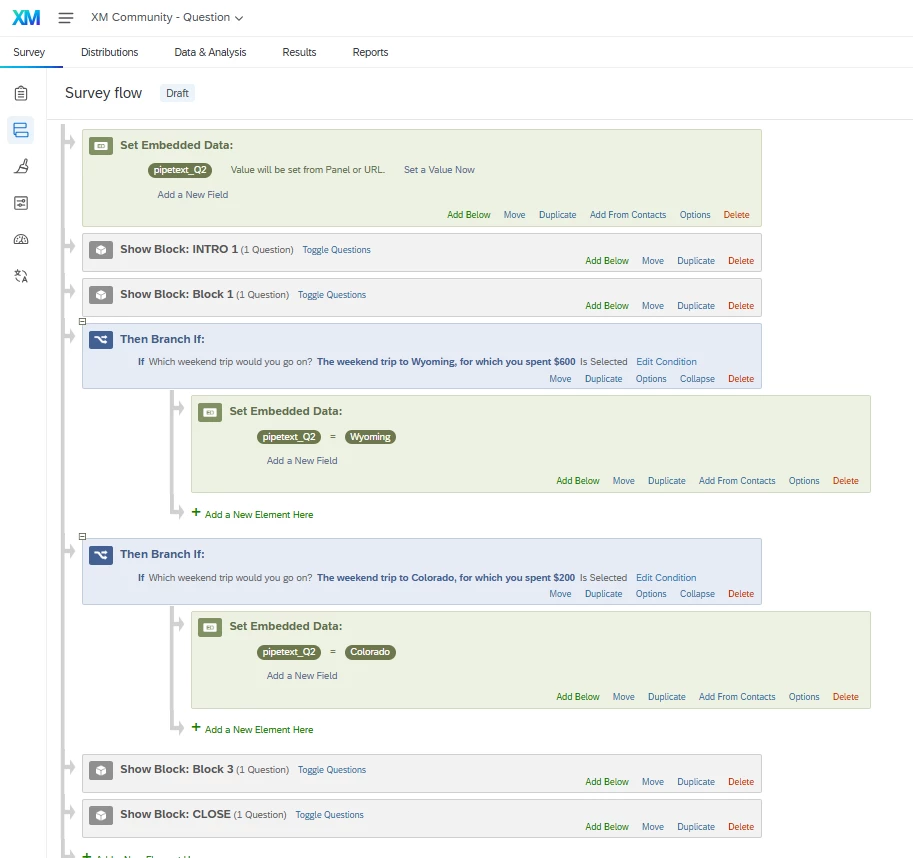
Step A: Place an Embedded Data block at the very top of your flow. Create a field named pipetext_Q2. (Leave it blank for now).
Step B: After the block containing Q2, add a Branch.
Set the condition: If Q2 Choice "Wyoming" is Selected.
Under that branch, add a new Embedded Data element. Set pipetext_Q2 = Wyoming.
Step C: Add a second Branch for Colorado.
Set the condition: If Q2 Choice "Colorado" is Selected.
Under that branch, add an Embedded Data element. Set pipetext_Q2 = Colorado.
2. Insert the Piped Text into Q8
Now, go back to your Survey Builder to edit Q8:
In the question text for Q8, type:
“How much did the total trip to ${e://Field/pipetext_Q2} cost?”
Qualtrics will now automatically swap that code for whichever word ("Wyoming" or "Colorado") was assigned in your Survey Flow branches.
To achieve this, you don't need complex Piped Text directly from the question. Instead, you create a "container" (Embedded Data) to hold the specific name you want to show later.
1. Set up your Survey Flow
Go to the Survey Flow tab and follow these steps:
Step A: Place an Embedded Data block at the very top of your flow. Create a field named pipetext_Q2. (Leave it blank for now).
Step B: After the block containing Q2, add a Branch.
Set the condition: If Q2 Choice "Wyoming" is Selected.
Under that branch, add a new Embedded Data element. Set pipetext_Q2 = Wyoming.
Step C: Add a second Branch for Colorado.
Set the condition: If Q2 Choice "Colorado" is Selected.
Under that branch, add an Embedded Data element. Set pipetext_Q2 = Colorado.
2. Insert the Piped Text into Q8
Now, go back to your Survey Builder to edit Q8:
In the question text for Q8, type:
“How much did the total trip to ${e://Field/pipetext_Q2} cost?”
Qualtrics will now automatically swap that code for whichever word ("Wyoming" or "Colorado") was assigned in your Survey Flow branches.