

REPOST
Hi, I'm reposting a question I had from July 7th which hasn't been answered in the hope that someone sees it this time around, I hope that's ok:
----------------
Hi,
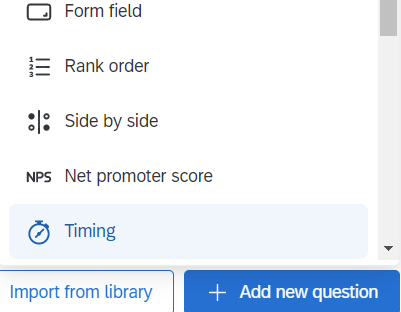
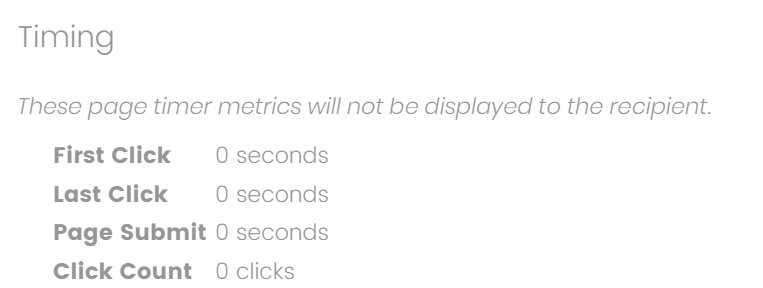
I'm doing a study that involves a great many loops over a great many blocks. Long story short, when I download data, there's a great many columns. I'm using the timer question, but I only really need the last click or the page submit metric. Unfortunately with the structure of the study, having the extra 3 metrics actually means 60,000 additional columns which I really don't care about. Is there a way to pick and choose which timer metrics to include?
Thanks in advance,
Casper
----------------

Solved
Excluding download of certain timer metrics
Best answer by AdamK12
Casperhp Sorry to have not seen your question earlier: if you are downloading directly into a CSV or Excel file, I don't think you have any choice other than to manually remove the extra columns (I know, that's a pain). But if you are using a web data connector to export into another application (in my case, it's Tableau), you should be able to pick and choose which columns to export.
Alternatively (and perhaps I'm not totally understanding what you mean by a timer question), if you are looking for the time that the survey was submitted, that should be captured through the embedded data in the survey, I think even by default.
I hope that helps! I'm also upvoting your question so that it gets more attention.




Sign up
Already have an account? Login

Welcome! To join the Qualtrics Experience Community, log in with your existing Qualtrics credentials below.
Confirm your username, share a bit about yourself, then you're ready to explore and connect .
Free trial account? No problem. Log in with your trial credentials to join.
No free trial account? No problem! Register here
Already a member? Hi and welcome back! We're glad you're here 🙂
You will see the Qualtrics login page briefly before being taken to the Experience Community.
Login with Qualtrics
Welcome! To join the Qualtrics Experience Community, log in with your existing Qualtrics credentials below.
Confirm your username, share a bit about yourself, then you're ready to explore and connect .
Free trial account? No problem. Log in with your trial credentials to join. No free trial account? No problem! Register here
Already a member? Hi and welcome back! We're glad you're here 🙂
You will see the Qualtrics login page briefly before being taken to the Experience Community.
Login to the Community
No account yet? Create an account
Welcome! To join the Qualtrics Experience Community, log in with your existing Qualtrics credentials below.
Confirm your username, share a bit about yourself, then you're ready to explore and connect .
Free trial account? No problem. Log in with your trial credentials to join.
No free trial account? No problem! Register here
Already a member? Hi and welcome back! We're glad you're here 🙂
You will see the Qualtrics login page briefly before being taken to the Experience Community.
Login with Qualtrics
Welcome! To join the Qualtrics Experience Community, log in with your existing Qualtrics credentials below.
Confirm your username, share a bit about yourself, then you're ready to explore and connect .
Free trial account? No problem. Log in with your trial credentials to join. No free trial account? No problem! Register here
Already a member? Hi and welcome back! We're glad you're here 🙂
You will see the Qualtrics login page briefly before being taken to the Experience Community.
Enter your E-mail address. We'll send you an e-mail with instructions to reset your password.