

Hello!
I am wondering is it possible to randomize blocks (6 different case stories) per participant in the first task, and then have that random order repeated at a later point of the survey?
In the second task, the participants would answer a few questions related to the cases from the first task, and it would make sense to have the same order in which it was presented to them in the first task. However, I do not know how to arrange that after having those blocks randomized in the first task.
I appreciate your help!
Thank you for your input.

Solved
How to randomize blocks and match that order at a later point?
 +1
+1Best answer by Aanurag_QC
Hi kknezev Unfortunately it's not possible to predict how the randomizer might push each block because of which it won't be possible to show the blocks in the exact order as they appeared randomly from the first one




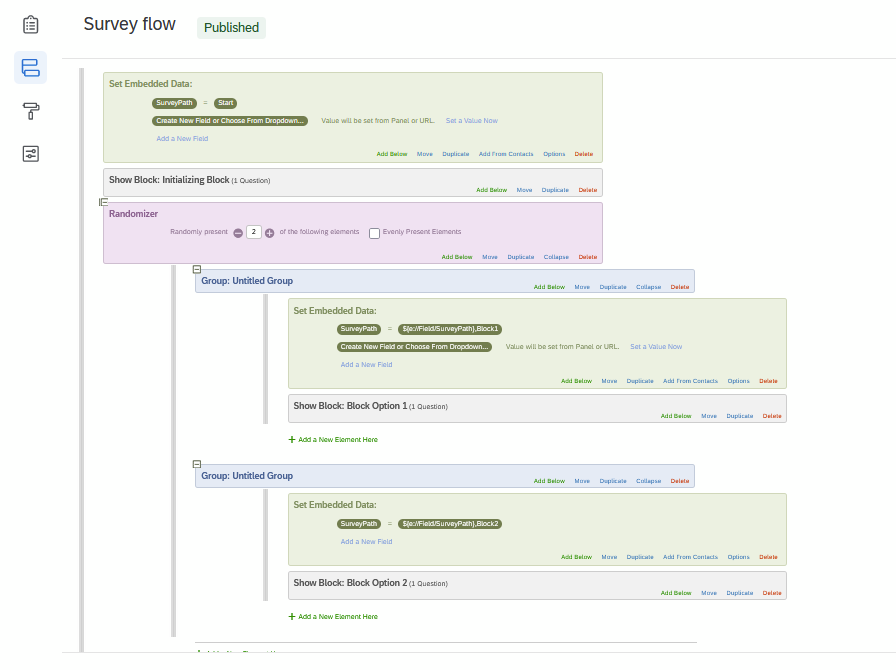 2. Add javascript to your question block to capture the SurveyPath information and separate it into a list of new embedded variables (Disp1, Disp2) you will be able to put into use. One issue is that I needed to put a "buffer question" in to hold this code. This is a question that added between the Block Option 1, etc. and the later question (for part 3) where I will use the new embedded variables. Here is the code I used (screenshot 2) Note that I am not familiar with Java so this might be improved by someone - I have a lot of calls to the console so I can check my work.
 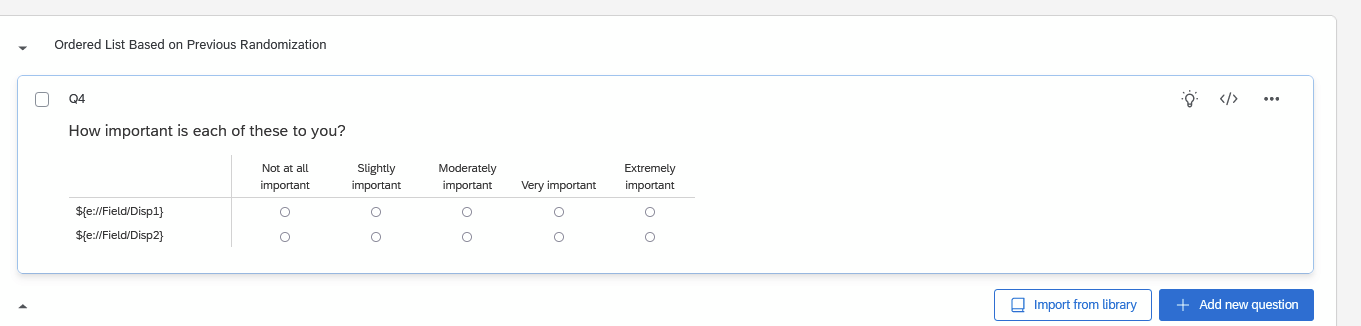 Hope this helps you and the next person looking to figure this out!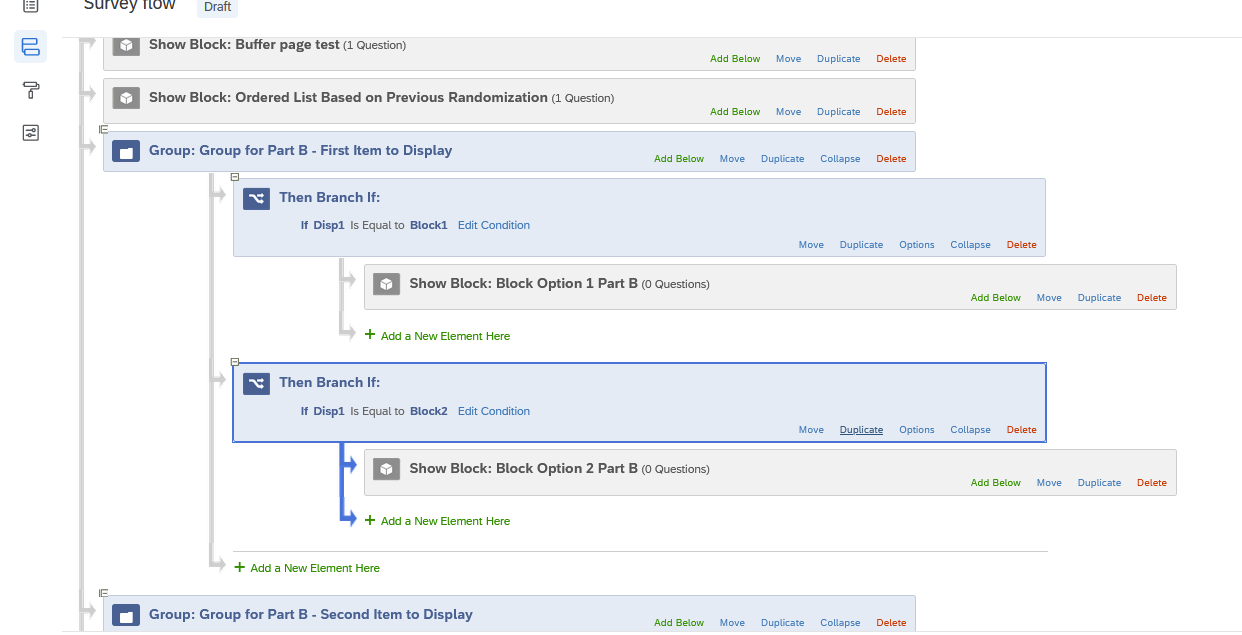
Sign up
Already have an account? Login

Welcome! To join the Qualtrics Experience Community, log in with your existing Qualtrics credentials below.
Confirm your username, share a bit about yourself, then you're ready to explore and connect .
Free trial account? No problem. Log in with your trial credentials to join.
No free trial account? No problem! Register here
Already a member? Hi and welcome back! We're glad you're here 🙂
You will see the Qualtrics login page briefly before being taken to the Experience Community.
Login with Qualtrics
Welcome! To join the Qualtrics Experience Community, log in with your existing Qualtrics credentials below.
Confirm your username, share a bit about yourself, then you're ready to explore and connect .
Free trial account? No problem. Log in with your trial credentials to join. No free trial account? No problem! Register here
Already a member? Hi and welcome back! We're glad you're here 🙂
You will see the Qualtrics login page briefly before being taken to the Experience Community.
Login to the Community
No account yet? Create an account
Welcome! To join the Qualtrics Experience Community, log in with your existing Qualtrics credentials below.
Confirm your username, share a bit about yourself, then you're ready to explore and connect .
Free trial account? No problem. Log in with your trial credentials to join.
No free trial account? No problem! Register here
Already a member? Hi and welcome back! We're glad you're here 🙂
You will see the Qualtrics login page briefly before being taken to the Experience Community.
Login with Qualtrics
Welcome! To join the Qualtrics Experience Community, log in with your existing Qualtrics credentials below.
Confirm your username, share a bit about yourself, then you're ready to explore and connect .
Free trial account? No problem. Log in with your trial credentials to join. No free trial account? No problem! Register here
Already a member? Hi and welcome back! We're glad you're here 🙂
You will see the Qualtrics login page briefly before being taken to the Experience Community.
Enter your E-mail address. We'll send you an e-mail with instructions to reset your password.