
Hyperlinks with Piped Text? | Experience Community
Skip to main content
Solved

Hyperlinks with Piped Text?

  • Apr 24, 2023 5:53 PM UTC
  • 5 replies
  • 819 views

Forum|alt.badge.img+2

Apologies for using incorrect terms - I’m fairly new to Qualtrics.


Is there a way to create a hyperlink that links to piped text containing a URL?


I am sending a single survey to multiple contact lists and each contact list has its own unique web page included as a field. Is there a way to create hyperlinked text (e.g., “click here”) in the body of the survey to take users to their contact list’s specific URL? I would ideally like the hyperlink to be in the text at the top of the survey form.


Best answer by Deepak

@hshere 

The following link should help Insert a Hyperlink (qualtrics.com)

Instead of any https protocol choose other protocol for piped text.

Hope it helps!

View original

5 replies

CxEx
Level 5 ●●●●●
Forum|alt.badge.img+13
  • Level 5 ●●●●●
  • Apr 24, 2023 5:56 PM UTC

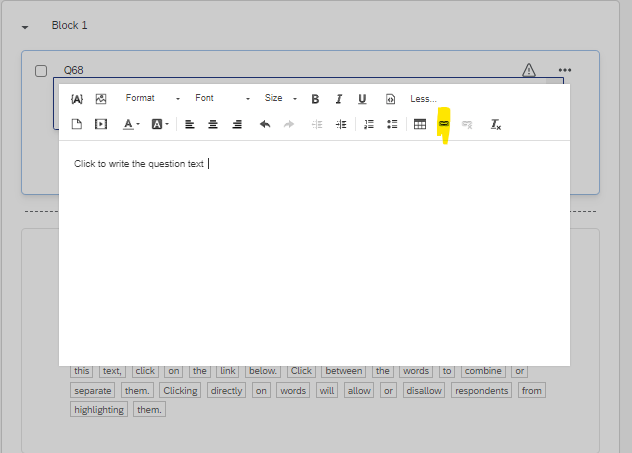
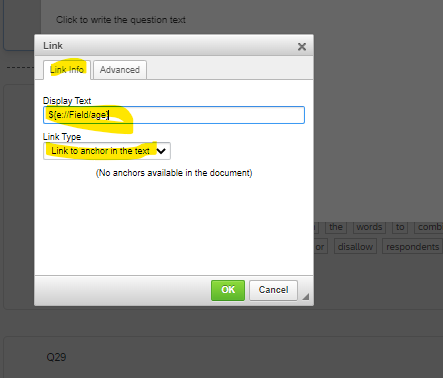
Edit your question in rich content editor and insert piped text. Under rich content editor link this piped text with hyper link. 


Deepak
QPN Level 8 ●●●●●●●●
Forum|alt.badge.img+48
  • Answer
  • Apr 24, 2023 6:05 PM UTC

@hshere 

The following link should help Insert a Hyperlink (qualtrics.com)

Instead of any https protocol choose other protocol for piped text.

Hope it helps!


qualtrics_nerd
Level 5 ●●●●●
Forum|alt.badge.img+19
  • Level 5 ●●●●●
  • Apr 24, 2023 8:23 PM UTC

Hi @hshere ,

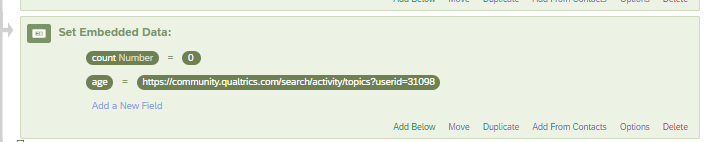
After creating the embedded data in the survey flow containing hyperlink:


After this open rich content editor :


This will show the hyperlink in the survey.

Hope this resolves your query😊!!


MattiasM
Level 5 ●●●●●
Forum|alt.badge.img+63
  • Level 5 ●●●●●
  • Apr 25, 2023 8:56 AM UTC

Good morning from a rainy Sweden!

I dont know how you’re planning on sending the surveys out, but if you’re using the “qualtrics_nerd” setup above, I would recommend using email and having each contacts specific link specified in the target list so it’s automatically pulled into the survey link. That way you pipe it in from the target list and would not need to specifically set in the Embedded data. 

All the best

-Mattias


Forum|alt.badge.img+2
  • Author
  • Level 1 ●
  • Apr 27, 2023 10:26 AM UTC

Thank you, everyone! I was able to solve this issue by looking through the reference Deepak sent.