



Piped text from embedded field is adding the words "Custom Value" after the selected choice | Experience Community
Skip to main content
Solved

Piped text from embedded field is adding the words "Custom Value" after the selected choice

  • Nov 19, 2026 4:49 PM UTC
  • 3 replies
  • 14 views

Forum|alt.badge.img+1

Hello, I -think- I’ve correctly set up piped text that pulls from an embedded field to display a selected choice. It seems to be working because when I preview it, the selected choice is properly displayed - but has the words “Custom Value” immediately after it. How do I prevent this? 

Here is the question with piped text:
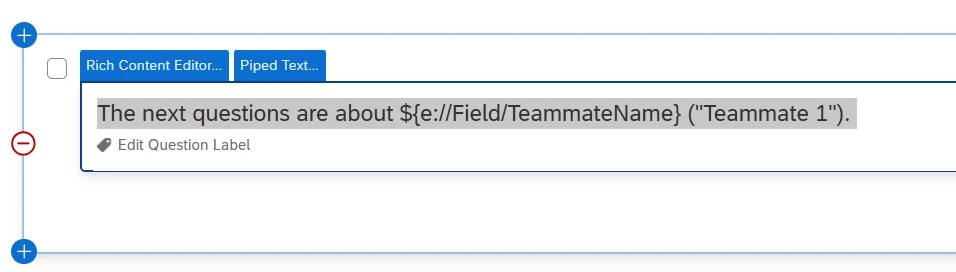
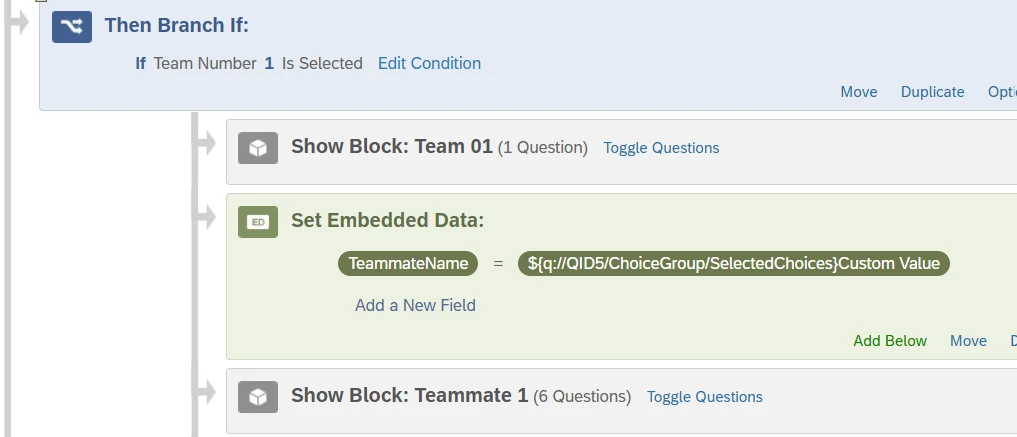
Here is the embedded field (Q.5 is the question above it, “Team 01”):
 

And here is the preview result:

I’ve only found one similar question but I couldn’t make sense of the offered solution - I’m not a coder; please have mercy and kindly let me know in plain language (pictures are helpful!) if there’s a way to  fix this. It’s been too many hours and I’m losing my mind. Thanks in advance.

Best answer by MatthewM

Hi, it’s pretty simple. Qualtrics pre-fills “Custom Value” in the Set Value Now field, and it tends to remain there when a user adds in code or text (even though it no longer serves any useful purpose), so users must remove it. In the Survey Flow, click on embedded field where you piped in the code and delete the “Custom Value” string of text from it. 😀

View original

3 replies

MatthewM
Level 6 ●●●●●●
Forum|alt.badge.img+30
  • Level 6 ●●●●●●
  • Answer
  • Nov 19, 2026 5:44 PM UTC

Hi, it’s pretty simple. Qualtrics pre-fills “Custom Value” in the Set Value Now field, and it tends to remain there when a user adds in code or text (even though it no longer serves any useful purpose), so users must remove it. In the Survey Flow, click on embedded field where you piped in the code and delete the “Custom Value” string of text from it. 😀


Forum|alt.badge.img+1
  • Author
  • Nov 19, 2026 5:57 PM UTC

You’re right, that was simple - so simple that I almost feel embarrassed about asking. Thank you for that, and for posting it in wording that even I can understand. This was a life saver! 


MatthewM
Level 6 ●●●●●●
Forum|alt.badge.img+30
  • Level 6 ●●●●●●
  • Nov 19, 2026 7:22 PM UTC

Glad that I could help!