SMS Reminders for Email Invites? Need advice on better lab processes | Experience Community
Skip to main content
Solved

SMS Reminders for Email Invites? Need advice on better lab processes

  • March 13, 2026
  • 5 replies
  • 31 views

Forum|alt.badge.img+1

Our research lab sends out a weekly survey to our participants every Monday morning. We have an email reminder set up every Wednesday, and we manually text our participants (who have opted in) every Friday if they still haven’t completed the survey.

The manually texting part is getting very inefficient, but we’ve discovered that it helps immensely with survey compliance.

Is there a way we can automate this reminder through Qualtrics? I see that there is SMS option, but if you start a survey via email, can you set up a reminder link via SMS? Any other options out there that could help us make this process more efficient for our study coordinators?

Thank you!
Best answer by nikamshubham73

Hi ​@Zonks
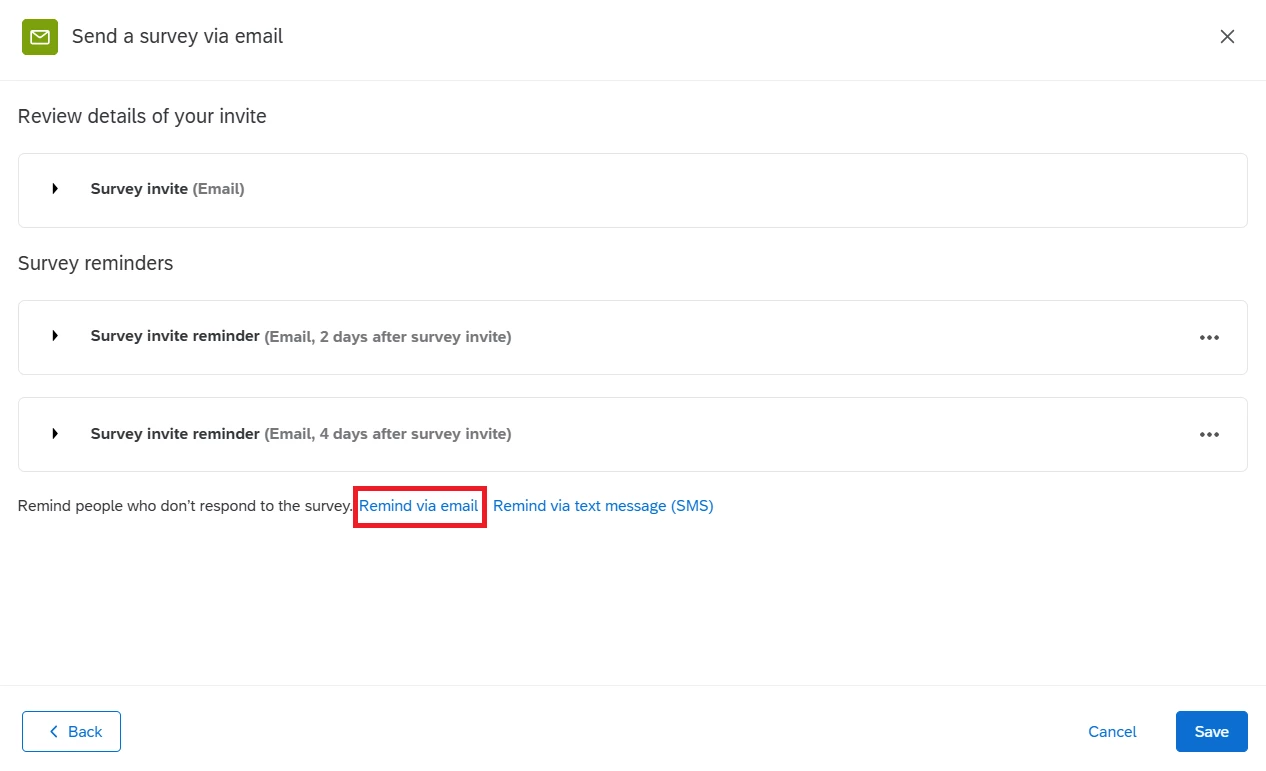
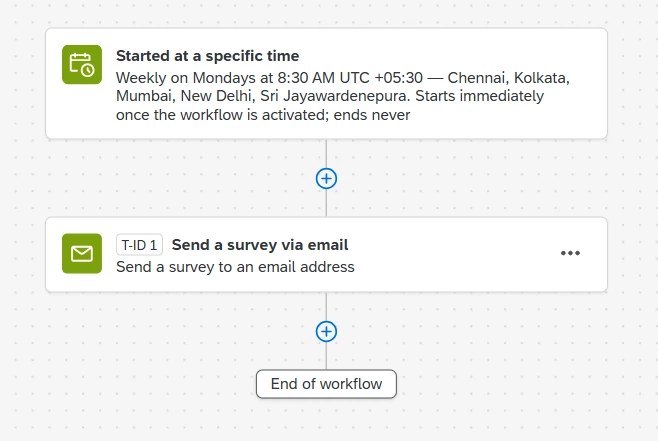
A recurring workflow can be configured in the Workflow tab. Begin by creating Task 1 to trigger the event on a specific day (such as Monday). Next, add Task 2 to schedule the email invitation and two reminder emails (Wednesday and Friday). This setup will help automate the process. Keep in mind that it will run for the same directory instance.
Setting a Workflow Schedule     Send Survey via Email Task


5 replies

nikamshubham73
Level 2 ●●
Forum|alt.badge.img+3
  • Level 2 ●●
  • Answer
  • March 13, 2026

Hi ​@Zonks
A recurring workflow can be configured in the Workflow tab. Begin by creating Task 1 to trigger the event on a specific day (such as Monday). Next, add Task 2 to schedule the email invitation and two reminder emails (Wednesday and Friday). This setup will help automate the process. Keep in mind that it will run for the same directory instance.
Setting a Workflow Schedule     Send Survey via Email Task


Forum|alt.badge.img+1
  • Author
  • Level 1 ●
  • March 16, 2026

Hi ​@nikamshubham73, if I created the workflow like this, would it send a new survey to the directory each week? Our participants take the same survey each week--would setting up this workflow still keep track of all future data from each week? Or would it overwrite the weekly data?

Currently, we set up a manual distribution to the directory and then assign 1 reminder to it. We also look at the distribution data at the end of each year to calculate overall compliance between Surveys Finished, Email Opened, Email Sent. Would this workflow prevent us from seeing that data?

Unfortunately, the email reminder on Friday would need to be via text message as we have seen it greatly increases survey compliance. I have found out that our entity is not willing to expand our license to include one-way text messages, so I’m at a loss of how we can make this Friday text reminder more automated for our study staff.


nikamshubham73
Level 2 ●●
Forum|alt.badge.img+3

Hi ​@Zonks,

if I created the workflow like this, would it send a new survey to the directory each week? Our participants take the same survey each week--would setting up this workflow still keep track of all future data from each week? Or would it overwrite the weekly data?

→ This will send the same survey each week and will continue to track both past and future responses. The data will be captured in the Data & Analysis tab as usual.
Currently, we set up a manual distribution to the directory and then assign 1 reminder to it. We also look at the distribution data at the end of each year to calculate overall compliance between Surveys Finished, Email Opened, Email Sent. Would this workflow prevent us from seeing that data?

→ Not at all. Once the workflow runs, you will find the distribution summary in the Distribution tab, just as you did previously. The same applies to the reminders as well.

Unfortunately, the email reminder on Friday would need to be via text message as we have seen it greatly increases survey compliance. I have found out that our entity is not willing to expand our license to include one-way text messages, so I’m at a loss of how we can make this Friday text reminder more automated for our study staff.

→ You can send the Friday reminders via SMS or email, depending on your requirement. I’m not certain about a better alternative for SMS, but one recommendation would be to make the Email subject line more attention-grabbing and craft the survey message in a way that captures the customers’ interest/attention.


Forum|alt.badge.img+1
  • Author
  • Level 1 ●
  • March 16, 2026

@nikamshubham73 Thank you! I will look into the workflow for future distributions. If we currently have distributions set up (we do a few months at a time), would we need to delete those?

Our demographic includes older adults, who some don’t really utilize email or they get 100s of emails per day and miss it. A text message helps us direct them to their email so they can complete it.

I’m wondering if I can create a workflow where it emails our study staff a list of people who have yet to complete the survey (to at least automate the prep work), but I’m unsure how to set this up.


nikamshubham73
Level 2 ●●
Forum|alt.badge.img+3

@Zonks The setup I suggested earlier would be ideal. But lets keep this forum open for any new suggestions. You can configure the workflow to send the initial email, the first reminder via email, and the second reminder via SMS. However, you may need to upgrade your license based on the limitations you mentioned earlier. Also, if you set up the workflow, make sure to delete the existing distribution (or vice versa) to prevent recipients from receiving duplicate emails.