Survey Flow - Add new Element - Embedded Data - Survey Metadata - ExternalDataReference is not working for me | Experience Community
Skip to main content
Solved

Survey Flow - Add new Element - Embedded Data - Survey Metadata - ExternalDataReference is not working for me

  • July 15, 2026
  • 5 replies
  • 47 views

Forum|alt.badge.img+1

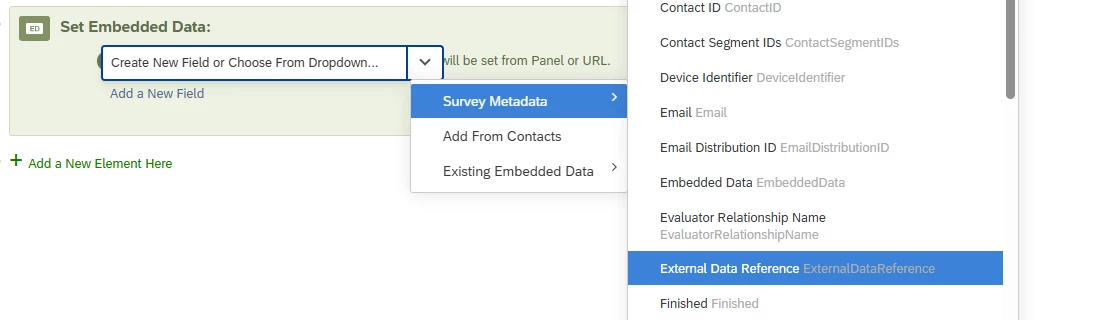
I’m trying to add the ExternalDataReference from my distribution contact list to my survey.  Following the directions here - https://www.qualtrics.com/support/survey-platform/survey-module/survey-flow/standard-elements/embedded-data/#BuiltinEmbeddedData,  I go to Survey Flow, do Add new Element, Select Embedded Data, Select Survey MetaData, Select ExternalDataReference. I’m using email distribution and selecting a contact list for my survey.  However when I go the “Data & Analysis” tab and export my survey responses, the “ExternalDataReference” column in my csv is blank.

  When I try the “Add from Contact” option and select other Embedded Data from my contact list, the value shows up correctly in my CSV export.

What am i doing wrong?

Best answer by vgayraud

Hello,

Another thing to double-check would be whether you’re anonymizing responses or not.

5 replies

Forum|alt.badge.img+28

Is the text in your contact list the same letter case?

Embedded data are case sensitive.

If your contact list uses another form of letter case (e.g. ExternalDatareference), it will be treated as another embedded data field instead of ExternalDataReference.


Forum|alt.badge.img+1
  • Author
  • July 16, 2026

It’s the same letter case.  It’s not something I type in but picked from the list provided by the UI.


arunxmarchitect
Level 4 ●●●●
Forum|alt.badge.img+8

@eddownstate ,

Can you confirm whether you’re trying to pull the built-in External Data Reference field from the XM Directory or a custom Embedded Data field stored in the XM Directory?

If your Directory is using the External Data Reference field, it should work when added through Survey Metadata, based on your screenshot.

Also, please check that the distribution contact list you’re using has a value populated in the External Data Reference field for the relevant contacts.


vgayraud
QPN Level 8 ●●●●●●●●
Forum|alt.badge.img+65
  • QPN Level 8 ●●●●●●●●
  • Answer
  • July 16, 2026

Hello,

Another thing to double-check would be whether you’re anonymizing responses or not.


Forum|alt.badge.img+1

Hello,

Another thing to double-check would be whether you’re anonymizing responses or not.

Turned off the anonymize response option and it works now.  Thank you!