
Hi everyone,
I would like to create a "table question", in which the participant has to select one of several options by clicking on a cell (the "option" cells in the image below). Do you have any suggestions on how to do that? Thanks!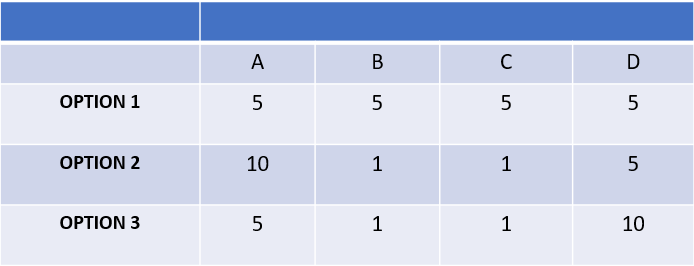

Solved
Table cell selection
Best answer by CamM
Hi Gio_blu, thanks for your reply. It sounds like you're after simplicity if possible, so I have an alternative option for your consideration -: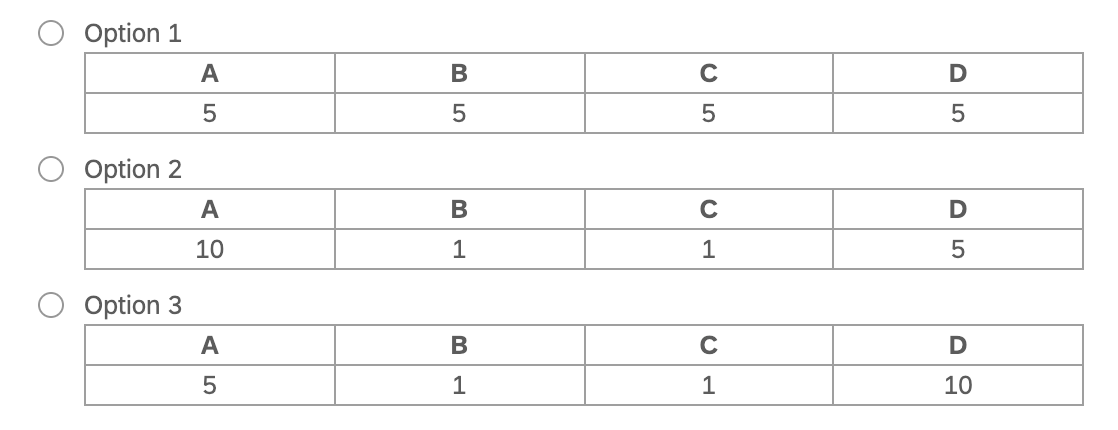 It's essentially a Multiple Choice question with a bit of rich text formatting of the choice labels. Obviously the formatting could do with some tidying up, but this would give you the table-style appearance (for visual consistency), allowing your respondents to select the "option row" and maintaining the integrity of out of the box reporting.
Cheers,
Cameron



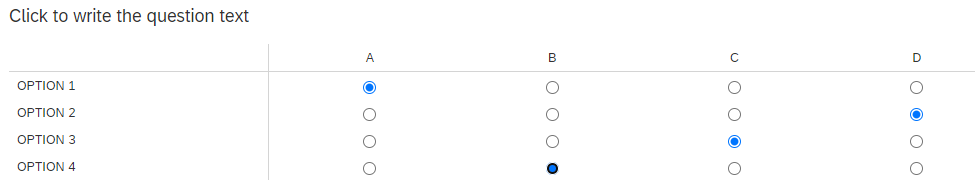 Assuming this is correct, then am I right in saying that the main difference here is that your selectable options all have differing pre-set values (i.e. per the table in your post) and that the challenge you're trying to overcome is that you can't have different choice values per option?
Sign up
Already have an account? Login

Welcome! To join the Qualtrics Experience Community, log in with your existing Qualtrics credentials below.
Confirm your username, share a bit about yourself, Once your account has been approved by our admins then you're ready to explore and connect .
Free trial account? No problem. Log in with your trial credentials to join.
No free trial account? No problem! Register here
Already a member? Hi and welcome back! We're glad you're here 🙂
You will see the Qualtrics login page briefly before being taken to the Experience Community
Login with Qualtrics
Welcome! To join the Qualtrics Experience Community, log in with your existing Qualtrics credentials below.
Confirm your username, share a bit about yourself, Once your account has been approved by our admins then you're ready to explore and connect .
Free trial account? No problem. Log in with your trial credentials to join. No free trial account? No problem! Register here
Already a member? Hi and welcome back! We're glad you're here 🙂
You will see the Qualtrics login page briefly before being taken to the Experience Community
Login to the Community
Welcome! To join the Qualtrics Experience Community, log in with your existing Qualtrics credentials below.
Confirm your username, share a bit about yourself, Once your account has been approved by our admins then you're ready to explore and connect .
Free trial account? No problem. Log in with your trial credentials to join.
No free trial account? No problem! Register here
Already a member? Hi and welcome back! We're glad you're here 🙂
You will see the Qualtrics login page briefly before being taken to the Experience Community
Login with Qualtrics
Welcome! To join the Qualtrics Experience Community, log in with your existing Qualtrics credentials below.
Confirm your username, share a bit about yourself, Once your account has been approved by our admins then you're ready to explore and connect .
Free trial account? No problem. Log in with your trial credentials to join. No free trial account? No problem! Register here
Already a member? Hi and welcome back! We're glad you're here 🙂
You will see the Qualtrics login page briefly before being taken to the Experience Community
Enter your E-mail address. We'll send you an e-mail with instructions to reset your password.