

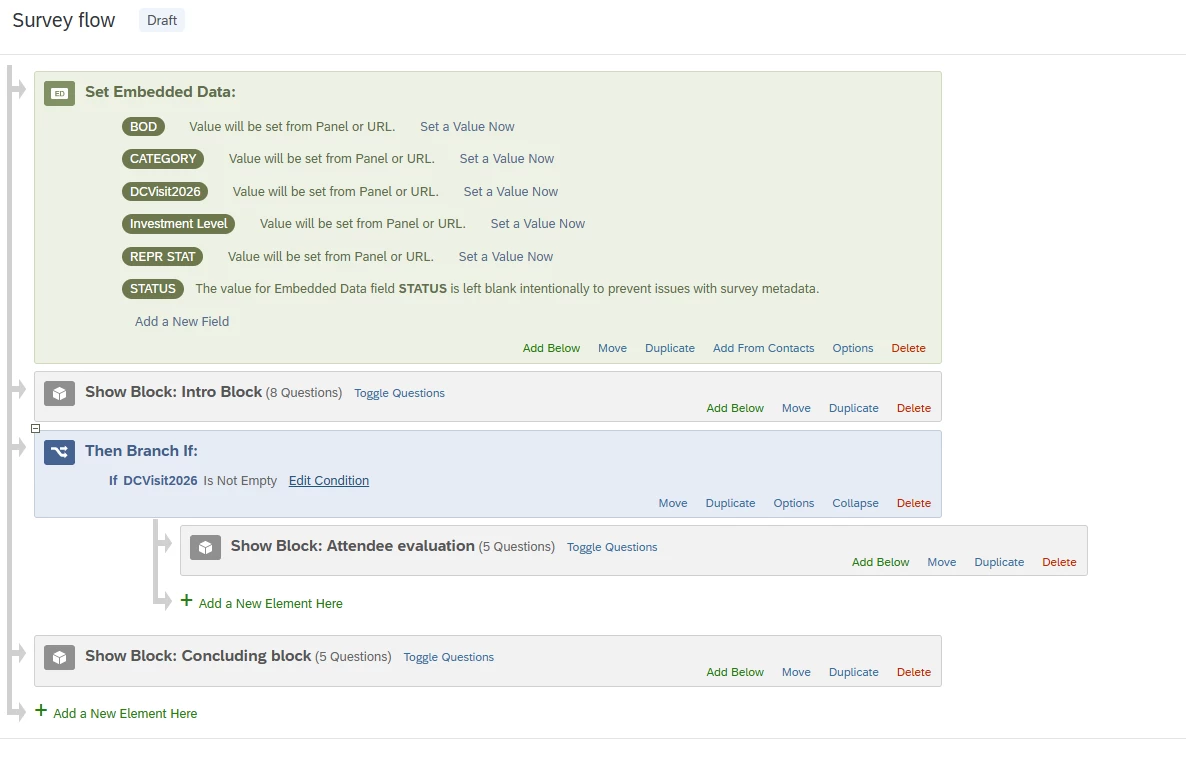
I am trying to test a survey with a branch that only displays for certain users based on embeded data. When I send the survey preview, I don’t see that branch for that distribution group as I think I should.

Solved
Testing Branch Display Logic
 +1
+1Best answer by MatthewM
Thank you! I’m assuming that the DCVisit2026 will be populated from your Directory in the live survey? If that’s the case, you’ll need to do some additional work to test the branching logic in your Survey Flow. The Preview link does not pull in embedded data by design, so you can’t perform a true test without some additional steps.
There are two options:
- To use the preview link, you’ll need to temporarily assign a constant value to the DCVisit2026 variable in your Survey Flow. Just make sure to remove the value before you go live.
- Alternatively, you can set up a test email list with your own email address, and all of the embedded data fields that the real list has, populated with test data, including for the DCVisit2026 variable. Upload it to your Directory, and use either the email invitations or personal links to create a link for yourself to use.
I hope you find one of these options useful. Good luck!







Sign up
Already have an account? Login

Welcome! To join the Qualtrics Experience Community, log in with your existing Qualtrics credentials below.
Confirm your username, share a bit about yourself, then you're ready to explore and connect .
Free trial account? No problem. Log in with your trial credentials to join.
No free trial account? No problem! Register here
Already a member? Hi and welcome back! We're glad you're here 🙂
You will see the Qualtrics login page briefly before being taken to the Experience Community.
Login with Qualtrics
Welcome! To join the Qualtrics Experience Community, log in with your existing Qualtrics credentials below.
Confirm your username, share a bit about yourself, then you're ready to explore and connect .
Free trial account? No problem. Log in with your trial credentials to join. No free trial account? No problem! Register here
Already a member? Hi and welcome back! We're glad you're here 🙂
You will see the Qualtrics login page briefly before being taken to the Experience Community.
Login to the Community
Welcome! To join the Qualtrics Experience Community, log in with your existing Qualtrics credentials below.
Confirm your username, share a bit about yourself, then you're ready to explore and connect .
Free trial account? No problem. Log in with your trial credentials to join.
No free trial account? No problem! Register here
Already a member? Hi and welcome back! We're glad you're here 🙂
You will see the Qualtrics login page briefly before being taken to the Experience Community.
Login with Qualtrics
Welcome! To join the Qualtrics Experience Community, log in with your existing Qualtrics credentials below.
Confirm your username, share a bit about yourself, then you're ready to explore and connect .
Free trial account? No problem. Log in with your trial credentials to join. No free trial account? No problem! Register here
Already a member? Hi and welcome back! We're glad you're here 🙂
You will see the Qualtrics login page briefly before being taken to the Experience Community.
Enter your E-mail address. We'll send you an e-mail with instructions to reset your password.