Use a list to replace embedded data in reports/survey/results | Experience Community
Skip to main content
Solved

Use a list to replace embedded data in reports/survey/results

  • April 16, 2026
  • 1 reply
  • 24 views

Lets say I have a feedback survey for courses. I have a CourseID embedded field which gets defined as a 7 digit code in the QR code/URL. So each course uses the same survey but with a different CourseID so that way I can tell which course the student took the survey for.
 

Now I have an excel spreadsheet that has the list of Course IDs and the full title of the courses.


Is there a way for me to connect that list to use so that way I can display the course title instead of the CourseID in reports tab, survey title or results tab


Some flexibility notes

-I would prefer to use the excel spreadsheet but can use other methods for the list

-I cannot use the Course name in the URL

-I need the course name to be displayed in either the results tab, the survey itself, or reports tab.

Best answer by zzh

Hi Pat,

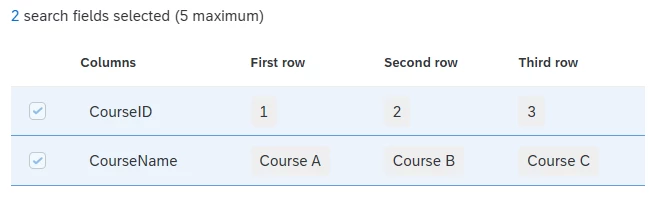
You can do this with a Supplemental Data Source (SDS) in the Library. It should contain two columns - course ID and course name and look something like:


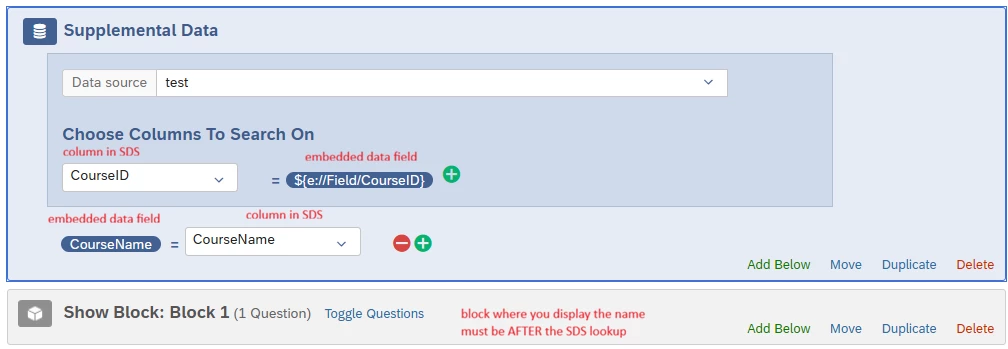
Then in the survey flow add a Supplemental Data element and set the matching field like so:


Then you can pipe-in the value of the embedded data field CourseName and also show it in Dashboards, etc.

1 reply

Forum|alt.badge.img+2
  • Answer
  • April 17, 2026

Hi Pat,

You can do this with a Supplemental Data Source (SDS) in the Library. It should contain two columns - course ID and course name and look something like:


Then in the survey flow add a Supplemental Data element and set the matching field like so:


Then you can pipe-in the value of the embedded data field CourseName and also show it in Dashboards, etc.