

Hello,
My survey currently has a form question that asks respondents for their City and State. The state question has the US State validation setting selected.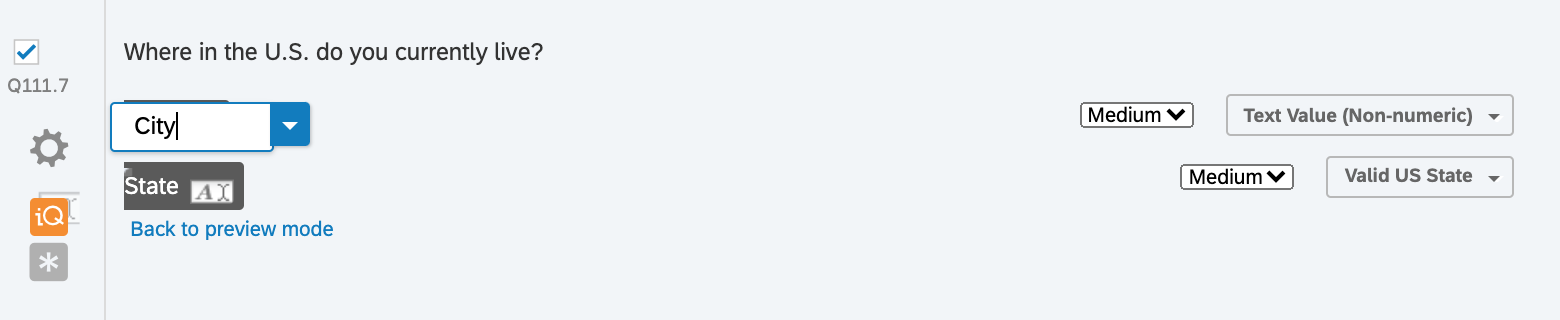 I store respondents' answers to the state Q as Embedded Data (see the last row):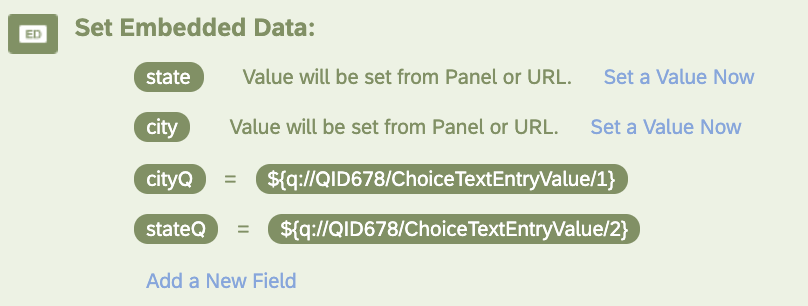
On the next page, I ask respondents how many years they have lived in their state (using the embedded data labels).
"About how many years have you lived in ${q://QID678/ChoiceTextEntryValue/2}?"
This works fine, but it displays the state exactly as the respondent worded it (e.g., About how many years have you lived in ca?")
My problem: I would like to display the properly capitalized, full name of the state in the second question. So, for example, if the respondent enters "ca", I would like the second question to ask "How long have you lived in California?" (A less ideal but acceptable solution would convert "ca" to "CA".) I also don't want to have to use an external dataset to do this, if possible.
I understand that I can do this if I ask respondents for their zip code (see link), but I don't know how to simply clean up the state abbreviation respondents have already entered.
Any help would be very much appreciated! Thanks.

How to display full state name using embedded data and content validation?





Sign up
Already have an account? Login

Welcome! To join the Qualtrics Experience Community, log in with your existing Qualtrics credentials below.
Confirm your username, share a bit about yourself, then you're ready to explore and connect .
Free trial account? No problem. Log in with your trial credentials to join.
No free trial account? No problem! Register here
Already a member? Hi and welcome back! We're glad you're here 🙂
You will see the Qualtrics login page briefly before being taken to the Experience Community.
Login with Qualtrics
Welcome! To join the Qualtrics Experience Community, log in with your existing Qualtrics credentials below.
Confirm your username, share a bit about yourself, then you're ready to explore and connect .
Free trial account? No problem. Log in with your trial credentials to join. No free trial account? No problem! Register here
Already a member? Hi and welcome back! We're glad you're here 🙂
You will see the Qualtrics login page briefly before being taken to the Experience Community.
Login to the Community
No account yet? Create an account
Welcome! To join the Qualtrics Experience Community, log in with your existing Qualtrics credentials below.
Confirm your username, share a bit about yourself, then you're ready to explore and connect .
Free trial account? No problem. Log in with your trial credentials to join.
No free trial account? No problem! Register here
Already a member? Hi and welcome back! We're glad you're here 🙂
You will see the Qualtrics login page briefly before being taken to the Experience Community.
Login with Qualtrics
Welcome! To join the Qualtrics Experience Community, log in with your existing Qualtrics credentials below.
Confirm your username, share a bit about yourself, then you're ready to explore and connect .
Free trial account? No problem. Log in with your trial credentials to join. No free trial account? No problem! Register here
Already a member? Hi and welcome back! We're glad you're here 🙂
You will see the Qualtrics login page briefly before being taken to the Experience Community.
Enter your E-mail address. We'll send you an e-mail with instructions to reset your password.