

I have some questions with a “NA” option and it is set as “Exclude from analysis”. This option value is also recoded as ‘999’ in Qualtrics. 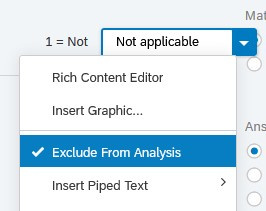 Since the legacy exporter will phase out in 2021, recently I start using the new data exporter. Then I notice a different behaviour between two exports.
In legacy exporter, these values will be exported as “999” but in the new exporter, those values are really “excluded” and those cells become blank. Since we also want to know the number of responses who chose "NA", it is important for us to get the "NA"/"999" responses in the exported data.
Although I can turn off the “Exclude From Analysis” setting, this makes results of Qualtrics report invalid (as it include 999 in calculating means and SD). Is there a way for me to keep those "999" responses in my response data set and keep the Qualtrics report correct?
Thanks.

Responses marked as "Exclude from Analysis" were not included in exported dataset
 +1






Sign up
Already have an account? Login

Welcome! To join the Qualtrics Experience Community, log in with your existing Qualtrics credentials below.
Confirm your username, share a bit about yourself, then you're ready to explore and connect .
Free trial account? No problem. Log in with your trial credentials to join.
No free trial account? No problem! Register here
Already a member? Hi and welcome back! We're glad you're here 🙂
You will see the Qualtrics login page briefly before being taken to the Experience Community.
Login with Qualtrics
Welcome! To join the Qualtrics Experience Community, log in with your existing Qualtrics credentials below.
Confirm your username, share a bit about yourself, then you're ready to explore and connect .
Free trial account? No problem. Log in with your trial credentials to join. No free trial account? No problem! Register here
Already a member? Hi and welcome back! We're glad you're here 🙂
You will see the Qualtrics login page briefly before being taken to the Experience Community.
Login to the Community
Welcome! To join the Qualtrics Experience Community, log in with your existing Qualtrics credentials below.
Confirm your username, share a bit about yourself, then you're ready to explore and connect .
Free trial account? No problem. Log in with your trial credentials to join.
No free trial account? No problem! Register here
Already a member? Hi and welcome back! We're glad you're here 🙂
You will see the Qualtrics login page briefly before being taken to the Experience Community.
Login with Qualtrics
Welcome! To join the Qualtrics Experience Community, log in with your existing Qualtrics credentials below.
Confirm your username, share a bit about yourself, then you're ready to explore and connect .
Free trial account? No problem. Log in with your trial credentials to join. No free trial account? No problem! Register here
Already a member? Hi and welcome back! We're glad you're here 🙂
You will see the Qualtrics login page briefly before being taken to the Experience Community.
Enter your E-mail address. We'll send you an e-mail with instructions to reset your password.