

 After I ran the retakelink, no data is changed in the original response. The field 'sts' remains empty.
I also tried Web Services in the Survey Flow section. Below the screenshot of the settings I used:
But when I click on the Test button I receive an errormessage: 404 - Not Found, The requested resource does not exist.
Can somebody help me setting up either option to amend the Embedded Data Field in the original response?
Kind regards and thanks in advance.
Nico Leussink
After I ran the retakelink, no data is changed in the original response. The field 'sts' remains empty.
I also tried Web Services in the Survey Flow section. Below the screenshot of the settings I used:
But when I click on the Test button I receive an errormessage: 404 - Not Found, The requested resource does not exist.
Can somebody help me setting up either option to amend the Embedded Data Field in the original response?
Kind regards and thanks in advance.
Nico Leussink
Solved
Update a response using Actions Tab or Webservice option in Survey Flow


 +5
+5Hello,
I have a survey wich contains two steps. In the first step a new respondent is answering all questions. In the Survey Flow an Embedded Data Field is added called 'sts'. This field remains empty after the first step. After finishing an emailtrigger sends a message to another person. This emailmessage contains a retake link from the response and is set to not delete the original respons. This retakelink looks like:
https://mycompany.qualtrics.com/jfe/form/SV_1aBCd2EF3ghIJ4K?Q_R=R_X1Y2Z3k4l5m67NO&Q_R_DEL=0
Now the survey starts based on this retakelink. In the original response I want the Embedded Data Field 'sts' be filled with some info, like 'xyz'. But I can't get it to work. Below some screenshots:
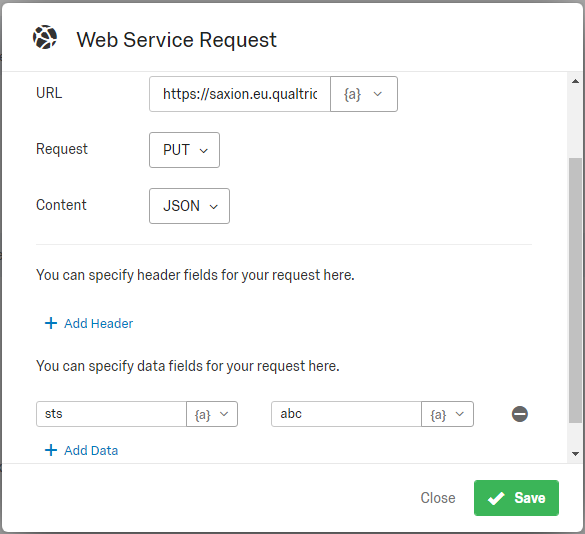
In the Actions Tab I have set the event to 'All types'. No conditions is set. The task is set up to:
- Authentication = Token. I used the Token I found in the QualtricsID's screen.
- URL = https://mycompany.qualtrics.com/api/v3/responses/${e://Field/ResponseID}
- Request = PUT
- Content = JSON
- Datafields = 'sts' and 'xyz'
!
After I ran the retakelink, no data is changed in the original response. The field 'sts' remains empty.
I also tried Web Services in the Survey Flow section. Below the screenshot of the settings I used:
But when I click on the Test button I receive an errormessage: 404 - Not Found, The requested resource does not exist.
Can somebody help me setting up either option to amend the Embedded Data Field in the original response?
Kind regards and thanks in advance.
Nico Leussink
After I ran the retakelink, no data is changed in the original response. The field 'sts' remains empty.
I also tried Web Services in the Survey Flow section. Below the screenshot of the settings I used:
But when I click on the Test button I receive an errormessage: 404 - Not Found, The requested resource does not exist.
Can somebody help me setting up either option to amend the Embedded Data Field in the original response?
Kind regards and thanks in advance.
Nico LeussinkBest answer by KeirJ
Hi @Nico_Leussink!
You're on the right track with the Web Service but the configuration is missing a couple of pieces.
The Update Response API documentation shows that two parameters are required (In addition to including the response ID in the URL, as you have done already):
1) surveyId
2) embeddedData
To add these to your Web Service block, you'll want to set it the 'Body Parameters' section as seen below. According to the documentation, the 'embeddedData' parameter is structured as a JSON object, so that's why it has the curly braces around the content (e.g., {"sts": "Test"}.
!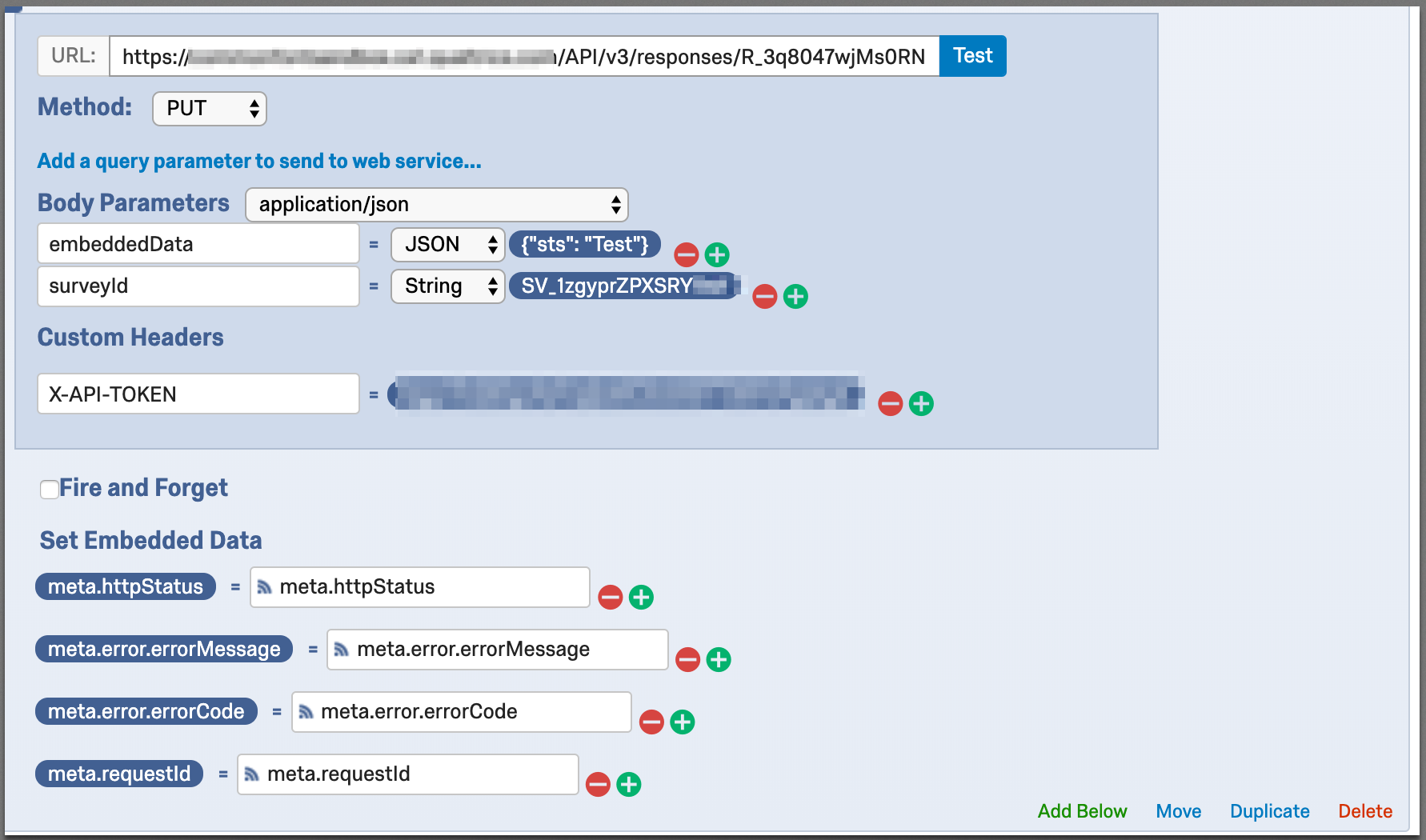 I also recommend capturing the HTTP response variables as you can see in the 'Embedded Data' section of the Web Service block. These will capture the HTTP response from when the Web Service fires and store it on the survey response that triggered the Web Service. This can be useful for troubleshooting purposes. Below, you can see what this looks like in the response data.
!
I also recommend capturing the HTTP response variables as you can see in the 'Embedded Data' section of the Web Service block. These will capture the HTTP response from when the Web Service fires and store it on the survey response that triggered the Web Service. This can be useful for troubleshooting purposes. Below, you can see what this looks like in the response data.
!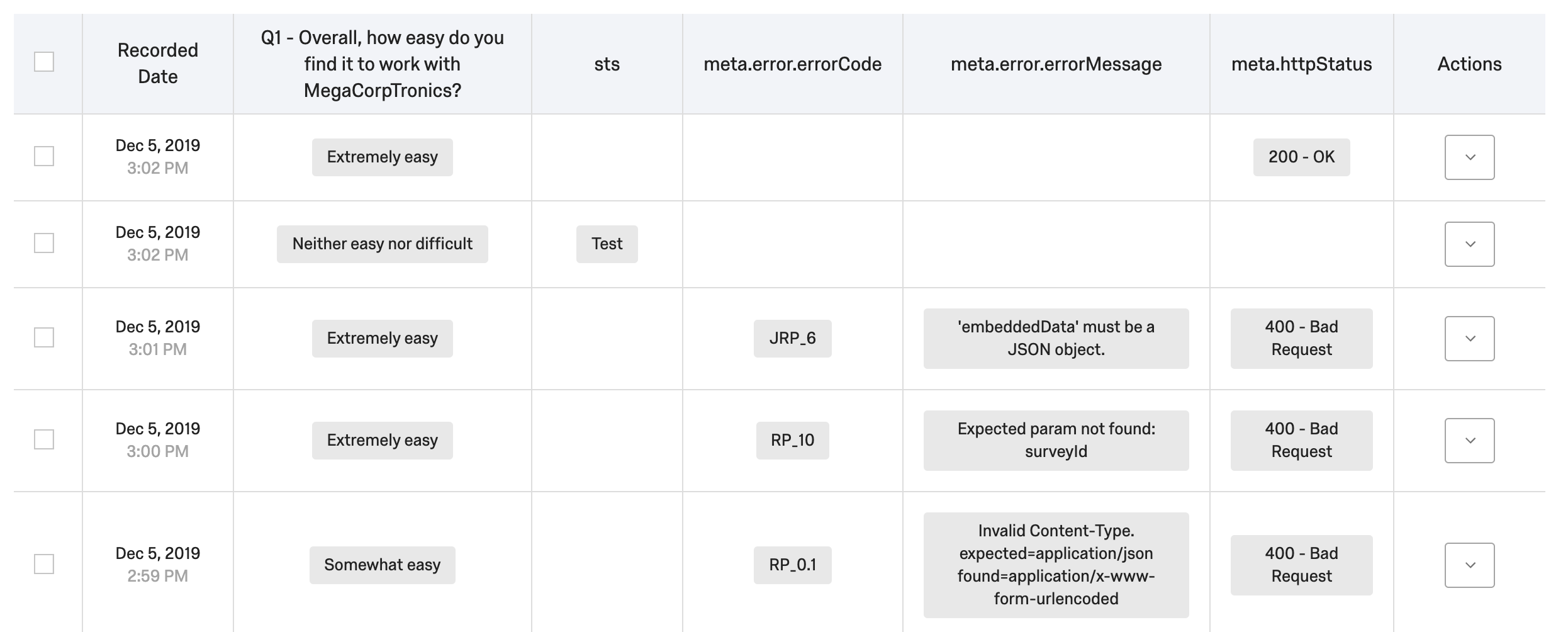 I hope that helps!
I also recommend capturing the HTTP response variables as you can see in the 'Embedded Data' section of the Web Service block. These will capture the HTTP response from when the Web Service fires and store it on the survey response that triggered the Web Service. This can be useful for troubleshooting purposes. Below, you can see what this looks like in the response data.
!
I hope that helps!




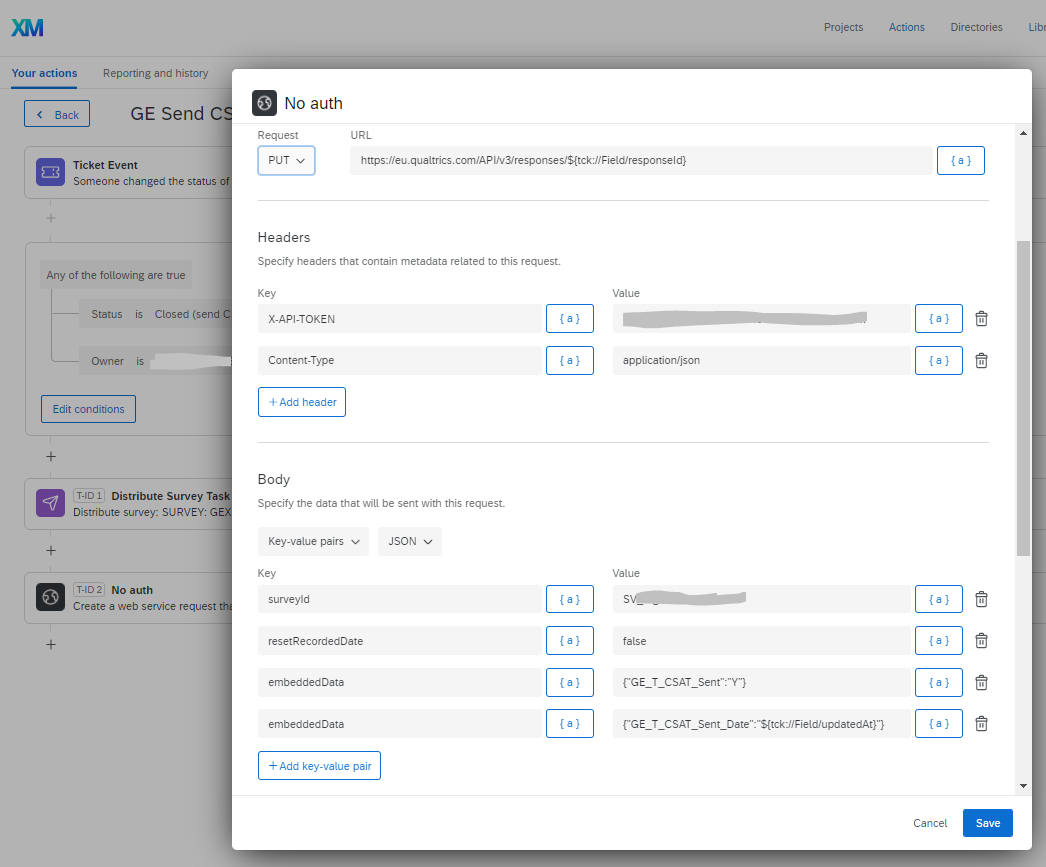 as soon as I save it though the 1st of the 2 embeddedData fields is lost
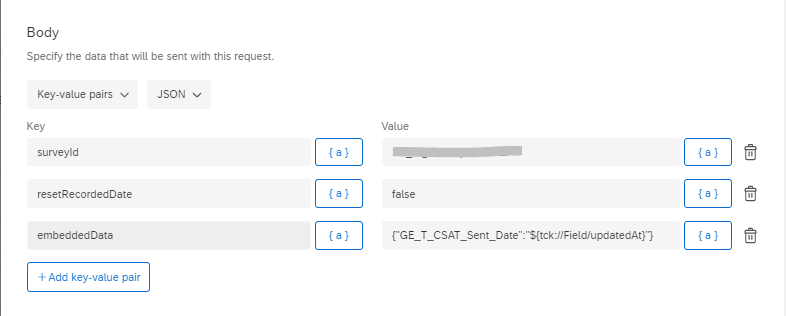 Can you or anyone advise when using this webservice task (from within the event based actions part of the system how you can do more than one embeddedData field at a time?
Sign up
Already have an account? Login

Welcome! To join the Qualtrics Experience Community, log in with your existing Qualtrics credentials below.
Confirm your username, share a bit about yourself, then you're ready to explore and connect .
Free trial account? No problem. Log in with your trial credentials to join.
No free trial account? No problem! Register here
Already a member? Hi and welcome back! We're glad you're here 🙂
You will see the Qualtrics login page briefly before being taken to the Experience Community.
Login with Qualtrics
Welcome! To join the Qualtrics Experience Community, log in with your existing Qualtrics credentials below.
Confirm your username, share a bit about yourself, then you're ready to explore and connect .
Free trial account? No problem. Log in with your trial credentials to join. No free trial account? No problem! Register here
Already a member? Hi and welcome back! We're glad you're here 🙂
You will see the Qualtrics login page briefly before being taken to the Experience Community.
Login to the Community
Welcome! To join the Qualtrics Experience Community, log in with your existing Qualtrics credentials below.
Confirm your username, share a bit about yourself, then you're ready to explore and connect .
Free trial account? No problem. Log in with your trial credentials to join.
No free trial account? No problem! Register here
Already a member? Hi and welcome back! We're glad you're here 🙂
You will see the Qualtrics login page briefly before being taken to the Experience Community.
Login with Qualtrics
Welcome! To join the Qualtrics Experience Community, log in with your existing Qualtrics credentials below.
Confirm your username, share a bit about yourself, then you're ready to explore and connect .
Free trial account? No problem. Log in with your trial credentials to join. No free trial account? No problem! Register here
Already a member? Hi and welcome back! We're glad you're here 🙂
You will see the Qualtrics login page briefly before being taken to the Experience Community.
Enter your E-mail address. We'll send you an e-mail with instructions to reset your password.